




 here!
I’m your shopping assistant for PC builds, upgrades, and everything tech.
Got questions? Ask away!
Start a conversation
here!
I’m your shopping assistant for PC builds, upgrades, and everything tech.
Got questions? Ask away!
Start a conversation







Any questions? Ask CelesteSM will help you find out quickly.
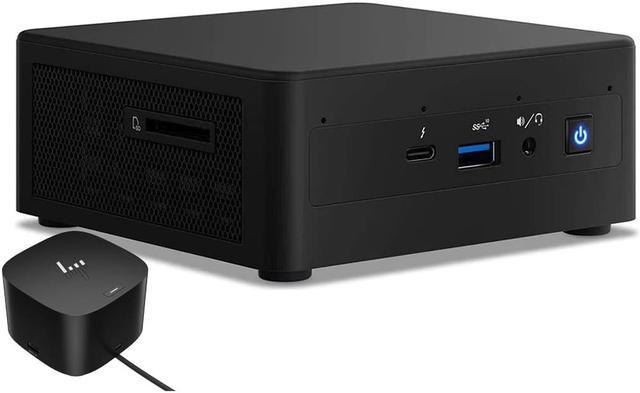
The Intel NUC11PAHi5 is a compact mini desktop with an 11th Gen Core i5 processor, 8GB RAM, a 2TB SATA SSD, and Windows 10 Home, bundled with a Thunderbolt 4 dock. It suits home and office users who want a small computer for everyday productivity, with the dock adding connections for a multi-monitor desk setup.
| Attribute | Value |
|---|---|
| Best For | Home and business desktop use where a compact mini PC with integrated graphics and 2TB of SSD storage fits the setup |
| Processor And Cache | 11th Gen Intel Core i5 with four cores and 8MB of L3 cache |
| Graphics | Integrated graphics |
| Memory | 8GB DDR4 memory |
| Storage And Expansion | 2TB SSD, no HDD, and no optical drive |
| Networking And Connectivity | Wi-Fi 6 AX201, Bluetooth 4.2, RJ45 networking, and a card reader |
| Display And Peripherals | No screen or monitor included; no keyboard included |
| Power | 120W power supply |
| Operating System | Windows 10 Home |
| Chassis | Mini PC form factor in black |
| Model Identifiers | Intel NUC11PAHi5 |
Q: Intel NUC11PAHi5 vs NUC 12 Pro NUC12WSKi5: which should I choose?
A: Choose this NUC11PAHi5 when its listed 2TB SATA SSD, 8GB RAM, and included Thunderbolt dock fit your setup. Choose the NUC12WSKi5 when you prefer a newer 12th Gen Core i5-1240P platform with 12 cores and 16 threads; reviews benchmark the NUC 12 Pro as a newer performance generation.
Q: NUC11PAHi5 vs NUC11PAHi7: is the i7 version worth choosing?
A: Choose this NUC11PAHi5 for its Core i5-1135G7, listed 2TB SSD, and included dock. Choose the NUC11PAHi7 if you want the higher-tier Core i7-1165G7, which has a higher maximum turbo frequency and more Iris Xe graphics execution units.
Q: Should I get the NUC11PAHi3 or this NUC11PAHi5?
A: Choose the NUC11PAHi5 when you want the four-core Core i5-1135G7 and the listed 2TB SSD and dock bundle. The NUC11PAHi3 is the lower-tier option in the same NUC 11 Performance family; this i5 configuration is the more suitable choice when you want the Core i5 tier for everyday multitasking.
Q: Is this mini desktop suitable for everyday office work?
A: Yes. Its 11th Gen Core i5 processor, 8GB of RAM, and 2TB SSD make it suitable for typical tasks such as documents, email, web browsing, and business applications. The 8GB of RAM may be a limitation if you regularly keep many demanding apps or browser tabs open.
Q: How many monitors can I connect?
A: The listing includes HDMI and mini DisplayPort video outputs, plus a dock advertised to support up to three monitors, including dual 4K UHD. Confirm that your monitors, cables, and connection setup are compatible before relying on a particular display count or resolution.
Q: Does it come with a monitor, keyboard, mouse, or webcam?
A: No. The listing says the monitor, keyboard, and webcam are not included. Plan to provide a monitor and input devices; use an external webcam if you need video calls.
Q: Is it a good choice for working while traveling?
A: It is better suited to a fixed desk than to travel. It is a mini desktop with a 120W power supply, and the listing does not include a screen or keyboard; you would need access to a display and peripherals wherever you use it.
Q: Does the NUC11PAHi5 work well with Linux?
A: Linux use is possible, but Reddit discussions report issues involving suspend fan behavior, display flicker, and network drivers on some NUC11PAHi5 setups. If you need a trouble-free Linux system, allow for driver or configuration troubleshooting.
Q: Can the NUC11PAHi5 be used for gaming?
A: Its integrated graphics and listed 8GB of RAM make it a better fit for lighter gaming than demanding games. Reddit users discuss using this model for retro gaming and connecting an external GPU over Thunderbolt, but note that heat and setup compatibility can be trade-offs.
Q: Is the NUC11PAHi5 straightforward to set up with Windows 10?
A: It can run Windows 10, but setup may require attention to BIOS and drivers. A YouTube setup video reports that Wi-Fi or Ethernet may need Intel drivers installed manually, while Reddit users describe boot, sleep, or stability problems on some configurations.


