




 here!
I’m your shopping assistant for PC builds, upgrades, and everything tech.
Got questions? Ask away!
Start a conversation
here!
I’m your shopping assistant for PC builds, upgrades, and everything tech.
Got questions? Ask away!
Start a conversation







Any questions? Ask CelesteSM will help you find out quickly.
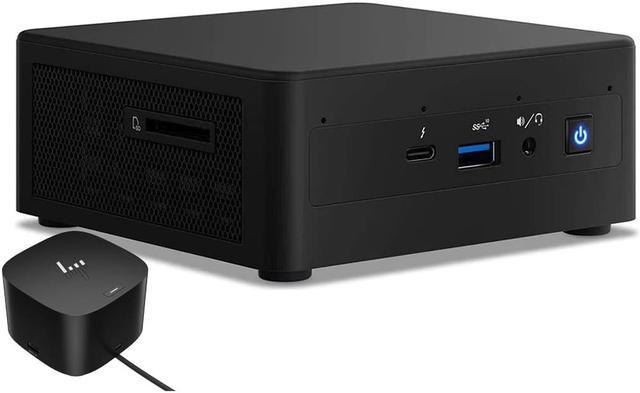
The Intel NUC11PAHi5 is a compact Windows 11 Pro mini desktop with an 11th Gen Core i5-1135G7, 16GB RAM, a 2TB SATA SSD, and a Thunderbolt dock. It suits home and office users who want a small productivity PC with wired and wireless connectivity; a monitor and keyboard are not included.
| Attribute | Value |
|---|---|
| Best For | Business desktop use where a compact mini PC is preferred |
| Processor And Cache | 11th Gen Intel Core i5 quad-core processor with 8MB L3 cache |
| Graphics | Integrated graphics |
| Memory | 16GB DDR4 memory |
| Storage | 2TB SSD with no HDD |
| Networking And Wireless | Wi-Fi 6 AX201, Bluetooth 4.2, and RJ45 connectivity |
| System And Included Equipment | Windows 11 Pro; monitor, screen, keyboard, and optical drive are not included; card reader included |
| Power And Color | 120W power supply in black |
| Model Identifiers | Intel NUC11PAHi5 |
Q: Intel NUC11PAHi5 or NUC11PAHi3: which is better for multitasking?
A: Choose the NUC11PAHi5 for more multitasking and integrated-graphics headroom. Its Core i5-1135G7 has 4 cores and 8 threads with Iris Xe graphics; the NUC11PAHi3’s Core i3-1115G4 has 2 cores and 4 threads with Intel UHD graphics. This listing also includes 16GB of RAM and a 2TB SATA SSD.
Q: Should I choose the NUC11PAHi5 or upgrade to the NUC11PAHi7?
A: Choose the NUC11PAHi5 for a compact everyday home or business PC with a 4-core, 8-thread processor, 16GB RAM, and 2TB storage in this listing. The NUC11PAHi7 is the higher processor tier: its i7-1165G7 keeps the same 4-core, 8-thread count and offers higher maximum turbo frequency and more cache, making it the option to consider for additional CPU and graphics headroom.
Q: Intel NUC 11 Performance i5 or NUC 12 Pro i5: which should I pick?
A: Choose this NUC 11 configuration if you want its listed bundle of 16GB RAM, a 2TB SATA SSD, Windows 11 Pro, and a Thunderbolt dock. Choose the NUC 12 Pro with Core i5-1240P if a newer processor platform and more CPU cores and threads are the priority: the i5-1240P has 12 cores and 16 threads, compared with the NUC 11’s i5-1135G7 with 4 cores and 8 threads.
Q: Is this mini desktop suitable for everyday office work?
A: Yes. Its 11th Gen Core i5 processor, 16GB of RAM, 2TB SSD, Wi-Fi 6, Ethernet, and Windows 11 Pro suit typical office tasks such as web browsing, email, video meetings, and document work. It has integrated graphics and no built-in display, so it is not an all-in-one computer.
Q: Can it run more than one monitor?
A: The product listing describes HDMI, mini DisplayPort, Thunderbolt 3, and an included Thunderbolt dock that supports up to three monitors and dual 4K UHD displays. Check the dock and monitor connection requirements before buying, especially if you plan to use three displays.
Q: Is it a good choice for gaming?
A: It is better suited to productivity than graphics-heavy gaming. The listing specifies integrated graphics, not a dedicated graphics card, so performance will depend on each game's requirements; do not assume it will handle demanding games well.
Q: Does it come with a monitor, keyboard, or mouse?
A: No monitor, keyboard, or mouse is listed as included. Plan to provide those separately; the listing does include the mini desktop and the 120W Thunderbolt dock.
Q: Is the NUC11PAHi5 suitable for a home media server?
A: It may suit a compact media-server setup: Reddit users report using this model for Plex and other home-server tasks. This listing includes a quad-core i5-1135G7, 16GB RAM, and a 2TB SATA SSD. Workloads and performance vary, so those reports are examples rather than guarantees.
Q: Is it suitable for everyday work and software development?
A: It can be a compact desktop for everyday work and development. A Reddit user reported being generally happy with this model for browsing, software development, containers, and virtual machines, but that setup had 64GB RAM. This listing has 16GB, so memory-heavy multitasking or several virtual machines may be more constrained.
Q: Is fan noise a potential drawback?
A: Yes. A NUC11PAHi5 owner reported hearing a constant fan hum, even after cleaning and replacing thermal paste. That is an individual report, not proof that every unit is noisy; consider fan noise if the computer will sit close to you in a quiet room.
Q: Should I check Thunderbolt compatibility before relying on the included dock?
A: Yes. The listing describes the NUC as having Thunderbolt 3 ports and includes a Thunderbolt 4 dock. A Reddit discussion reports Thunderbolt-device problems on some NUC11PAHi5 systems, but it does not establish that all units are affected. Confirm the seller’s return and warranty terms, and verify that your required peripherals work with the specific unit.


