




 here!
I’m your shopping assistant for PC builds, upgrades, and everything tech.
Got questions? Ask away!
Start a conversation
here!
I’m your shopping assistant for PC builds, upgrades, and everything tech.
Got questions? Ask away!
Start a conversation



Any questions? Ask CelesteSM will help you find out quickly.


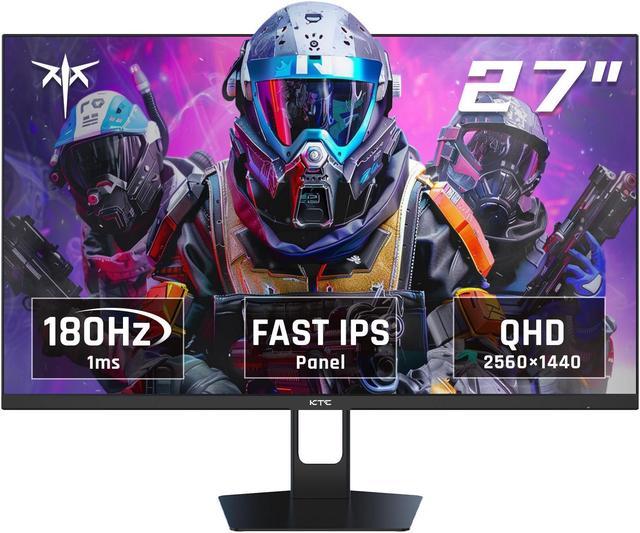
The KTC H27T22S is a 27-inch QHD gaming monitor with a Fast IPS panel, 180Hz refresh rate, and 1ms GTG response time. It is suitable for PC gamers who want smooth motion, sharp 1440p detail, Adaptive Sync support, and wide color coverage for competitive and general gaming.
| Attribute | Value |
|---|---|
| Best For | Gaming and general desktop use with a 27-inch QHD display and 180Hz refresh rate |
| Panel And Resolution | 27-inch QHD display |
| Refresh Rate | 180Hz refresh rate |
| Ports And Connectivity | 2 HDMI 2.0 ports, 2 DisplayPort 1.4 ports, and USB connectivity |
| Audio Setup | No built-in speakers |
Q: Should I buy the KTC H27T22S or a 27-inch 1080p 180Hz gaming monitor?
A: Choose the KTC H27T22S if you want sharper game graphics, clearer text, and more desktop space from its 2560×1440 resolution. Choose a 1080p 180Hz monitor only when your PC cannot sustain the higher rendering load of 1440p or you mainly play competitive esports titles where maximizing frame rates is the priority. The KTC still supports high-refresh gaming at up to 180Hz, but 1440p requires about 78% more pixels than 1080p. ([ktcmonitors.com](https://ktcmonitors.com/product/ktc-27-inch-qhd-gaming-monitor-180hz-1ms-gtg-fast-ips-2k-computer-gamer-monitor/?utm_source=openai))
Q: Is the KTC H27T22S better than the older KTC H27T22?
A: Choose the H27T22S if you prefer a slightly higher 180Hz refresh rate and a simpler budget setup. Choose the older H27T22 if its height-adjustable, swivel, and pivot stand is more important than the refresh-rate difference. Independent testing describes the H27T22S as using a tilt-only stand, while the H27T22 specification sheet lists a more adjustable ergonomic stand and a 165Hz maximum refresh rate. Both are 27-inch 1440p IPS gaming monitors, so the decision is mainly refresh rate versus stand flexibility. ([displayninja.com](https://www.displayninja.com/ktc-h27t22s-review/?utm_source=openai))
Q: KTC H27T22S or MSI G272QPF E2: which 1440p 180Hz monitor should I choose?
A: Choose the KTC H27T22S when you want the same basic 27-inch QHD, Fast IPS, and 180Hz gaming format with a value-focused feature set. Choose the MSI G272QPF E2 when stand adjustability, a specified 300-nit typical brightness, and MSI’s listed 36-month warranty are higher priorities. The core gaming specifications are close, but the H27T22S uses a tilt-only stand in independent testing, while MSI specifies height, swivel, and tilt adjustment. ([displayninja.com](https://www.displayninja.com/ktc-h27t22s-review/?utm_source=openai))
Q: Should I get the KTC H27T22S or spend more on a 27-inch 4K 144Hz gaming monitor?
A: Choose the KTC H27T22S when high frame rates and easier GPU performance matter more than maximum image sharpness. Choose a 27-inch 4K 144Hz monitor when you prioritize sharper text, higher pixel density, and finer detail for productivity, editing, or visually demanding games. The KTC’s 1440p resolution is a practical middle ground: it is noticeably sharper than 1080p while generally requiring less GPU rendering power than 4K. ([ktcmonitors.com](https://ktcmonitors.com/product/ktc-27-inch-qhd-gaming-monitor-180hz-1ms-gtg-fast-ips-2k-computer-gamer-monitor/?utm_source=openai))
Q: Is the KTC H27T22S suitable for both gaming and everyday office work?
A: Yes. The 27-inch QHD resolution provides more workspace than 1080p for documents, spreadsheets, note-taking, and multitasking, while the Fast IPS panel, 180Hz refresh rate, Adaptive Sync, and 1ms GTG response time support smooth gaming. The main office-use limitation is that it has no built-in speakers, so meetings and media playback require headphones or external speakers.
Q: Who is the KTC H27T22S best suited for?
A: It is best suited for PC gamers and users who want one monitor for gaming, productivity, and general media use. The combination of 1440p resolution, 180Hz refresh rate, Fast IPS viewing angles, Adaptive Sync, and 99% sRGB coverage is appropriate for fast-paced games and everyday desktop work. It is less suitable for buyers who need built-in speakers, a portable travel display, or advanced USB-C docking.
Q: Can the KTC H27T22S reach 180Hz with a laptop or desktop computer?
A: The monitor supports refresh rates up to 180Hz, but the connected computer, graphics hardware, output port, and cable must also support 2560×1440 at 180Hz. The monitor provides DisplayPort 1.4 and HDMI 2.0 inputs, so users should select the connection supported by their computer and verify its maximum output resolution and refresh rate.
Q: Can the KTC H27T22S be mounted on a monitor arm or wall mount?
A: Yes. The monitor supports the VESA 100×100mm mounting standard, so it can be used with a compatible monitor arm or wall mount. The mounting hardware is typically purchased separately, and the mount must support the monitor’s size and weight.
Q: Does the KTC H27T22S have built-in speakers for meetings or gaming audio?
A: No. The KTC H27T22S does not have built-in speakers. Users will need headphones, external speakers, or an audio solution connected to the computer or another compatible audio output.
Q: Is the KTC H27T22S worth buying as a budget 1440p gaming monitor?
A: It is a strong budget option for users who want 27-inch QHD resolution, a 180Hz refresh rate, Fast IPS response, Adaptive Sync, and VESA support. The main trade-off is that it is a value-oriented monitor rather than a premium display, so buyers should compare its price and return support with competing 1440p models.
Q: Is the KTC H27T22S suitable for work or as a laptop display extension?
A: Yes. Its 27-inch 2560×1440 resolution provides more workspace than a typical 1080p monitor, and its IPS panel is suitable for general productivity. It can also serve as a laptop display extension when the laptop provides a compatible HDMI or DisplayPort connection, but it has no built-in speakers.
Q: What are the main trade-offs of the KTC H27T22S?
A: The primary trade-off discussed by users is the basic, relatively rigid stand. The monitor supports tilt adjustment and 100×100mm VESA mounting, so users who need height, swivel, or ergonomic adjustment may prefer a third-party monitor arm or stand. It also lacks built-in speakers.
Q: Is the KTC H27T22S good for fast-paced gaming?
A: It is designed for fast-paced gaming, with a 180Hz refresh rate, 1ms GTG response-time rating, Fast IPS panel, and Adaptive Sync. It is best suited to users whose computer can produce high frame rates at 1440p; otherwise, the benefit of 180Hz will be limited.


