




 here!
I’m your shopping assistant for PC builds, upgrades, and everything tech.
Got questions? Ask away!
Start a conversation
here!
I’m your shopping assistant for PC builds, upgrades, and everything tech.
Got questions? Ask away!
Start a conversation Top Rated







Any questions? Ask CelesteSM will help you find out quickly.
ASUS LC ARGB (AIO) Liquid CPU Cooler
The ASUS ROG Strix LC IV 360 ARGB LCD White Edition is a 360 mm all-in-one liquid CPU cooler for gaming PCs and high-performance desktops. It suits users who want strong thermal management, customizable ARGB lighting, a large 5.08-inch 720p LCD display, and compatibility with Intel LGA 1851/1700 or AMD AM5/AM4 processors.
| Attribute | Value |
|---|---|
| Best For | PC builders seeking an ASUS all-in-one liquid CPU cooler for compatible desktop systems |
| Product Identity | ASUS ROG STRIX LC IV 360 ARGB LCD WHT liquid CPU cooler |
| Color | White |
| Package Contents And Quantity | Includes the main unit and other components, with 1 item packaged in 1 box |
| Package Dimensions And Weight | Package measures 16.9 × 21.1 × 41.5 cm and weighs 1 kg |
| Manufacturer | ASUS |
| Battery Requirement | Batteries are not required |
Q: Should I buy the ASUS ROG Strix LC IV 360 ARGB LCD White Edition or the previous-generation ROG Strix LC III 360 ARGB LCD?
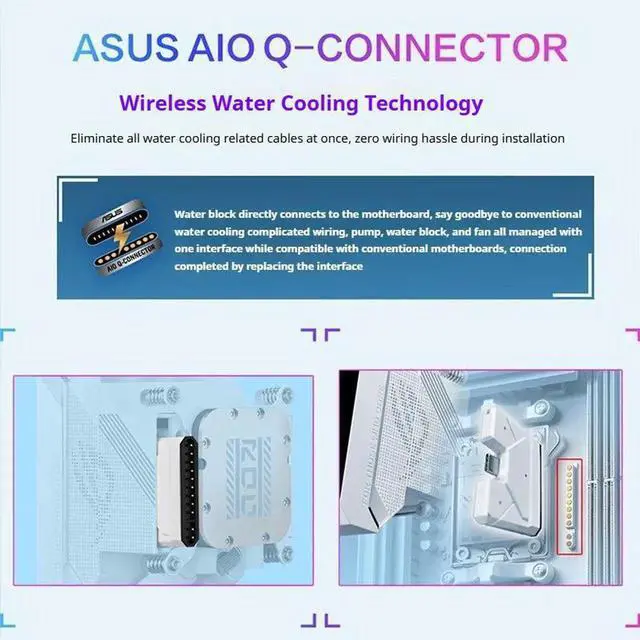
A: Choose the ROG Strix LC IV if you want the newer platform, a larger 5.08-inch 720p LCD, integrated radiator fans, and ASUS AIO Q-Connector support on compatible motherboards. ASUS claims up to 10% higher performance than the LC III, but the LC III can be the more practical choice when its lower price is more important than the larger display, simplified cabling, and updated design.
Q: Is the ROG Strix LC IV 360 better than the ASUS TUF Gaming LC III 360 ARGB LCD White Edition?
A: Choose the ROG Strix LC IV for a more premium build focused on display size, higher-end pump and fan design, cable-reduction features, and ROG styling. Choose the TUF Gaming LC III when you want a 360mm LCD cooler for a mainstream gaming system and do not need the LC IV’s larger 5.08-inch display or ASUS AIO Q-Connector feature.
Q: Should I choose the ROG Strix LC IV 360 or step up to the ROG Ryuo IV 360 ARGB?
A: Choose the ROG Strix LC IV when you want a large LCD and high-end cooling without moving to ASUS’s flagship-tier Ryuo series. Choose the ROG Ryuo IV when the display is a primary feature: it has a larger 6.67-inch curved 2K AMOLED panel and an upgraded Asetek Gen8 V2 pump, while the LC IV uses a 5.08-inch 720p LCD and is positioned below the Ryuo line.
Q: Is the ROG Strix LC IV 360 a better choice than the NZXT Kraken Elite 360 for a white ASUS gaming PC?
A: Choose the ROG Strix LC IV when you are building around ASUS components and want a larger rectangular display, Aura-compatible ARGB styling, and the option to use ASUS AIO Q-Connector on supported motherboards. Choose the NZXT Kraken Elite 360 when you prefer NZXT CAM software, its 2.72-inch IPS display, or an existing NZXT ecosystem. Both are 360mm desktop AIO coolers, so case radiator clearance matters more than portability.
Q: Is this cooler compatible with my CPU and motherboard?
A: It supports Intel LGA 1851 and LGA 1700 processors, plus AMD AM5 and AM4 processors. The ASUS AIO Q-Connector feature requires a compatible ASUS motherboard; otherwise, the cooler can be installed using standard connections.
Q: Will this 360mm AIO fit in my PC case?
A: The cooler uses a 360mm radiator and 400mm tubing, so the case must support a 360mm radiator and provide sufficient clearance for the radiator, fans, motherboard, memory, and graphics card. Check the case manufacturer's radiator-clearance specifications before buying.
Q: Does the LCD screen support custom images or animations?
A: Yes. The cooler has a 5.08-inch 720p IPS LCD that supports custom animations, allowing users to display personalized visual content in addition to cooling information.
Q: Is this cooler suitable for high-performance gaming or demanding workloads?
A: It is designed for demanding CPU cooling and uses a 360mm radiator with an integrated fan optimized for airflow and noise control. Actual temperatures and noise depend on the processor, power settings, case airflow, room temperature, and fan or pump settings.
Q: Does installation require the ASUS AIO Q-Connector?
A: No. The cooler can use standard installation on motherboards that do not support the ASUS AIO Q-Connector. On compatible ASUS motherboards, the Q-Connector can simplify cable connections, but users must follow the instructions and avoid connecting radiator fan cables when using it.
Q: Is the ASUS ROG Strix LC IV 360 ARGB LCD worth buying for a cleaner, cable-free build?
A: It is most suitable for users with a compatible ASUS motherboard that supports the AIO Q-Connector. The connector can simplify wiring, but the feature is proprietary; users with other motherboards must use standard installation and will not receive the same cable-free integration.
Q: Will it work with a non-ASUS motherboard?
A: Yes. The cooler supports Intel LGA 1851 and LGA 1700, plus AMD AM5 and AM4, and can be installed using standard connections. The ASUS AIO Q-Connector is optional and works only with selected compatible ASUS motherboards.
Q: Is the LCD easy to manage, and does it use Armoury Crate?
A: The LCD is managed through ASUS InfoHub rather than Armoury Crate, according to discussion about the LC IV. Armoury Crate is used for functions such as ARGB lighting and fan control, so buyers should expect more than one ASUS software utility.
Q: Will the 400 mm tubing fit a compact case?
A: The 400 mm tubing can be sufficient for compact cases such as the Lian Li O11 Vision Compact, but fit depends on radiator placement and routing. The pump's fixed tube outlet position may limit installation options, so buyers should check the case layout before purchasing.
Q: Who should choose this cooler over a simpler 360 mm AIO?
A: It is best suited to PC builders who want a large customizable LCD, ARGB lighting, broad Intel and AMD socket support, and—on compatible ASUS motherboards—simplified Q-Connector wiring. Buyers focused only on cooling value may prefer a simpler 360 mm AIO because this model's main differentiators are its display and ASUS ecosystem integration.


