Your Browsing History
Best Sellers
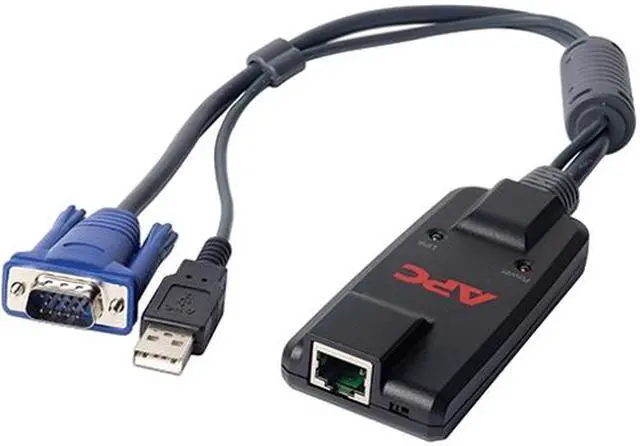
APC KVM Cable
- KVM Cable for Keyboard/Mouse, Monitor, KVM Switch
- First End: 1 x HD-15 Male VGA
- First End: 1 x Type A Male USB
- Second End: 1 x RJ-45 Female Network
- Black
- TAA Compliant
+
+
Overview
Specs
Reviews
See all Q & A
Any questions? Ask CelesteSM will help you find out quickly.
Try me now
Manage multiple servers with just one keyboard, monitor and mouse.
APC KVM-USB. Brand NewIncludes 2 Year Warranty. . Product # KVM-USB. . Manage multiple servers with just one keyboard, monitor and mouse.. . KVM-USB
Warranty & Returns
Warranty, Returns, And Additional Information
Warranty
- Limited Warranty period (parts): 1 year
- Limited Warranty period (labor): 1 year
- Read full details
Return Policies
- Return for refund until: January 31, 2027
- Return for replacement until: January 31, 2027
- This item is covered by Newegg.com's Extended Holiday Return Policy.
- Read full return policy for details.
We want to ensure your holiday shopping this year is hassle-free. That’s why we’re automatically extending our return policies on almost every product! For purchases placed between November 1st, 2026 and December 31, 2026 you will have until January 31, 2027 to return your product.
Manufacturer Contact Info
- Manufacturer Product Page
- Manufacturer Website
- Support Phone: 1-800-555-2725
- Support Website
- View other products from APC
LOADING...
LOADING...
The APC KVM-USB is a TAA-compliant KVM cable with a VGA male connector and USB-A male connector on one end and an RJ-45 female connector on the other, for users connecting compatible keyboards, mice, monitors, and KVM switches.
Recommended For
- Data-center administrators connecting a USB-equipped server to a compatible APC KVM 2G switch, using VGA for video and USB for keyboard and mouse.
- IT staff standardizing a rack of USB-based servers on one APC CAT5 KVM setup, where each server needs its own interface module and CAT5 cabling to the switch.
- Technicians replacing a missing or failed KVM-USB interface module in an existing compatible APC KVM installation, rather than building a new desktop KVM setup.
- Organizations that need a TAA-compliant USB server module for an APC KVM installation and have verified the switch and server connections match.
Real-World Use Scenarios
- In a server rack, connect a USB-equipped server’s VGA and USB ports to this module, then link it to a compatible APC KVM switch; the server can be accessed through the KVM console’s shared monitor, keyboard, and mouse.
- When several compatible servers share one rack console, install a module on each server and connect each to a KVM switch port; an administrator can select a server without moving the console’s cables between machines.
- For a rack where the KVM switch and server are separated, connect the module’s RJ-45 port to the compatible switch with the required CAT5/6 cabling; the KVM link can run between them without a separate VGA-and-USB cable run.
- When replacing a missing or failed server-side KVM module, use this USB model with a listed compatible APC KVM switch and a USB/VGA server; the connection restores that server’s access from the shared KVM console.
Spec Summary
| Attribute | Value |
|---|---|
| Best For | Connecting a keyboard, mouse, and monitor to a KVM switch |
| Cable Connections | HD-15 male VGA and Type A male USB on one end; RJ-45 female network on the other |
| Device Compatibility | Keyboard, mouse, monitor, and KVM switch |
| Model Identifiers | APC KVM-USB |