




 here!
I’m your shopping assistant for PC builds, upgrades, and everything tech.
Got questions? Ask away!
Start a conversation
here!
I’m your shopping assistant for PC builds, upgrades, and everything tech.
Got questions? Ask away!
Start a conversationShipped by Newegg
 Hot Seller




Any questions? Ask CelesteSM will help you find out quickly.
We want to ensure your holiday shopping this year is hassle-free. That’s why we’re automatically extending our return policies on almost every product! For purchases placed between November 1st, 2026 and December 31, 2026 you will have until January 31, 2027 to return your product.
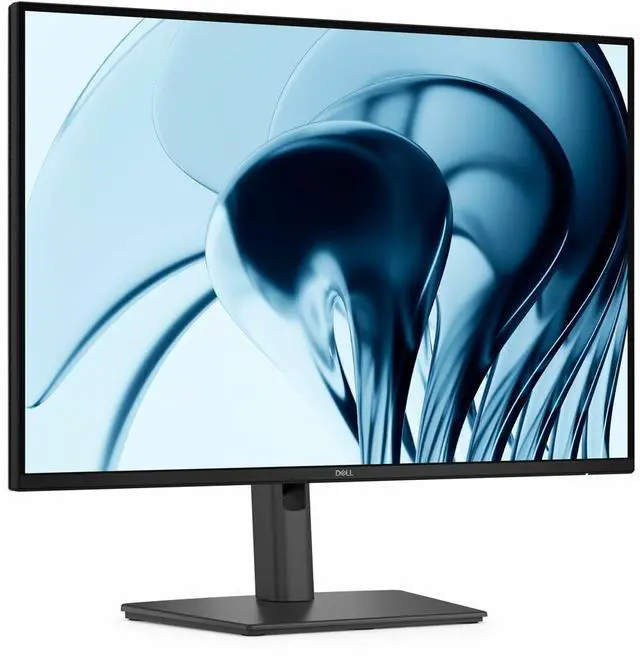
The Dell Pro P2426 is a 24-inch WUXGA IPS monitor with a 1920 × 1200 resolution and 16:10 aspect ratio, suited to office users who want extra vertical space for documents, spreadsheets, and web pages.
| Attribute | Value |
|---|---|
| Best For | Office and productivity setups focused on documents, spreadsheets, and other work that benefits from a 16:10, 1920 × 1200 display |
| Panel And Resolution | 24-inch IPS LCD with LED backlight, 1920 × 1200 native resolution, 16:10 aspect ratio, 178°/178° viewing angles, 16.7 million colors, 300-nit brightness, 1500:1 contrast ratio, and 99% sRGB color gamut |
| Refresh Rate And Response | 100 Hz refresh rate with a 5 ms response time |
| Ports And Connectivity | HDMI, DisplayPort, VGA, and USB connectivity, including USB Type-C; 1 HDMI port and 5 USB 3.0 ports |
| Viewing Comfort | Anti-glare screen with flicker-free and low-blue-light features |
| Mounting And Physical Fit | 100 × 100 mounting support; listed dimensions are 20.86 inches deep, 6.45 inches wide, and 17.08 inches high |
| Power | 13.6 W power consumption |
| Included Components | Stand, power cable, DisplayPort cable, USB Type-A to Type-B upstream cable, QR card, and safety, environmental, and regulatory information; HDMI cable included for selected countries |
| Model Identifiers | Dell Pro P series, model P2426; part number DELL-P2426 |
Q: Dell Pro P2426 vs. Dell P2425H: which is better for documents and spreadsheets?
A: Choose the Dell Pro P2426 when you want a taller 16:10 workspace: its 1920 × 1200 resolution provides 1200 vertical pixels, compared with the P2425H’s 1920 × 1080 and 1080 vertical pixels. Both are 100 Hz Dell IPS monitors; the P2425H is a 16:9 Full HD option, while the P2426 prioritizes extra vertical workspace.
Q: Dell Pro P2426 vs. Dell Pro P2425D: should I choose WUXGA or QHD?
A: Choose the P2426 if you prefer a 16:10 WUXGA screen, VGA connectivity, and a model Dell lists as TAA compliant. Choose the P2425D if your priority is higher pixel resolution: it provides 2560 × 1440 QHD at 100 Hz, compared with the P2426’s 1920 × 1200 WUXGA at 100 Hz.
Q: Dell P2426 vs. Dell P2425: what’s the practical difference?
A: Both are 24-inch-class Dell IPS monitors with 1920 × 1200 resolution, a 16:10 aspect ratio, and a 100 Hz refresh rate. The P2426 is a fit when you want the Pro P model and Dell’s listing for TAA compliance; the P2425 offers the same core screen format and refresh rate in the Pro Plus line.
Q: Is this monitor suitable for office work and multitasking?
A: Yes. Its 24-inch 1920 × 1200 IPS screen has a 16:10 aspect ratio, providing more vertical workspace than a 16:9 Full HD display. The adjustable stand and 100Hz refresh rate also suit everyday document work, spreadsheets, and smoother scrolling.
Q: Can I connect this monitor to a laptop?
A: Yes, if the laptop has HDMI, DisplayPort, or VGA video output. The monitor has those three inputs. A laptop with only USB-C video output will need a compatible video adapter or dock; USB-C connectivity is not listed for this monitor.
Q: Can I adjust the screen height or use a monitor arm?
A: Yes. The included stand supports height, tilt, swivel, and pivot adjustment. The monitor is also listed as VESA-mount compatible, so it can be used with a compatible monitor arm or wall mount.
Q: Is this a good monitor for gaming?
A: It can handle casual gaming: it has a 100Hz refresh rate and a 5ms response time. The supplied specifications do not list gaming-focused features such as variable refresh rate, so buyers seeking those features should check for them separately.
Q: Is the Dell Pro P2426 a good monitor for productivity work?
A: It is suited to office tasks such as working with documents, spreadsheets, and multiple windows. Its 1920 × 1200, 16:10 screen provides more vertical workspace than a 16:9 Full HD display, and the stand supports height, tilt, swivel, and pivot adjustment. Its 24-inch size may be limiting if you want a larger workspace on one screen.


