




 here!
here!
I’m your shopping assistant for PC builds, upgrades, and everything tech.
Got questions? Ask away!
Start a conversation
here!
I’m your shopping assistant for PC builds, upgrades, and everything tech.
Got questions? Ask away!
Start a conversationShipped by Newegg




Any questions? Ask CelesteSM will help you find out quickly.


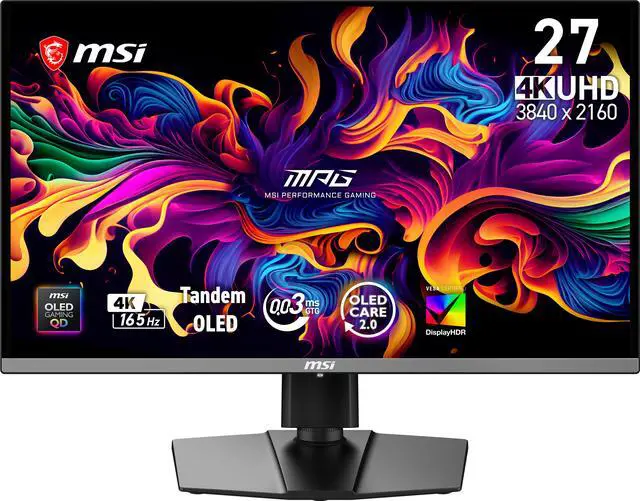
Equipped with a 27" UHD (3840 x 2160) QD-OLED panel with a high 165 Hz refresh rate & an ultra-low 0.03ms response time, the MAG 272UP QD-OLED E16 provides a competitive edge & outstanding image quality. The 4th-gen Tandem QD-OLED incorporates a 5-layer Tandem OLED architecture powered by EL Gen 3 technology, which boosts light efficiency by 30%.

5-layer tandem OLED panel and EL Gen 3 technology represents a groundbreaking display innovation, achieving lower power consumption and maintaining the peak 1000 nits of HDR performance through its 5-layer tandem structure. With EL Gen 3 technology, these advancements collectively improve light efficiency by up to 30%.

Uniform Luminance grants you fully customizable HDR brightness for precise control on the MAG 272UP QD-OLED E16. By fine-tuning points on the curves, it prevents sudden, aggressive dimming and ensures seamless transitions, delivering smoother visuals tailored to your preference.

VESA Certified DisplayHDR True Black 400 monitors produce a consistently higher brightness range as well as superior detail in darker regions. Enjoy realistic dynamic contrast by OLED pixel dimming control that mimics the human eye in the real world:

Fine-tune your visuals with advanced color customization features on MAG 272UP QD-OLED E16, giving you full control to match your style and preferences.

Supports Super Low Motion Blur (SLMB) to significantly reduce ghosting and motion blur, ensuring fast-moving objects remain razor-sharp and easy to track. This technology inserts black frames between images to counteract image persistence, providing gamers with advanced motion clarity.
* SLMB is available at 165Hz only and cannot be used simultaneously with VRR.

Supports a variety of aspect ratios, allowing selection between 24.5" imagery. Choose the size you want at your leisure, and elevate your gaming experience to utmost.

The flat stand design adapts to your setup and peripherals, maxmizing limited space and creating a clean, spacious environmanet for compatitive play.

PC console & laptop interface options include
The MSI MAG 272UP QD-OLED E16 is a 26.5-inch 4K gaming monitor with a 165Hz refresh rate, Adaptive Sync, and 0.03ms response time, suited to PC and console gamers seeking sharp detail and responsive motion on a QD-OLED display.
| Attribute | Value |
|---|---|
| Best For | Gaming with a 26.5-inch QD-OLED 4K display and 165Hz refresh rate |
| Panel And Resolution | 26.5-inch flat QD-OLED panel with 3840 × 2160 (4K) resolution, 16:9 aspect ratio, 178° horizontal and vertical viewing angles, and anti-reflection finish |
| Refresh Rate And Response | 165Hz refresh rate, 0.03ms GtG response time, and Adaptive Sync with G-SYNC Compatible and FreeSync Premium Pro support |
| Image Quality And Color | 1,500,000:1 contrast ratio, 250 cd/m² brightness, DisplayHDR True Black 400, 1.07 billion colors, and color gamut coverage of Adobe RGB 98%, DCI-P3 99%, and sRGB 138% |
| Ports And Connectivity | 2 HDMI 2.1 ports supporting UHD at 165Hz, DisplayPort 1.4a (HBR3), USB-C with DisplayPort Alt Mode and 15W power delivery, and a headphone output |
| Stand, Mounting And Dimensions | Height, pivot, swivel, and tilt adjustment; VESA 100 × 100mm mounting; measures 20.9 × 24 × 9.5 inches with the stand and 14 × 24 × 9.5 inches without it |
| Display And Gaming Features | Picture-in-Picture and Picture-by-Picture, Uniform Luminance Technology, AI Care Sensor, OLED Care 2.0, flicker-free operation, and VESA ClearMR 9000 |
| Audio And Built-In Devices | Headphone output; no built-in speakers or webcam |
| Power | Internal power supply rated for 100–240 VAC, 50/60Hz |
| Physical Details | Black cabinet; weighs 16.9 lb |
| Package Contents | DisplayPort 1.4a cable, C13 power cord, quick guide, four VESA screws, fiber cloth, and color report |
| Model Identifiers | MSI MAG 272UP QD-OLED E16 |
Q: Should I get the MSI MAG 272UP QD-OLED E16 or the MPG 272URX?
A: Choose the MAG 272UP QD-OLED E16 if 4K QD-OLED at up to 165Hz meets your gaming needs and you do not need the MPG model’s higher-bandwidth connections. The MPG 272URX raises the refresh rate to 240Hz, adds DisplayPort 2.1a, and provides up to 98W USB-C power delivery; the E16 has DisplayPort 1.4a and 15W USB-C power delivery.
Q: Is the MSI MAG 272UP QD-OLED E16 or MAG 272UP QD-OLED X24 better for 4K gaming?
A: Both are 26.5-inch 4K QD-OLED monitors, but the X24 supports up to 240Hz while the E16 supports up to 165Hz. Choose the X24 if your PC can deliver higher frame rates and you want the extra refresh-rate headroom; choose the E16 if 165Hz is sufficient for your games and setup.
Q: Is the MSI MAG 272UP QD-OLED E16 worth choosing over a 4K 240Hz OLED monitor?
A: Choose the E16 if you want a 4K QD-OLED display and a 165Hz maximum refresh rate fits your gaming priorities. A 4K 240Hz model is the closer fit if you play fast-paced games at very high frame rates or specifically want the additional refresh-rate headroom; reaching those rates depends on your PC and game.
Q: Is this monitor a good choice for gaming?
A: It is suited to PC and console gaming if you want a 4K image, a refresh rate up to 165Hz, Adaptive Sync, and a 0.03ms GtG response time. To use the full 4K 165Hz refresh rate, the connected device and cable must support it.
Q: Is it suitable for office work and note-taking?
A: It can handle general office work and note-taking, with a 4K resolution and an adjustable stand. For long daily sessions with fixed menus, toolbars, or documents on screen, consider OLED image-retention risk; the provided specifications do not state this model’s burn-in warranty or panel-care features.
Q: Can I connect a laptop with one USB-C cable and charge it?
A: USB-C supports DisplayPort Alt Mode, so it can carry video from a compatible laptop. Its listed power delivery is 15W, so it may not charge a laptop adequately; you may need the laptop’s separate power adapter.
Q: Does it have built-in speakers for meetings or gaming?
A: No. This monitor has no built-in speakers, so use headphones, external speakers, or audio equipment connected to your computer or console.
Q: Can I mount it on a monitor arm?
A: Yes. It supports a 100 × 100mm VESA mount. The included stand also supports height, pivot, swivel, and tilt adjustments.
Q: Is the MSI MAG 272UP QD-OLED E16 worth considering?
A: Consider it if you want a 27-inch-class 4K QD-OLED for gaming and 165Hz is sufficient. Reddit discussions identify its lower refresh rate than some 27-inch 4K OLED alternatives and the limited amount of model-specific owner feedback as factors to weigh. The available information does not establish whether it is worth the price you find.
Q: Is 165Hz enough, or should I choose a faster 4K OLED monitor?
A: This monitor is specified for 4K at up to 165Hz. It may suit you if that refresh rate meets your gaming needs; choose a faster alternative if reaching a higher refresh rate is a priority. A Reddit discussion specifically frames the E16’s 165Hz as a trade-off against 240Hz 27-inch 4K OLED options.
Q: Is it a good choice for gaming and everyday desktop work?
A: It combines 4K resolution, a 165Hz refresh rate, and an adjustable stand, which may fit mixed gaming and desktop use. Reddit discussions raise text clarity and burn-in as considerations for OLED productivity use, but the available discussions do not establish long-term outcomes for this specific model. If your work involves long periods of static content, factor that uncertainty into your choice.
Q: Is it suitable for a bright room?
A: It has an anti-reflection screen, but the listed brightness is 250 cd/m². If the monitor will face strong daylight or bright room lighting, compare its brightness and reflection handling with alternatives before choosing. A Reddit comparison raises those factors, but it compares the E16 with a different monitor rather than reporting a direct test of the E16 in a bright room.


