Out of stock
This item is currently out of stock and it may or may not be restocked.
Sold by Newegg

Shipped by Newegg

Shop it at NeweggBusiness.

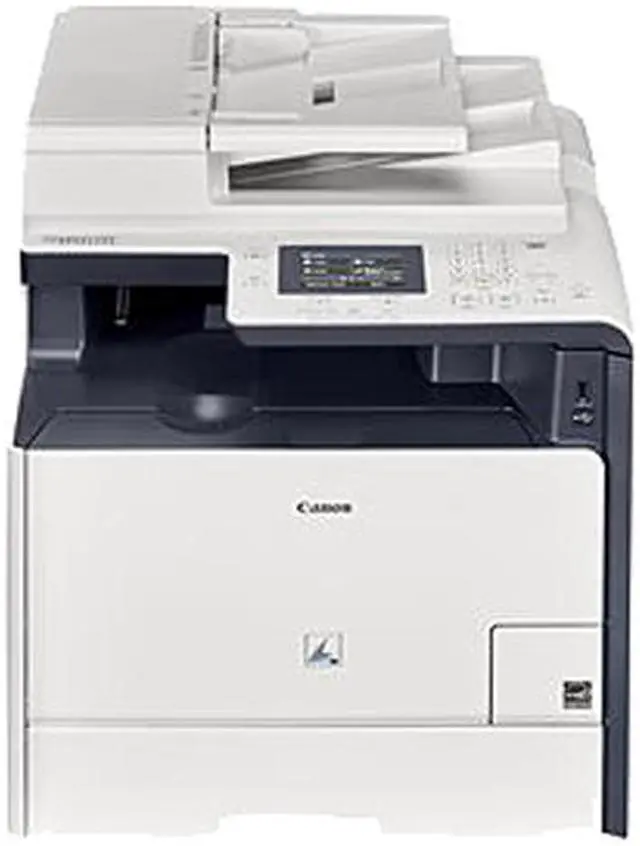
Canon imageCLASS MF729Cdw (9947B010) Up to 21 ppm (9600 x 600 dpi quality USB/Ethernet/Wireless Color Laser Multifunction Printer

  • Up to 21 ppm
  • Up to 9600 x 600 dpi quality
  • USB/Ethernet/Wireless
  • Duplex Printing
Overview
Specs
Reviews
general information
general information

Canon Color imageCLASS MF729Cdw Laser All-in-One Printer

The multifunctional 4-in-1 Canon Color imageCLASS MF729Cdw offers high quality output, various mobile solutions, security features, user-friendly designs and excellent reliability in a space-saving footprint, ideal for any small office or home office environment.

At a Glance

  • 4-in-1 functionality – Print, Scan, Copy, Fax
  • Print in both black and white and color at up to 21 pages1 per minute.
  • All-Mode Duplexing
  • Wireless connectivity allows you to access the device functions from anywhere in your home or office2.
  • Wi-Fi Direct3 enables easy connection to mobile devices without a router.
  • Print on-the-go with Canon PRINT Business4, Apple AirPrint5, Mopria Print Service6 and Google Cloud Print7.
  • USB Direct Print allows you to easily print from and scan to USB in JPEG, TIFF and PDF formats.
  • NFC8 capability allows you to "tap and print", using your mobile device.
  • Intuitive 7-line Color Touch LCD display which makes navigation a breeze.
  • Secure Print helps keep printed confidential documents safe.
  • Easy paper handling and limited interruptions
  • Environment friendly
general information

4-in-1 Functionality

The versatile 4-in-1 printer has print, scan, copy and fax capabilities, so you can accomplish all necessary tasks with just one machine.

Professional Quality Print

Your professional quality color documents are printed at speeds of up to 21 pages per minute1 in both color and black and white with a quick first print time of 14.3 seconds9. With Superior Color Imaging, your printed materials will be crisp and vibrant. All mode duplexing increases your business efficiency, allowing you to Print, Scan, Copy and Fax with ease.

With ID Card Copy, you can easily create copies of identification cards or other small documents on a single page.

general information

User Friendly Intuitive Display

The intuitive 7-line Color Touch LCD Display allows users to navigate through the menu seamlessly. Use the Favorites Settings to access the features you use most. The wide screen and color display is user friendly and easy to read, helping you to complete your business tasks efficiently.

general information

NFC Capability

The MF729Cdw includes NFC capability8 which allows you to "tap and print" using your compatible mobile device. Password protected Department ID Management helps business owners manage device usage and color access for up to 300 IDs, and the Secure Print feature helps keep confidential documents safe.

general information

USB Direct Print

Using USB Direct Print, you can easily print from and scan to that USB in JPEG, TIFF and PDF formats.

general information

Wireless Connectivity

The MF729Cdw has wireless connectivity, increasing your productivity and allowing you to print from almost anywhere in your home or office2. The device also has built in Wi-Fi direct capability3, enabling easy connection to mobile devices without a router.

general information

Print-On-The-Go Mobile Features

The MF729Cdw is equipped with a variety of easy-to-use mobile capabilities for printing on the go using your compatible mobile device, such as Apple AirPrint5, Mopria Print Service6 and Google Cloud Print7. The Canon PRINT Business4 app allows users to print to and scan from the device to compatible iOS or Android devices.

general information

Paper Handling

With the front-loading 250-sheet paper cassette, 50-sheet ADF, 50-sheet multipurpose tray, and 250-sheet optional additional paper cassette10, your paper handling requirements are covered.

general information

Eco Friendly Features

The MF729Cdw uses only 2 watts or less of energy in wireless Energy Saver Mode, helping you save money on energy costs. The Single Cartridge System combines the toner and drum into one unit, making replacement of cartridges simple.

NOTE:

  • Print speed is based on internal testing. Print speed may vary depending on the number of copies selected, as well as on the settings for size, type and orientation of paper.
  • Wireless performance may vary based on terrain and distance between the printer and wireless network clients.
  • Wi-Fi is a registered trademark of the Wi-Fi Alliance. The Wi-Fi CERTIFIED Logo is a certification mark of the Wi-Fi Alliance.
  • Canon PRINT Business is a new app, available free on the App Store and Google Play Store; compatible with iPhone 6 Plus, iPhone 6, iPhone 5S, iPhone 5C, iPhone 5, iPhone 4S, iPhone 4, iPad Air 2, iPad Air, iPad 4, iPad 3, iPad 2, original iPad, iPad mini, iPad mini Retina, iPad mini 3 devices running iOS versions 7.0 - 8.0. Supports Android Tablets and Phones running OS versions 4.0 - 5.0. Canon PRINT Business combines the functions of the Canon Mobile Printing App and the Canon Mobile Scanning for Business App into one, streamlining both apps and adding new features and functionality for business users of all types, from small or home offices to large enterprises . Users of Canon Mobile Printing can simply update the app to use Canon PRINT Business. Users who have installed Canon Mobile Scanning for Business should install Canon PRINT Business on their compatible device. After Canon PRINT Business is installed, users can re-register their Canon Mobile Scanning for Business device list and local documents. Android is a trademark of Google Inc. App Store is a service mark of Apple Inc. iPhone, iPad Air, iPad, iPad mini, are trademarks of Apple Inc., registered in the U.S. and other countries. iOS is a trademark or registered trademark of Cisco in the United States and other countries and is used under license.
  • AirPrint functionality requires an iPad, iPad Mini, iPad 2, the new iPad, iPhone 3GS or later, or iPod touch 3rd generation or later device running iOS 4.2 or later, and an AirPrint-enabled printer connected to the same network as your iOS device. A printer conne
  • Mopria Print Service, available for free at the Google Play Store, requires a compatible Android KitKat 4.4 smartphone or tablet. The printer must be either wirelessly connected to the network router or with an Ethernet cable. The mobile device and printer must be connected to the same network.
  • Google Cloud Print requires an Internet connection and Google Account. Printer firmware update may be necessary for Google Cloud Print function. Certain exceptions may apply. A PC running Windows XP or later or a Mac running OS 10.4.11 or later and USB cable are required to perform firmware update.
  • Requires an Android mobile device with NFC hardware running Android 4.0 or later, and the Canon Print Business app, available for free at Google Play. Canon Print Business app must be open to use tap and print functionality.
  • May vary depending on the output environment.
  • Based on 20 lb. bond paper.

Warranty & Returns

Warranty, Returns, And Additional Information

Warranty

  • Limited Warranty period (parts): 1 year
  • Limited Warranty period (labor): 1 year
  • Read full details

Return Policies

LOADING...