• $39.99
  • This item is not returnable
  • Login to Make an Offer
    Sold by Newegg

    Shipped by Newegg

    Price alert
    Shop it at NeweggBusiness.

    Individual Software AnyTime Organizer Deluxe 16 - Download

    • Deluxe
    • Standard
    • Calendars
    • Layout Designer-Choose from 100+ Layouts & 15 Base Themes for Customization!
    • Downloadable Calendars
    • Design Layout Share and Print
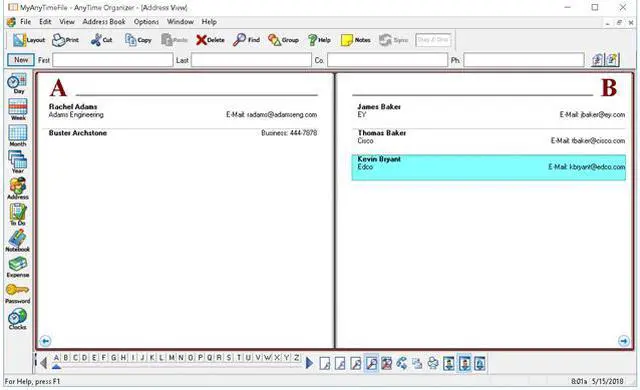
    • Address Book & Contacts
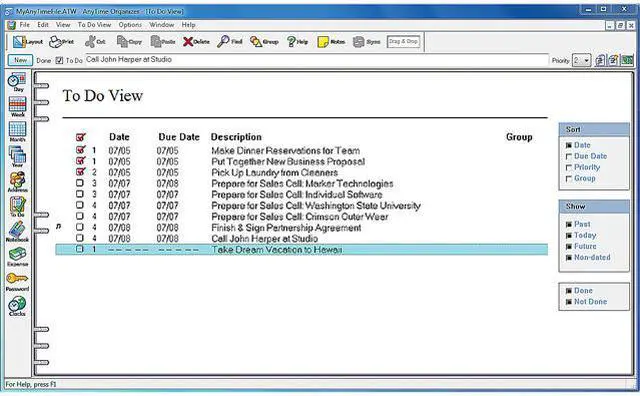
    • To-Do Lists
    • Electronic Sticky Notes
    • Special Event Reminders
    • Alarms & Reminders
    • Driving Directions
    • Import & Export
    • AnyTime Clocks
    Please note that this product is non-returnable and non-refundable.
    +
    +
    Overview
    Specs
    Reviews
    See all Q & A

    Any questions? Ask CelesteSM will help you find out quickly.

    image for this item
    image for this item

    Get Organized & Take Control of Your life!

    AnyTime Organizer has all the powerful tools you need to organize your personal and professional life! The friendly and simple interface makes it easy to access the Calendars, To-Do lists, Contacts, Notebooks, Passwords, Expenses, and hundreds of design combinations for printable calendars. Let AnyTime Organizer help you organize your life and you will see why more people choose AnyTime over any other brand of organizer software.

    Features

    The Only Organizer that Organizes Your Calendar, To-Do’s and Contacts!

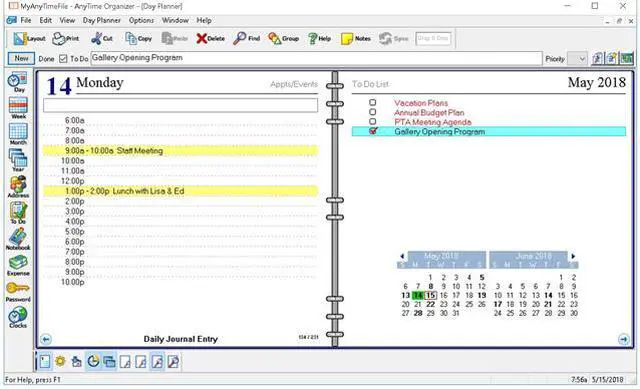
    Organize your calendar for work, personal, or other groups. Schedule events, calls, tasks and appointments. Increase your productivity and prioritize and manage your To-Do lists. Keep a detailed record of every contact. Remember important events–even prepare a holiday card mailing!

    New! Get AnyTime Organizer Info with Your iPhone & Android Apps!

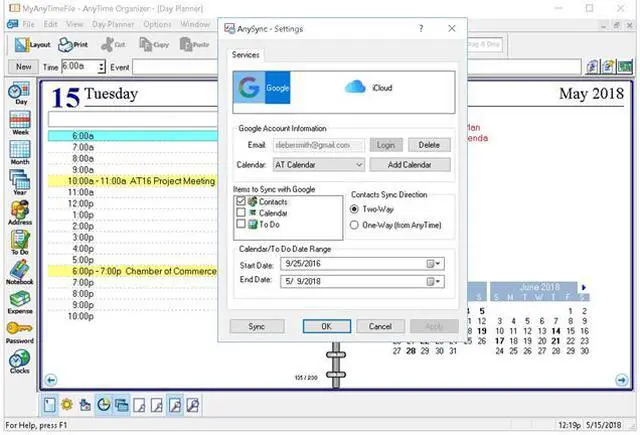
    Access your calendar, To-Do list and contacts from your home or office 24/7 from your mobile device or Web apps. Sync your calendar, contacts, and To Do’s using AnySync. Sync for free through your Google or iCloud accounts and access data from any connected device on AnyTime.

    Calendars

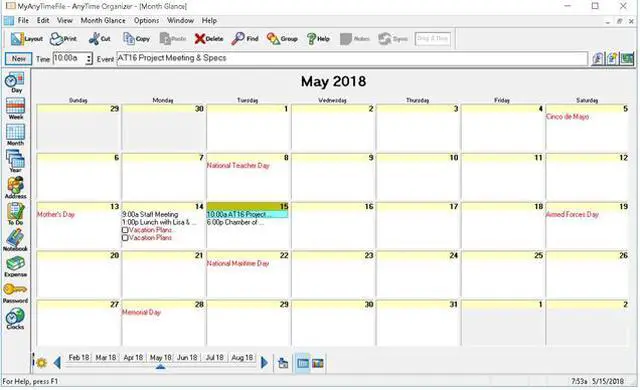
    • Organize and switch between multiple calendars: work or personal, and create categories
    • Schedule events, calls, tasks and appointments, and avoid conflicts
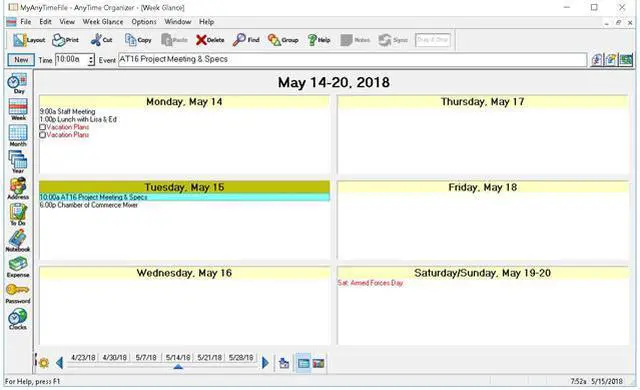
    • View schedule by day, week, month or year
    • Add recurring and repeating events
    • Drag-and-drop to reschedule
    • Print or e-mail a PDF of schedule

    Layout Designer–Choose from 100+ Layouts & 15 Base Themes for Customization!

    • Take advantage of exclusive layouts like Weekend Planner, 3-Day Travel Planner, and Tri-Fold Address Book. Create a PDF of any layout and e-mail your schedule to others.

    Downloadable Calendars

    • Add-in your favorite NFL®, NBA®, NHL®, MLBTM, PGATM, and NASCAR® season schedule to your daily planner. Have fun with the Lunar Calendar, Famous Birthdays, International Holidays, and Word-of-the-Day.

    Design Layout Share and Print

    • More than 3,000 layout design combinations
    • Choose from 15 base themes or create your own design
    • Exclusive layouts include Weekend Planner, 3-Day Travel Planner, and Tri-Fold Address Book. Print to popular day planner sizes including 8.5″ x 11″, 5.5″ x 8.5″, 3.75″ x 6.75′, and 3.5″ x 6″
    • Print or send as PDF

    Address Book & Contacts

    • Keep a detailed record of every contact
    • Remember birthdays and anniversaries – even prepare a holiday card mailing
    • Keep a history of meetings, tasks and notes
    • Simply drag-and-drop to schedule calls
    • Date and time stamps are added automatically
    • Add photos for each person as a quick visual

    To-Do Lists

    • Keeps record of accomplished tasks
    • Set deadlines, track, prioritize, sub-prioritize, and add alarms and important notes for to-do’s
    • Assign tasks to categories
    • View completed versus non-completed to-do’s
    • Add alarms

    Electronic Sticky Notes

    • Add colorful reminders to desktop with one-click
    • Visible while working in other applications
    • Display in front of or behind open applications
    • Choose note sizes, colors and fonts

    Special Event Reminders

    • Keep track of special events tied to each contact (e.g. birthdays, anniversaries)
    • Set event alarms

    Alarms & Reminders

    • Use MP3 music as alarm ringtones
    • Snooze alarms by hours, days or weeks
    • Send text message and e-mail reminders

    Driving Directions

    • Get maps and driving directions for any entry in address book

    Import & Export

    • Import data seamlessly from Microsoft® Outlook, Sidekick®, Lotus Organizer®, Day-Timer Organizer®, previous versions of AnyTime, and other organizers
    • Import addresses, phone numbers, and contacts

    AnyTime Clocks™

    • Unlimited number of simultaneous clocks and timers
    • Add to desktop
    • World Clock to track date and time in any time zone
    • Countdown Timer
    • Elapsed Timer to monitor events and tasks, or capture billable time

    Warranty & Returns

    Warranty, Returns, And Additional Information

    Return Policies

    • Return for refund within: non-refundable
    • Return for replacement within: non-replaceable
    • This item is covered by Newegg.com's Digital Products Return Policy.
    • Read full return policy for details.
    LOADING...

    Individual Software AnyTime Organizer Deluxe 16 is downloadable Windows organizer software for people who want to manage calendars, tasks, contacts, notes, passwords, expenses, and reminders in one place.

    Recommended For

    • Windows users who want appointments, to-do lists, contacts, and reminders managed together in one desktop organizer.
    • People who plan across work and personal calendars and want to separate schedules into categories, set recurring events, and receive reminders.
    • People who prefer paper-style planning and want to customize, print, or share calendar and planner layouts as PDFs.
    • Individuals maintaining a detailed personal address book who want to organize contacts, track birthdays, and prepare mailing materials.

    Real-World Use Scenarios

    • When work and personal appointments compete for attention, keep them in separate or combined calendars and view the schedule by day, week, month, or year to spot conflicts and plan ahead.
    • For a busy week with calls, appointments, and deadlines, put events and to-dos in one planner, set priorities and reminders, and use the schedule to keep track of what is coming up.
    • To remember birthdays and anniversaries, store dates with contact records and set event reminders; the contact list can also help organize a holiday-card mailing.
    • If you prefer a paper planner or need to share a schedule, choose a printable layout and print it or send it as a PDF for others to reference.
    • When managing ongoing relationships or client follow-ups, keep contact details alongside notes and histories of meetings or tasks, then use the records to plan calls and follow-up work.

    Spec Summary

    AttributeValue
    Best ForPersonal and professional organization with calendars, tasks, contacts, and printable calendar layouts
    Organizer FeaturesManage calendars, events, calls, appointments, to-do lists, contacts, notebooks, passwords, and expenses; create printable calendars with customizable designs
    Sync And AccessCalendar, contact, and to-do syncing through AnySync with Google or iCloud accounts; access through mobile or web apps
    Supported Operating SystemsWindows PC: Windows 10, 8, or 7; Windows tablet: Windows 10 or 8
    System Requirements45 MB of hard disk space and an 800 × 600 or higher display; speakers or headphones and a sound card recommended. For Windows tablets, a keyboard is recommended
    Product Type And DeliveryTraining software delivered as a download
    Model IdentifiersIndividual Software AnyTime Organizer Deluxe 16; Deluxe version; model ESD-A16