


Your Browsing History

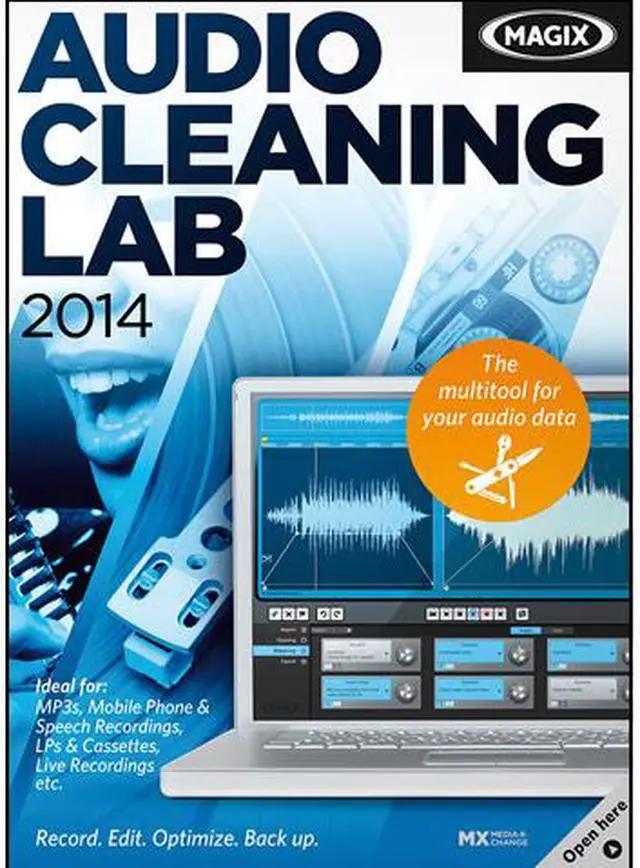

MAGIX Audio Cleaning Lab 2014 - Download
- Auto Mastering
- Optimized Smartphone Recordings
- Removes unwanted Noises
- Optional Touch Screen Operation
- Clipping Reduction
Overview
Specs
Reviews (1)
See all Q & A 
Any questions? Our AI mode will help you find out quickly.
Try me now

MAGIX AUDIO CLEANING LAB 2014
AUDIO OPTIMIZATION MADE EASY.
Music on - Noise off! The new MAGIX Audio Cleaning Lab 2014 enables fast and easy control of all the functions necessary for recording, cutting and optimizing your audio material.
THE MULTITOOL FOR YOUR AUDIO DATA.
Audio Cleaning Lab 2014 is the ideal solution for recording and digitizing all kinds of audio material. Single audio files can be cut, moved and enhanced with effects. The program is so easy to use that you can get great results without having to spend hours learning the program.

1. Record
Save your sounds for the digital age: Easily record LPs, cassettes or speech.
2. Edit
Single audio files can be cut, moved and enhanced with effects. The program is so easy to use that you can get great results without having to spend hours learning the program.
3. Optimize
With only a few clicks you can precisely remove hissing, crackling, wind noise and other disturbances.
4. Convert
Easily convert audio files into any standard format and save them on a CD, DVD, smartphone or hard drive.

The most important features:
- NEW! Auto Mastering: Perfect sound with just a few clicks
- NEW! Optimize smartphone recordings
- Removal of disturbing noises such as wind, rain or crackling
- Wide range of presets for sound optimization
- Automatic completion of album information
- Reduce clipping & adjust volume
- Add sound effects or audio commentary
- Easier import and export of audio files
NEW IN THIS VERSION

Even better: Auto Mastering
Simply choose the music genre for your song and the Auto Mastering function selects the optimal audio settings

Extensive program optimizations make
MAGIX Audio Cleaning Lab 2014 faster and easier to use than ever before

Optimize smartphone recordings
Various presets for current models mean that brilliant sound is only a click away
RECORD & DIGITIZE
Record LPs, cassettes and audio commentary
Audio Cleaning Lab 2014 is the ideal solution for recording and digitizing all kinds of audio material. Or you can record your audio commentary for podcasts, memos or presentations in studio quality.
Track Marker Wizard: Divide recordings into sections
The Track Marker Wizard automatically recognizes the beginning and end of a recording. If you, for example, transfer an entire LP, each song will automatically be indicated. Individual songs can then be burned to a CD. Plus! Complete the track information for entire albums automatically.
Fade lines: Design transitions
Design your own intros, outros & transitions: The new Fade Lines allow you to quickly and easily adjust the volume in individual songs or between songs.
REMOVE NOISE WITH EASE

290 Presets
The practical presets help to easily find problems in the audio and the clearly structured interface means you won't have to search for long. Distortions, crackling vinyl, hissing, cracks, humming, and any other noise can be reduced or removed quickly and easily.
Remove crackling from LP tracks
With Audio Cleaning Lab 2014 it's easy to get rid of the annoying noises from old records, such as crackling or other disturbances. Simply digitize them, optimize them and enjoy those treasured memories in superior quality.
Auto Mastering
Boost the bass, tone down the highs and fill out the mids: Even small changes to the frequencies can have a big effect on your sound. The Auto Mastering function makes it possible to perfect the sound fully automatically with just a few clicks.
Auto Cleaning
Auto Cleaning offers practical help for removing noise from your recordings. Simply choose the preset that works best with your audio material and with just a few clicks you can enjoy your music without annoying noise.
Optimum smartphone sound
The new Audio Cleaning Lab 2014 makes it easy to optimize your smartphone recordings with just a few clicks. Various presets for current models mean that brilliant sound is only a click away.
Optimize speech recordings
Dialogs and spoken words in video recordings can often be difficult to understand if they were not recorded using professional equipment. With Audio Cleaning Lab 2014 you can optimize speech in a matter of minutes and bring the quality of your audio to a whole new level.
MASTER, CONVERT AND BACK UP
Easy to use
Simplified mouse applications, an easy-to-access file manager and the redesigned CD progress display are just a few examples of the numerous improvements. Add to that the powerful Auto Mastering function and you have a range of improved tools that guarantee improved sound.
Mastering effects
Now in their fourth generation, the tried and tested mastering effects provide professional sound and incredible results! Optimize and fine-tune the sound image of your audio material with just a few clicks - perfect sound at the press of a button!
The preview function
Simply click on one of the many presets and the automatic preview feature will immediately tell you if you made a suitable selection, independent of the style and intensity of the optimization.
Visible acoustics
Four different visual analysis tools help to identify problems with frequency and volume in your recordings. Audio Cleaning Lab 2014 includes a spectroscope, a peak meter, a phase oscilloscope and a spectrogram.
Object effects
The object effects enable you to adjust the volume of individual sections in a song or a speech recording, to efficiently remove audio errors and apply effects such as reverb and echo only to those sections that really need them.
Audio converter
More possibilities: Audio Cleaning Lab 2014 supports all standard audio and video formats.This enables you to convert new audio files easily for import and export in the highest quality or burning to CD or DVD.
Ready for anything
Practical tabs for various standard applications offer total support in every situation. Simply open the program, select the audio type (e.g. LP recording) and the program automatically prepares the next steps.
USEFUL COURSES AND HELP

Multimedia Community
At magix.info you'll find information and even complete workshops created by other users and experts about formats, editing techniques, special effects and much more. Share your knowledge and discuss your experiences with other users.
Instant Help
The info box, an integrated direct help feature, offers useful information and helps you edit your recordings. All the effects and their corresponding functions are clearly explained, allowing you to achieve optimum results without having to spend hours and hours familiarizing yourself with the program.

Restore sound
The practical presets help to easily find problems in the audio and the clearly structured interface means you won't have to search for long.

Visible acoustics
The 4 various visualization options for your audio tracks make it easier to identify and edit problems with the volume or frequency.
Warranty & Returns
Warranty, Returns, And Additional Information
Return Policies
- Return for refund within: non-refundable
- Return for replacement within: non-replaceable
- Read full return policy for details.
Manufacturer Contact Info
- Manufacturer Product Page
- Manufacturer Website
- Support Phone: 1-305-722-5810
- Support Website
- View other products from MAGIX
Digital Download Disclaimer
- View full Digital Download Disclaimer
LOADING...