here!
here!
I’m your shopping assistant for PC builds, upgrades, and everything tech.
Got questions? Ask away!
Start a conversation
here!
I’m your shopping assistant for PC builds, upgrades, and everything tech.
Got questions? Ask away!
Start a conversation

Combo Up Savings Up To $250+
The more you add, the more you'll save!
Any questions? Ask CelesteSM will help you find out quickly.
Overview
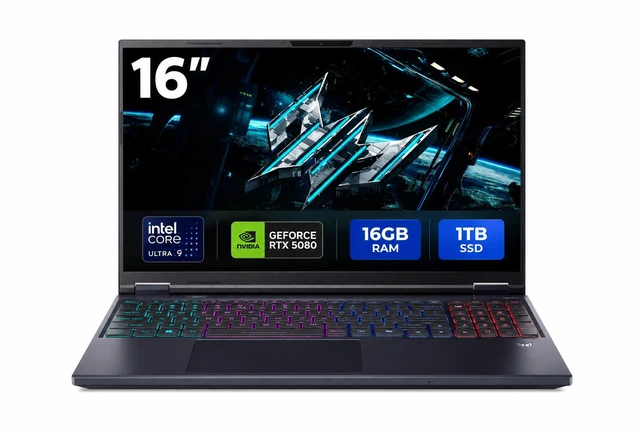
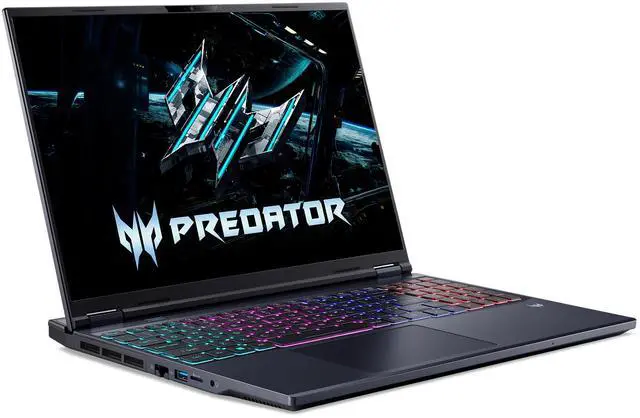
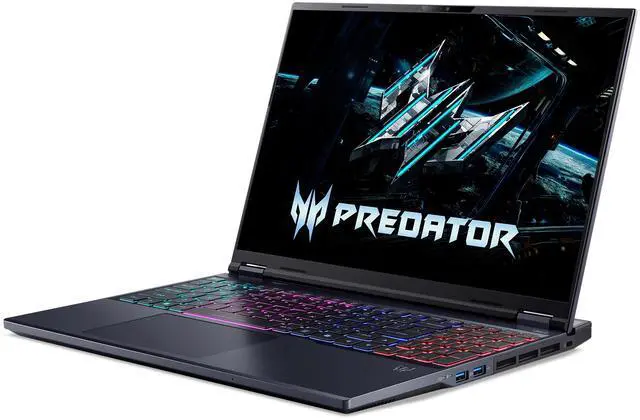
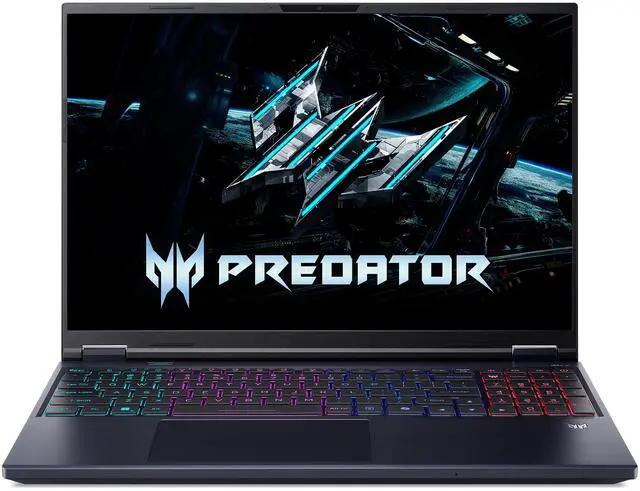
The Acer Predator Helios Neo 16 AI is a consumer gaming and mainstream laptop with a 16.0" WQXGA display, Intel Core Ultra 9 290HX Plus processor, dedicated GeForce RTX 5080 Laptop GPU, 16GB DDR5 memory and 1TB NVMe PCIe Gen 4 SSD storage.
Key Features
Performance
The Intel Core Ultra 9 290HX Plus is a 24-core processor with 8P+16E cores, 40MB L2 cache and 36MB L3 cache. The laptop includes 16GB DDR5 6400 memory and a 1TB NVMe PCIe Gen 4 SSD. The WQXGA display provides 2560 x 1600 resolution and a 180 Hz refresh rate.
Design
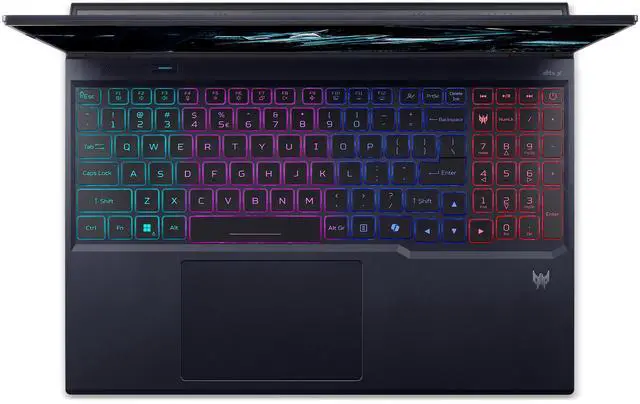
The laptop has an Abyssal Black finish, standard form factor, 4-zone RGB backlit keyboard, Precision Touchpad and two built-in stereo speakers. Dimensions are 14.0" x 10.85" x 0.53"-1.05", and weight is 5.95 lbs. Power comes from a lithium-ion 92 Watt Hour battery and a 330-watt AC adapter.
Connectivity & Compatibility
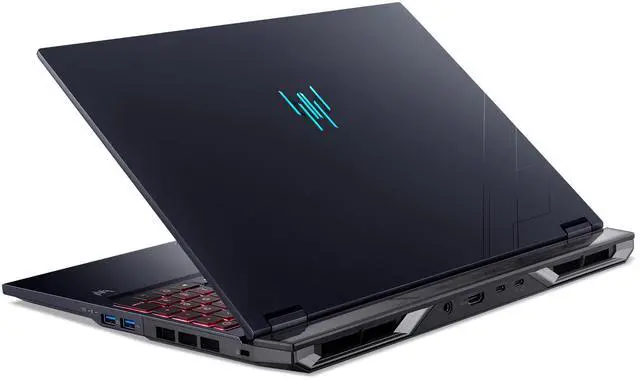
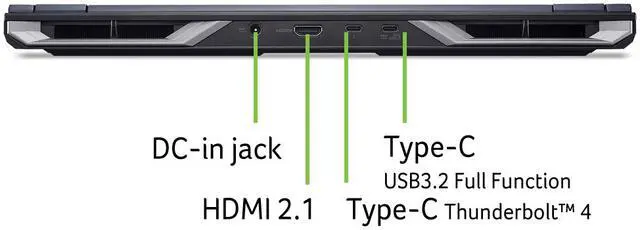
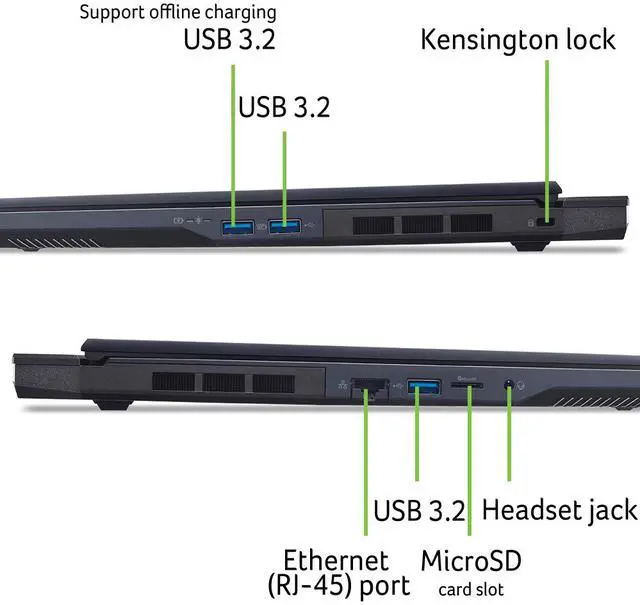
Wired connectivity includes 1 x Thunderbolt 4, 1 x HDMI 2.1, 1 x USB 3.2 Gen 1 Type-A, 1 x USB 3.2 Gen 2 Type-C, 2 x USB 3.2 Gen 2 Type-A, 1 x RJ-45 2.5Gbps Ethernet, a microSD card reader, a headphone/speaker/line-out jack supporting high impedance headsets up to 600ohm, a Kensington Lock Slot and a DC-in Jack for AC Adapter. Wireless connectivity includes 802.11ax Wireless LAN, Wi-Fi 6E and Bluetooth 5.4.
Software & Tools
The laptop includes Windows 11 Home and is identified as a Copilot+ PC. The FHD IR webcam supports 1920 x 1080 video. Acer PurifiedVoice Technology provides AI Noise Reduction with dual built-in microphones.
Specifications
The Acer Predator Helios Neo 16 AI is a 16-inch gaming laptop built for high-end play, creator workloads, and AI-assisted Windows use, pairing an Intel Core Ultra 9 290HX Plus with an RTX 5080 Laptop GPU, a 2560x1600 180Hz display, and 1TB SSD storage. It suits gamers, streamers, and power users who want desktop-class performance in a portable format.
| Attribute | Value |
|---|---|
| Best For | Consumers and gamers who need an AI-enabled, high-performance laptop for gaming and creative workloads — Intel Core Ultra 9 290HX Plus CPU, NVIDIA GeForce RTX 5080 Laptop GPU, and Copilot+ PC AI features |
| Processor And Core Count | Intel Core Ultra 9 290HX Plus (Intel Core Ultra 9, Series 2) — 24 cores (8 performance + 16 efficiency) with 40 MB L2 cache and 36 MB L3 cache |
| GPU And VRAM | NVIDIA GeForce RTX 5080 Laptop GPU, dedicated graphics with 16 GB video memory |
| Display Spec | 16.0\" WQXGA (2560 x 1600) IPS non-touch display, 180 Hz refresh, 100% DCI-P3 and 100% Adobe RGB — suitable for high-refresh gaming and color-accurate content work |
| Memory Configuration | 16 GB DDR5-6400 (8 GB x 2) in two slots (both populated, 0 available), expandable up to 64 GB |
| Storage And Expansion | 1 TB PCIe Gen 4 NVMe SSD for primary storage, plus a microSD card reader for removable storage; no optical drive |
| High Speed I O | I/O includes 1x Thunderbolt 4, 1x HDMI 2.1, 1x USB 3.2 Gen 2 Type-C, 1x USB 3.2 Gen 1 Type-A, 2x USB 3.2 Gen 2 Type-A, headset jack with Hi‑Z support (up to 600 ohm), microSD reader, Kensington lock, and DC-in |
| External Display And Docking Fit | Supports external displays and docking via HDMI 2.1 and Thunderbolt 4 |
| Wired And Wireless Networking | Wired: Intel Killer Ethernet E3100G with 2.5 Gbps RJ-45; Wireless: 802.11ax (Wi‑Fi 6E) and Bluetooth 5.4 |
| Battery And Power | 92 Wh lithium-ion battery with a 330-watt AC adapter |
| Webcam And Privacy | FHD IR webcam (1920 x 1080) with blue glass, supports 1080p video and includes Acer's TNR for improved low-light imagery |
| Keyboard And Control | 4-zone RGB backlit keyboard and precision touchpad supporting Windows Modern Touchpad gestures |
| Audio Setup | DTS:X Ultra audio with Acer TrueHarmony and High SNR DAC (2.1 Vrms), AI noise-reduction PurifiedVoice with dual built-in microphones, two built-in stereo speakers, and a headphone jack supporting high-impedance headsets up to 600 ohm |
| Portability | Dimensions 14.0\" x 10.85\" x 0.53\"-1.05\" and weight 5.95 lbs in Abyssal Black finish |
| Model Identifiers | Acer Predator Helios Neo 16 AI PHN16-I71-95FY (Part NH.U5TAA.001), Windows 11 Home |
Q: Should I buy the Acer Predator Helios Neo 16 AI with RTX 5080 or step down to an RTX 5070 Ti gaming laptop?
A: Choose the Helios Neo 16 AI with RTX 5080 if you want a clearer performance buffer for native 1600p gaming, heavier ray tracing, and longer-term headroom from the 16GB GPU memory. Across laptop GPU testing, RTX 5080 Laptop typically lands meaningfully ahead of RTX 5070 Ti Laptop, with gains often around the mid-teens and sometimes closer to 20% depending on power limits and the game. An RTX 5070 Ti laptop is the better fit when price, efficiency, or thinner chassis design matters more than maximum frame rate.
Q: Is the Helios Neo 16 AI a better buy than a larger 18-inch gaming laptop?
A: Buy the Helios Neo 16 AI if you want high-end gaming power in a size that is still practical to carry regularly. Acer positions the 16-inch Helios Neo as the better fit for gamers and professionals on the go, while the 18-inch version is positioned more like a desktop replacement. The 18-inch class makes more sense if screen size and a roomier thermal layout matter more than travel convenience.
Q: Should I choose this Helios Neo 16 AI over a thinner 16-inch gaming laptop?
A: Choose the Helios Neo 16 AI if sustained gaming performance and upgrade flexibility matter more than minimizing size and weight. Thinner gaming laptops can be easier to carry, but reviews across the category regularly show that slim designs are more dependent on lower GPU power limits, which can narrow or even offset the advantage of a higher GPU tier in some workloads. A thinner model is the better choice if portability, lower carry weight, or a more understated travel setup matters most.
Q: Is this RTX 5080 Helios Neo 16 AI worth buying over the lower-memory base configurations in the same class?
A: Yes, if you plan to keep the laptop for several years or want fewer compromises in new AAA games. This configuration pairs the RTX 5080 Laptop GPU with 16GB of VRAM, which gives it more room than common lower-tier mobile options when texture settings, ray tracing, or AI-assisted features increase memory demand. Lower-tier models are still sensible if your focus is esports, older games, or a lower total system cost.
Q: Is this a good buy if I want one laptop for gaming, meetings, and office work?
A: Yes, if you want high performance first and productivity second. This model has a 24-core Intel Core Ultra 9 processor, RTX 5080 Laptop GPU, 16-inch 2560x1600 display, FHD IR webcam, Wi-Fi 6E, Bluetooth 5.4, Thunderbolt 4, HDMI 2.1, and 2.5Gb Ethernet, so it is fully capable for meetings, multitasking, documents, and creative work. The trade-off is that it is still a large 5.95 lb gaming laptop with a 330W charger, so it is less convenient than a thin productivity laptop for daily commuting.
Q: Is it worth buying as a travel work device?
A: Only if you need desktop-class performance while traveling. It can handle work tasks easily, but at 5.95 lb with a 16-inch chassis and 330W power adapter, it is better described as a portable gaming workstation than a lightweight travel laptop. For frequent flights, daily campus carry, or long unplugged sessions, a thinner 14- to 16-inch productivity laptop will usually be easier to live with.
Q: Will 16GB of RAM be enough, or should I plan to upgrade?
A: For modern AAA gaming, heavy multitasking, local AI tools, or content creation, you should plan on upgrading. The included 16GB is usable for general gaming and everyday work, but it is a modest memory configuration for an RTX 5080-class laptop. This Acer has 2 memory slots populated as 8GB x 2, no empty RAM slot, and supports up to 64GB, so moving to 32GB is the practical upgrade path for most buyers who want longer-term headroom.
Q: Who is this laptop best suited for?
A: It is best for buyers who want a high-end 16-inch gaming laptop that can also serve as a powerful creator or engineering machine. The RTX 5080 Laptop GPU, Core Ultra 9 processor, WQXGA 180Hz display, wide color coverage, and strong port selection make it a good fit for high-refresh gaming, 3D work, coding, and GPU-accelerated creative apps. It is less suitable for buyers who mainly want long battery life, low weight, touchscreen input, or simple office-only use.
Q: How does it compare with a thinner alternative like the ASUS ROG Zephyrus G16?
A: Choose the Acer if you value upgradeability, wired connectivity, and a more traditional performance-laptop layout. It offers user-upgradeable RAM up to 64GB, 2.5Gb Ethernet, HDMI 2.1, Thunderbolt 4, and a microSD reader. A thinner model like the Zephyrus G16 is usually the better choice if portability, lower weight, and a more premium slim design matter more than expansion and serviceability. The main trade-off is that thin designs often make stricter compromises on thermals, upgrade flexibility, or configuration limits.
Q: Who is the Acer Predator Helios Neo 16 AI best suited for?
A: It is best suited for buyers who want a desktop-replacement gaming laptop and expect to use it mostly plugged in. The hardware is high-end for gaming and creator workloads, but the 5.95 lb weight, 330 W charger, and user reports about limited battery life make it a better fit for performance-first use than for frequent travel.
Q: Is this a good choice for gaming if I care more about performance than portability?
A: Yes. Based on the product specs, this configuration is clearly aimed at high-end gaming: Core Ultra 9 290HX Plus, RTX 5080 Laptop GPU, 2560 x 1600 display, and 180 Hz refresh rate. Reddit discussion around the Helios Neo 16 AI line repeatedly treats the non-slim Neo 16 as the stronger performance choice when compared with thinner variants, especially for buyers who prioritize sustained power over a lighter chassis.
Q: What are the main trade-offs of buying this model?
A: The main trade-offs are portability, battery life, and out-of-box memory capacity. The laptop is relatively heavy at 5.95 lbs, uses a large 330 W adapter, and ships with 16 GB RAM, which may feel limited for a premium RTX 5080 configuration unless you plan to upgrade later. In return, you get a large 16-inch 2560 x 1600 IPS display, strong port selection, upgradeable memory slots, and hardware aimed at sustained gaming performance.
Q: Is it worth buying over thinner gaming laptops?
A: It can be, if your priority is performance value rather than a thinner design. Reddit discussion around the Helios Neo 16 AI line often frames the standard Neo 16 as the more practical choice for buyers who want higher-power gaming hardware, while slimmer alternatives are seen as easier to carry but more constrained. If you want a machine that will mostly stay on a desk, this model makes more sense than an ultra-thin gaming laptop.
Q: Is this a good laptop for school, work, or travel?
A: It is usable for school or work, but it is not an ideal travel-first laptop. The 16-inch size, 5.95 lb weight, gaming-focused design, and large power brick make it better as a high-performance laptop that can move occasionally rather than a device optimized for carrying all day. It is a stronger fit for users who need one machine for gaming plus heavier work tasks at a desk.