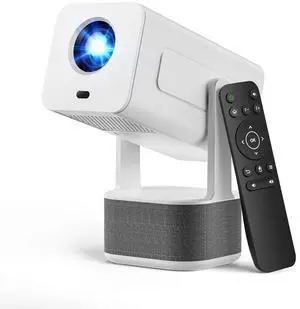
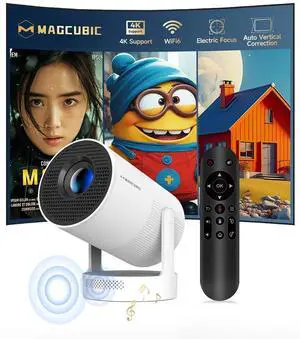
product function introduction
Merchant Video![[Auto Focus] Mini Portable Projector with WiFi and Bluetooth](http://c1.neweggimages.com/sellingpilot/modules/product/a-plus/1a8e84e24144d16f13edc862749c5c38a927b7aed506fa81238b383c4438f7fd.jpg)
![[Auto Focus & Auto Keystone] Mini Portable Projector with WiFi and Bluetooth](http://c1.neweggimages.com/sellingpilot/modules/product/a-plus/b2e9906f0c4b7c94e6ef1c64c355ff3e34e7366a078dad6d5bc702ae817ff572.jpg)


How to Screen Mirror Your iOS Device to the Projector?
1. Connect your phone and the projector to the same Wi-Fi. 2. On the projector: Go to QuickShare > AirPlay. 3. On your phone: Swipe to open the Control Center, tap Screen Mirroring, then select your projector from the device list to start casting.
What Is the Optimal Projection Distance?
The recommended projection distance is 1.5–2 meters. This range produces a clear, well-sized image of 56–80 inches.
Can I Stream Netflix, Prime Video, Hulu, and Other Services?
Due to HDCP protocol limitations, screen mirroring may fail to work properly (audio only, no video) when streaming content from certain apps (e.g., Netflix, Prime Video, Hulu). We recommend using a streaming device such as a Fire TV Stick or Roku.
Is It Good for Daytime Use?
Due to its brightness rating, the projector is ideal for dark environments, such as a backyard at night, a campsite after sunset, a living room with closed curtains, or a bedroom with the lights off.
Important Safety Note
Please don't block the projector’s air intake and exhaust vents (heat dissipation vents) — blockage can cause overheating or screen burn-in. Avoid touching the vents during and after use to prevent burns from high temperatures.
product function introduction
Merchant Video![[Auto Focus] Mini Portable Projector with WiFi and Bluetooth](http://c1.neweggimages.com/sellingpilot/modules/product/a-plus/8d9608aaf64f9984f865384c542e2ad8c02618cc7be9bf01d6766f88a629b2ae.jpg)
![[Auto Focus & Auto Keystone] Mini Portable Projector with WiFi and Bluetooth](http://c1.neweggimages.com/sellingpilot/modules/product/a-plus/1998994a57091defada20a3441434a7f93504db1c7964f9425bcca9cd8cc0889.jpg)


How to Screen Mirror Your iOS Device to the Projector?
1. Connect your phone and the projector to the same Wi-Fi. 2. On the projector: Go to QuickShare > AirPlay. 3. On your phone: Swipe to open the Control Center, tap Screen Mirroring, then select your projector from the device list to start casting.
What Is the Optimal Projection Distance?
The recommended projection distance is 1.5–2 meters. This range produces a clear, well-sized image of 56–80 inches.
Can I Stream Netflix, Prime Video, Hulu, and Other Services?
Due to HDCP protocol limitations, screen mirroring may fail to work properly (audio only, no video) when streaming content from certain apps (e.g., Netflix, Prime Video, Hulu). We recommend using a streaming device such as a Fire TV Stick or Roku.
Is It Good for Daytime Use?
Due to its brightness rating, the projector is ideal for dark environments, such as a backyard at night, a campsite after sunset, a living room with closed curtains, or a bedroom with the lights off.
Important Safety Note
Please don't block the projector’s air intake and exhaust vents (heat dissipation vents) — blockage can cause overheating or screen burn-in. Avoid touching the vents during and after use to prevent burns from high temperatures.


![Main image of [Auto Focus] Mini Portable Projector with WiFi and Bluetooth, Built-in Apps Smart Projector 4K Support, 180° Rotation Auto Keystone, Home Outdoor Movie Projector Compatible with TV Stick/Phone/Laptop](https://c1.neweggimages.com/productimage/nb640/C57ZD2603100M7PZLE6.jpg)
![Alt view image 2 of 7 - [Auto Focus] Mini Portable Projector with WiFi and Bluetooth, Built-in Apps Smart Projector 4K Support, 180° Rotation Auto Keystone, Home Outdoor Movie Projector Compatible with TV Stick/Phone/Laptop](https://c1.neweggimages.com/productimage/nb640/C57ZD2603100M7Q2O7F.jpg)
![Alt view image 3 of 7 - [Auto Focus] Mini Portable Projector with WiFi and Bluetooth, Built-in Apps Smart Projector 4K Support, 180° Rotation Auto Keystone, Home Outdoor Movie Projector Compatible with TV Stick/Phone/Laptop](https://c1.neweggimages.com/productimage/nb640/C57ZD2603100M7Q3VDA.jpg)
![Alt view image 4 of 7 - [Auto Focus] Mini Portable Projector with WiFi and Bluetooth, Built-in Apps Smart Projector 4K Support, 180° Rotation Auto Keystone, Home Outdoor Movie Projector Compatible with TV Stick/Phone/Laptop](https://c1.neweggimages.com/productimage/nb640/C57ZD2603100M7Q29CD.jpg)
![Alt view image 5 of 7 - [Auto Focus] Mini Portable Projector with WiFi and Bluetooth, Built-in Apps Smart Projector 4K Support, 180° Rotation Auto Keystone, Home Outdoor Movie Projector Compatible with TV Stick/Phone/Laptop](https://c1.neweggimages.com/productimage/nb640/C57ZD2603100M7Q3RAB.jpg)
![Alt view image 6 of 7 - [Auto Focus] Mini Portable Projector with WiFi and Bluetooth, Built-in Apps Smart Projector 4K Support, 180° Rotation Auto Keystone, Home Outdoor Movie Projector Compatible with TV Stick/Phone/Laptop](https://c1.neweggimages.com/productimage/nb640/C57ZD2603100M7Q590B.jpg)
![Alt view image 7 of 7 - [Auto Focus] Mini Portable Projector with WiFi and Bluetooth, Built-in Apps Smart Projector 4K Support, 180° Rotation Auto Keystone, Home Outdoor Movie Projector Compatible with TV Stick/Phone/Laptop](https://c1.neweggimages.com/productimage/nb640/C57ZD2603100M7QKU9B.jpg)