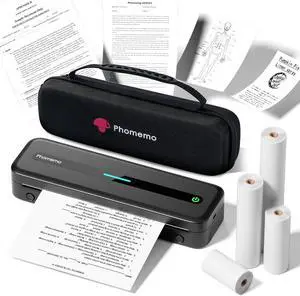
Wireless Freedom for Travel - Experience seamless printing on-the-go with this portable printer wireless for travel, featuring instant Bluetooth connectivity to smartphones and tablets. Its ultra-compact design (1.5lb/1.7in) slips effortlessly into backpacks or briefcases, making it ideal for business trips, outdoor work, or campus lifeno ink, toner, or cables required
Inkless Thermal Efficiency - Say goodbye to messy ink costs! As an inkless printer using advanced thermal technology, the M832 delivers crisp, smudge-free prints while saving 90% on traditional printing expenses. Includes multiple thermal paper rolls for receipts, contracts, or creative projectsperfect for eco-conscious users.
Dual Connectivity Versatility - Unlock flexible printing with wireless printer convenience: Pair via Bluetooth with the dedicated app for mobile devices or connect to laptops/PCs via USB. Print documents, images, or PDFs directly from your phone, tablet, or computerno complex setup needed.
Marathon Battery & Space-Saving Design - Powered by a 2600mAh rechargeable battery, this portable thermal printer delivers up to 3 hours of non-stop printing (360+ sheets). Its built-in paper tray and slim profile keep your workspace clutter-free, whether in a car, office, or cramped dorm room.
Crisp Clarity, Anywhere Precision - Engineered for sharp, professional results, the M832 wireless portable printer ensures high-definition text and graphics. The thermal print head adapts to multiple paper sizes: 8.5 X 11 US Letter, A4, 4.33'' (110mm), 3.15'' (80mm), 2.08'' (53mm), great for invoices, travel itineraries, or DIY designsall with fade-resistant durability.
Thermal Printer with a Strong Case - The printer comes with a protective case that can store the printer, thermal paper, USB cable, adapter, etc. Never worry about the portable printer getting damaged or losing the USB data cable.
How to Clean the Print Head - Wipe the cut parts of the printer, especially the black lines, with alcohol cotton to ensure that there is no adhesive or foreign object on the print head. Note: Do not scratch the print head with any hard objects