• $39.99
  • Ships from China.
    Price alert
    Newegg PC Builder
    Shop it at NeweggBusiness.
    Get Educated

    Make informed decisions with expert advice. Learn More

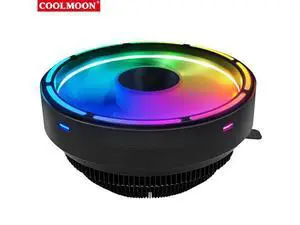
    Coolmoon CPU Cooling Fan Silent Down Pressure 120mm RGB CPU Fan Intel LGA 775 115X AMD AM3 PC Computer Cooler Fan

    • Brand: Coolmoon
    • Package size: 130 * 130 * 95mm
    • Fan size: 120 * 120 * 70mm
    • Applicable Accessory Type: CPU
    • Type: CPU Cooler
    • Rated Voltage: 12v DC
    • Rated Current: 0.38A (max)
    • Material: Aluminum, ABS
    • Bearing Type: Hydraulic Bearing
    • Speed: 1700 ± 10% RPM
    • Noise: 28 ± 10% dBA
    • Air Volume: 62 CFM (max)
    • Service Life: 40000hrs
    • Power Supply Interface: Small 3 Pin
    • Cooling Method: Air Cooling
    • Features: Silent and Longevity
    +
    +
    Overview
    Specs
    Reviews
    avatar

    Any questions? Our AI beta will help you find out quickly.

    Features
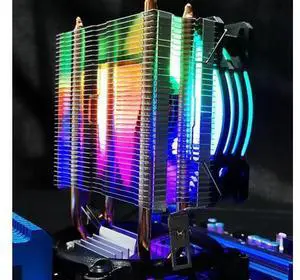
    Streamer Magic Color: up to 17 Modes of Automatic Color Change, Cool Lighting Effect
    Large Air Volume Design: 120mm Large Fan, High Speed Design, with Greater Air Volume
    Efficient Heat Dissipation: Suitable for i5 and AMD CPU with Thermal Power Consumption Below 95w
    Hydraulic Bearing: Low Noise, Long Life and other Advantages
    Silent Operation: the Noise Value is about 28dBA, Adding Comfort to Your Work and Entertainment
    Intel Socket LGA 115X/LGA 775, AMD Socket FM2/FM1/AM3+/AM4/AM2/940/939/754, Easy To Install and Excellent Compatibility


    Specification
    Brand: Coolmoon
    Package size: 130 * 130 * 95mm
    Fan size: 120 * 120 * 70mm
    Applicable Accessory Type: CPU
    Type: CPU Cooler
    Rated Voltage: 12v DC
    Rated Current: 0.38A (max)
    Material: Aluminum, ABS
    Bearing Type: Hydraulic Bearing
    Speed: 1700 ± 10% RPM
    Noise: 28 ± 10% dBA
    Air Volume: 62 CFM (max)
    Service Life: 40000hrs
    Power Supply Interface: Small 3 Pin
    Cooling Method: Air Cooling
    Features: Silent and Longevity

    Packages:
    CPU Cooling Fan*1

    Note:
    Due to the Different Monitor and Light Effect,the Actual Color of the Item Might be Slightly Different From the Color Showed on the Pictures.
    Please Allow 1-3mm Measuring Deviation Due to Manual Measurement.


    Intel LGA 775 115X Installation Guide
    Step 1: Install the Bracket on the Motherboard and Insert 4 Pins
    Bracket Mounted on Motherboard (Motherboard Placed on Soft Surface or Suspended)
    Insert Pin Retaining Bracket
    Step 2: Apply the Cooling Paste Evenly on the CPU

    AMD754/939/940/AM2/AM2+AM3/AM4/FM1/FM2 Installation Guide
    Hang the Bracket Hook on the Short Side First
    Flatten the Radiator with one Hand
    At the Same Time, Press Down the Buckle with the Other Hand and Hang the Hook on the Other Side of the Bracket. 4. Move it Left and Right to Check Whether The Radiator is Installed Correctly

    Warranty & Returns

    Warranty, Returns, And Additional Information

    Warranty

    • Please contact the Seller directly for warranty information. Warranty information may also be found on the Manufacturer's website.
    • CONTACT

    Return Policies

    Manufacturer Contact Info

    LOADING...