shipping Holiday Shipping Details & Extended Holiday Returns
  • $35.89
  • Free 30-day Returns
  • Ships from China.
    Price alert
    Shop it at NeweggBusiness.

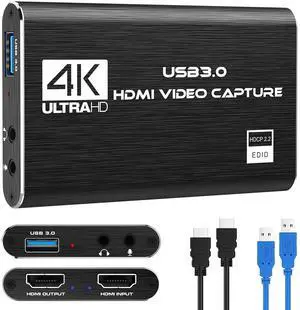
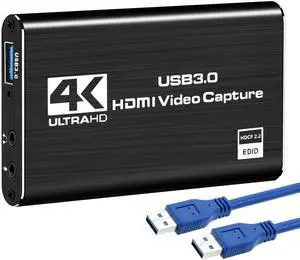
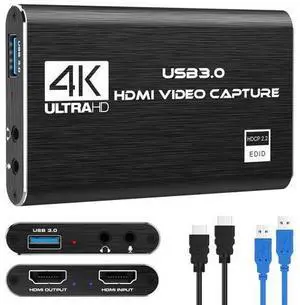
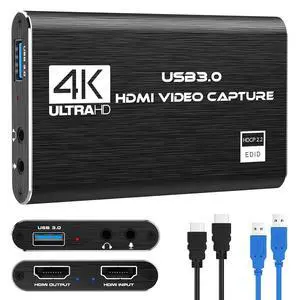
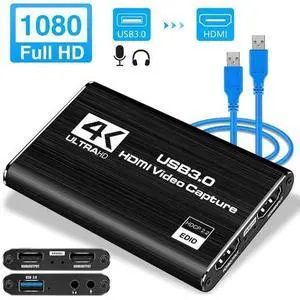
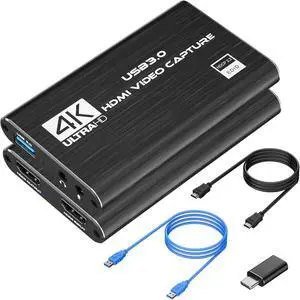
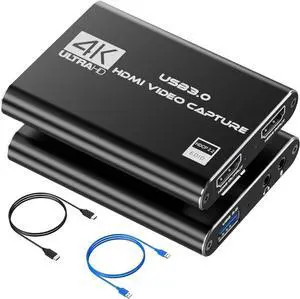
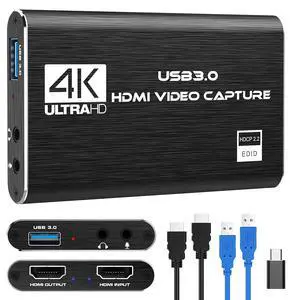
    KEHIPI 4K HDMI Capture Card for Streaming, Full HD 1080P 60FPS USB 3.0 Cam Link Game Audio Video Capture Card, Work with Camera/Nintendo Switch/Xbox/PS4/PS5/PC/OBS (Black)

    Limited time offer, ends 12/16 By Wispa Technologies

    • 1080P HD High QualityCapture resolution up to 1080p for video source and it is ideal for all HDMI devices such as PS4, PS3, Xbox One, Xbox 360, Wii U, DVDs, DSLR, Camera, Security Camera and set top box.
    • Plug and PlayNo driver or external power supply required, true PnP. Once plugged in, the device is identified automatically as a webcam. Detect input and adjust output automatically. Won't occupy CPU, optional audio capture. No freeze with correct setting.
    • Compatible with Multiple Systemssuitable for Windows and Mac OS. High speed USB 3.0 technology and superior low latency technology makes it easier for you to transmit live streaming to Twitch, Youtube, Facebook, Twitter, OBS, Potplayer and VLC.
    • HDMI LOOP-OUTBased on the high-speed USB 3.0 technology, it can capture one single channel HD HDMI video signal. There is no delay when you are playing game live.
    • Support Mic-in for CommentaryKedok capture card has microphone input and you can use it to add external commentary when playing a game. Please note: it only accepts 3.5mm TRS standard microphone headset.
    +
    +
    Overview
    Specs
    Reviews
    avatar

    Any questions? Our AI beta will help you find out quickly.

    VIXLW Capture Card

    1
    2
    3
    4

    SDF

    High-Speed USB 3.0 Technology

    This chip with excellent performance enables clearer and smoother experience of video conferencing, game broadcasting and other applications, realizing excellent performance with no latency and no blue screen.

    DTH

    Wide Compatibility

    The VIXLW capture card seamlessly integrates with various devices and systems, ensuring smooth operation whether paired with the latest high-end game consoles, professional streaming setups, or standard laptops and desktops.

    WG

    What's in the package?

    • High-Quality Capture Card *1
    • User's Guide *1
    • USB Cable *1
    • HDMI Cable *1
    • Elegant Packaging Box *1 (Ideal for Gift Giving as Well)

    SAFD
    afd

    OBS Studio Setup

    1. Open OBS, create a new source under Sources by clicking "+", select "Video Capture Device", name it, then set:

    Device: USB3.0 Video

    Audio Output Mode: Capture Mode Only; Use custom audio device: Digital Audio Interface (USB 3.0 Audio)

    2. In OBS settings ? Audio:

    Disable all Global Audio Settings except Mic/Auxiliary Audio; Set Mic/Auxiliary Audio to Digital Audio Interface (USB 3.0 Audio)

    3. Under the Audio tab:

    Right-click Mic/Auxiliary Audio ? Advanced Audio Properties ? Set Audio Monitoring to "Monitor Only (Mute Output)"

    4. In PC settings ? System ? Sound:

    Set Input to Laptop Microphone;

    All Sound Devices ? Input Devices ? Digital Audio Interface. Ensure it is NOT set to default.

    All Sound Devices ? Input Devices ? Laptop Microphone. Ensure it IS set to default.

    5. In Discord:

    If prompted to switch audio device, choose "don't switch"

    User Settings > Voice & Video > Input > Laptop Microphone.

    User Settings > Voice & Video > Output > Laptop Speakers.

    VIXLW Capture Card

    1
    2
    3
    4

    SDF

    High-Speed USB 3.0 Technology

    This chip with excellent performance enables clearer and smoother experience of video conferencing, game broadcasting and other applications, realizing excellent performance with no latency and no blue screen.

    DTH

    Wide Compatibility

    The VIXLW capture card seamlessly integrates with various devices and systems, ensuring smooth operation whether paired with the latest high-end game consoles, professional streaming setups, or standard laptops and desktops.

    WG

    What's in the package?

    • High-Quality Capture Card *1
    • User's Guide *1
    • USB Cable *1
    • HDMI Cable *1
    • Elegant Packaging Box *1 (Ideal for Gift Giving as Well)

    SAFD
    afd

    OBS Studio Setup

    1. Open OBS, create a new source under Sources by clicking "+", select "Video Capture Device", name it, then set:

    Device: USB3.0 Video

    Audio Output Mode: Capture Mode Only; Use custom audio device: Digital Audio Interface (USB 3.0 Audio)

    2. In OBS settings ? Audio:

    Disable all Global Audio Settings except Mic/Auxiliary Audio; Set Mic/Auxiliary Audio to Digital Audio Interface (USB 3.0 Audio)

    3. Under the Audio tab:

    Right-click Mic/Auxiliary Audio ? Advanced Audio Properties ? Set Audio Monitoring to "Monitor Only (Mute Output)"

    4. In PC settings ? System ? Sound:

    Set Input to Laptop Microphone;

    All Sound Devices ? Input Devices ? Digital Audio Interface. Ensure it is NOT set to default.

    All Sound Devices ? Input Devices ? Laptop Microphone. Ensure it IS set to default.

    5. In Discord:

    If prompted to switch audio device, choose "don't switch"

    User Settings > Voice & Video > Input > Laptop Microphone.

    User Settings > Voice & Video > Output > Laptop Speakers.

    Capture Card Nintendo Switch, 4K HDMI Video Capture Card, Game Capture Card, 1080P 60FPS Video Capture Device, HDMI to USB 3.0 Capture Card for Streaming, Work with Camera/Xbox/PS4/PS5/PC/OBS

    Warranty & Returns

    Warranty, Returns, And Additional Information

    Warranty

    • Please contact the Seller directly for warranty information. Warranty information may also be found on the Manufacturer's website.
    • CONTACT

    Return Policies

    Manufacturer Contact Info

    LOADING...