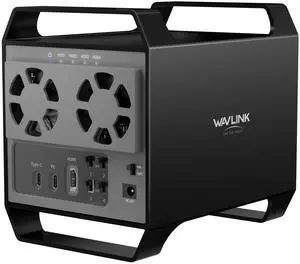
Part Number: with only one USB-C port: DC IN(130W input), USB-C(Host, 100W output), HDMI Alt Mode(4K@60Hz), Display 1/2(HDMI1/2 or DP1/2), 4xUSB-A 3.1(10Gbps), 2xUSB-C 3.1(10Gbps), RJ45 Ethernet, Audio/Mic. Note: This dock must connect the power adapter, otherwise it will not work.
Compatibility: Universal Compatibility:
Universal docking station support Windows 11/10, Mac OS 11.x or later, ChromeOS 100.x or later, Ubuntu 20.04, 22.04 systems with full-featured type c port or thunderbolt 3/4 port or USB4 port. Ideal home & office partner for USB-c devices like Intel/M1/M2/M3-based Mac, Dell, Asus, Lenovo, Surface, Samsung, Huawei and...
Compatibility: Perfect for laptops with a full-function type-C port or thunderbolt 3/4 port. Support Windows 11/10/8.1/8/7/XP/Vista, Mac OS 10.14-14.x and latest, Chrome OS, Ubuntu, Android and Harmony OS. Not compatible with Unix systems, Linux, iOS and iPad OS. *Does not support plug and play; the installation of the latest DisplayLink driver is required.
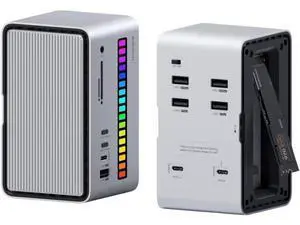
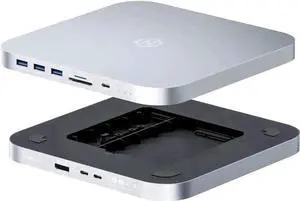
Ports Spec: Front Panel: 1x TF Card Slot, 1x SD Card Slot, 2 x USB-C 10Gbps, 1 x USB-A 5Gbps, 1 x 4-Pole Phone Jack;
Rear Panel: 1x RJ45(10/100/1000Mbps), 1 x Display 1(HDMI/DP), 1 x Display 2(HDMI/DP), 1 x 4K HMDI(Alt. Mode), 2 x USB-A 5Gbps, 1x USB-C (Host, PD100W), 1x DC...
Part Number: 2x HDMI: up to 4K@60Hz
1x DisplayPort: up to 4K@60Hz
1x USB C (power input): up to 100W
1x USB C (power output): up to 85W
1x Ethernet: up to 1Gbps
2x USB 3.0: up to 5Gbps
2x USB 2.0: up to 480Mb/s
1x SD Card Reader: max 25MB/s
1x Micro SD Card Reader: max 25MB/ s
1x Audio/Mic(4-Pole)
Compatibility: -Windows 11/10/8.1/8/7/XP/Vista
-Mac OS 10.x or later
-Chrome OS
-Android
-Harmony OS
-iPadOS
-Linux
Weight: 245g/8.6oz
Features: MST triple displays to extend different pages to 3 monitors
4K displays, featuring 2 x HDMI and 1 x DisplayPort
PD3.0 passthrough charging, with power in 100W to charge your laptop up to 85W
Multiple USB A ports, Gigabit Ethernet port, Audio/Mic jack, card readers to make up for missing functions of computer
Driver-free...
Part Number: Ports: Side 1: Power LED; 3x USB-A 5Gbps; 1x 3.5mm Earphone; 1x 3.5mm Mic; SD/TF Card Reader(312MB/s)
Side 2: 1x RJ45(10/100/1000Mbps); 2x HDMI (2K@60Hz); 1x 4K HDMI(Alt. Mode); 2x USB-A 5Gbps; 1x USB-C Upstream (Host, PD100W); 1x DC IN(20V)
Compatibility: Works with Windows 10/11, Mac OS 11.x-15.x and later, Chrome OS, Ubuntu, Android, and HarmonyOS. Compatible with popular laptops like M1/M2/M3/M4 MacBooks, Dell, ASUS, etc.
*Not compatible with Linux, Unix, iOS, iPadOS. Requires DisplayLink driver installation; not plug-and-play.
Features: - Three HDMI ports support video output simultaneously: one HDMI port can support the resolution up to 4K@60Hz and the other two support up to 2K@60Hz. - Extend/Mirror video modes are available for multiple tasks. - 130W Power Supply delivers maximum 100W power upstream to charge your laptop. - A...
Compatibility: Compatible Systems
-Thunderbolt 4 PC running Windows 10/11.
-Thunderbolt 3/4 Mac running Mac OS 11 or later.
-Compatible with Other USB4 and MFDP Hosts (Full-functional USB-C, supports DisplayPort+USB3.1+Power Delivery)
Compatibility: Installation Before using this dock, please make sure that the latest PC/laptop drivers are installed (including USB, graphics card etc) because the network port needs specific drivers. For Windows 10, the system detects and automatically installs them after the dock is connected to the network. If drivers cannot be automatically installed, the network port can’t perform properly. Please install them manually. For MAC OS system, you need to install the network port driver manually, please visit www.wavlink.com > Support > Driver > PC peripherals > USB Docking. 1. The dock is driver free, therefore you don’t need to install any driver before using it. 2. Plug the power adapter of the dock in a power outlet. 3. Connect the USB-C connector of the dock to your host laptop/PC, the LED light on the dock will turn blue. 4. Connect your monitor(s) to video ports of ...