Get a $25 Newegg Promo Gift Card when you spend $250+ between 1/17/26 and 1/19/26. Learn More>
  • In Stock
  • Sold by Newegg
  • Make an Offer
  • New
Department
Show More
Brands
Show More
Price
Show More
Function
All Top Brands
Availability
Condition
Current Promotion
Discount
Sold by
Useful Links
Customer Ratings
avatar

Any questions? Our AI beta will help you find out quickly.

Sort By:
View:
AV Access Docking Station KVM Switch 2 Monitors 2 Laptops, 4K KVM Switch Dual Monitor, 100W PD for Each PC, 1G Ethernet, EDID Emulation, Ideal for Home Office & Gaming(KD-E20)
Quick View
  • $199.99
  •  
  • $179.99 
  • Save: $20.00 (10%)
  • Free Shipping
Available Direct from v AV Access Available Direct from v AV Access
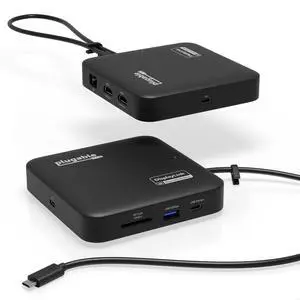
Plugable USB 3.0 and USB-C Universal Laptop Docking Station for Windows and Mac (Dual Video HDMI, Gigabit Ethernet, Audio, 6 USB Ports)
Quick View
Plugable USB 3.0 and USB-C Universal Laptop Docking Station for Windows and Mac (Dual Video HDMI, Gigabit Ethernet, Audio, 6 USB Ports)
  • Ports Spec: 2x USB 3.0, 4x USB 2.0, 2x HDMI, Gigabit Ethernet, 3.5mm audio
  • Model #: UD-3900Z
  •  
  • $99.95 
  • Free Shipping
Direct from Plugable Technologies Direct from Plugable Technologies
  • $93.95 - $99.95
WAVLINK USB C 4K Laptop Docking Station Triple Display With 100W PD3.0 Charging (65W for PC), Dual HDMI, 1 Displayport, 4xUSB-A 3.0 , Gigabit Ethernet, SD&TF Card Slot Audio Jack For Windows, Mac
Quick View
WAVLINK USB C 4K Laptop Docking Station Triple Display With 100W PD3.0 Charging (65W for PC), Dual HDMI, 1 Displayport, 4xUSB-A 3.0 , Gigabit Ethernet, SD&TF Card Slot Audio Jack For Windows, Mac

Limited time offer, ends 01/25

  • Compatibility: Installation Before using this dock, please make sure that the latest PC/laptop drivers are installed (including USB, graphics card etc) because the network port needs specific drivers. For Windows 10, the system detects and automatically installs them after the dock is connected to the network. If drivers cannot be automatically installed, the network port can’t perform properly. Please install them manually. For MAC OS system, you need to install the network port driver manually, please visit www.wavlink.com > Support > Driver > PC peripherals > USB Docking. 1. The dock is driver free, therefore you don’t need to install any driver before using it. 2. Plug the power adapter of the dock in a power outlet. 3. Connect the USB-C connector of the dock to your host laptop/PC, the LED light on the dock will turn blue. 4. Connect your monitor(s) to video ports of ...
  • Model #: WL-UMD05
  •  
  • $89.99 
  • Free Shipping
Available Direct from Wavlink Available Direct from Wavlink