The Sign of Efficiency
Wherever your work takes you, clarity leads the way.
Bridging the Gap Between Legacy Media and Modern Innovation
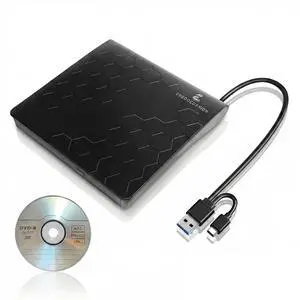
Most modern MacBook & laptops have sacrificed the optical drive for thinness. ERGOOCUSHION restores that capability with a professional-grade, high-speed solution that fits in the palm of your hand.

Performance and Precision in Every Detail

Genuine 2026 Hardware
We never use pulled laptop drives. Every ERGOOCUSHION unit features factory-new optical components for outstanding read/write reliability.

USB 3.2 Gen 1 Speed
Up to?5?Gbps data synchronization for rapid DVD burning and software installations. Our latest interface ensures stable and lag-free performance.

Intelligent Heat Dissipation
Built with heat-conducting materials, the slim body works as a passive heat sink to keep the drive cool during long data transfers or movie playback.
Next-Gen Performance Standard
ERGOOCUSHION?(2026?Edition) features a new optical?unit, dual USB-A + USB-C?interface, and a quiet power-stable design for modern computers.

Product Specifications:
Why is my external drive not appearing on my laptop?
Connect directly to your laptop’s USB-C or USB-A port instead of an unpowered hub. Ensure a media player like VLC is installed on Windows 11.
Can this drive be used with a USB hub or extension cable?
We recommend connecting the drive directly to your computer’s USB port. Many customers also use it successfully with powered hubs or short extension cables, but results may vary depending on hub quality and power supply.
The drive makes a sound while operating.
A short whirring sound during disc reading is normal calibration. Use a flat, stable surface for quieter operation.
Why isn't the drive showing up on my Mac?
For Mac users (especially M1/M2/M3), ensure you 'Allow Accessory Device' when prompted. Connect directly to the laptop's USB-C port rather than a non-powered hub to ensure the drive receives full voltage for the spinning motor.
Does the drive get hot while burning?
The exterior casing is designed to act as a heat sink, pulling thermal energy away from the internal laser to protect your data. A temperature of up to 48°C (120°F) is a normal indicator of efficient heat dissipation.
Bridging the Gap Between Legacy Media and Modern Innovation
Most modern MacBook & laptops have sacrificed the optical drive for thinness. ERGOOCUSHION restores that capability with a professional-grade, high-speed solution that fits in the palm of your hand.
Back up with the Drive
Your Memories, Secured for the Digital Age
Convert old discs to digital files fast. Keep your movies and photos safe and ready anytime.
Reliable for Laptop tasks
Built for Your Workday
Share files, read discs ?and install software anywhere with the ERGOOCUSHION Drive.
Quickly & Securely
Reliable for Work Records
The ERGOOCUSHION Drive help ?professionals save and share important recordings with ease.
Performance and Precision in Every Detail

Genuine 2026 Hardware
We never use pulled laptop drives. Every ERGOOCUSHION unit features factory-new optical components for outstanding read/write reliability.

USB 3.2 Gen 1 Speed
Up to?5?Gbps data synchronization for rapid DVD burning and software installations. Our latest interface ensures stable and lag-free performance.

Intelligent Heat Dissipation
Built with heat-conducting materials, the slim body works as a passive heat sink to keep the drive cool during long data transfers or movie playback.

Built Better for Every System
Next-Gen Performance Standard
ERGOOCUSHION?(2026?Edition) features a new optical?unit, dual USB-A + USB-C?interface, and a quiet power-stable design for modern computers.
Product Specifications:
| Dimensions | 14.6 (L) x 14.4 (W) x 1.8 (H)cm |
|---|---|
| Interface | USB 3.2 Gen 1, can also be connected to USB2.0 port |
| Reading speed | CD-ROM: 24X; DVD-ROM: 8x |
| Burning speed | DVD-+/-R: 8x; DVD+/-RW: 6x; DVD+/-R DL: 6x;CD-R:24X;CD-RW: 16X; DVD-RAM: 5x |
| Read types | DVD-+R / DVD+RW / DVD-ROM; DVD-R / DVD-RW /DVD-ROM; DVD+R9 (double layer); DvD-R9 (duallayer); CD-R / finalized CD-RW / CD-ROM;DVD-RAM; Video CD, Data/CD-DAE; |
| Burn types | DVD+/-R; DVD+/-RW; DVD+/-R DL; CD-R;CD-RW:DVD-RAM |
| Burning mode | For CD-R / RW DVD-R / DVD-RW disc:1. Disc At Once (DA0)2. Session At Once (SA0)3. Track At Once (TAO)4. Variable Packet Write5. Fixed Packet Write |
| Supported 0S | Windows 11 /10/8.1/7; MacOS Xv 10.6 orhigher; Linux |
| Minimum hardware requirements | USB 3.0 or USB 2.0 port* At least 2GB of free hard disc space (10G Brecommended) |
| Power supply | USB Powered |
| Power input | 5V, Reading /Writing 1.1/1.5 A |
Why is my external drive not appearing on my laptop?
Connect directly to your laptop’s USB-C or USB-A port instead of an unpowered hub. Ensure a media player like VLC is installed on Windows 11.
Can this drive be used with a USB hub or extension cable?
We recommend connecting the drive directly to your computer’s USB port. Many customers also use it successfully with powered hubs or short extension cables, but results may vary depending on hub quality and power supply.
The drive makes a sound while operating.
A short whirring sound during disc reading is normal calibration. Use a flat, stable surface for quieter operation.
Why isn't the drive showing up on my Mac?
For Mac users (especially M1/M2/M3), ensure you 'Allow Accessory Device' when prompted. Connect directly to the laptop's USB-C port rather than a non-powered hub to ensure the drive receives full voltage for the spinning motor.
Does the drive get hot while burning?
The exterior casing is designed to act as a heat sink, pulling thermal energy away from the internal laser to protect your data. A temperature of up to 48°C (120°F) is a normal indicator of efficient heat dissipation.
The Sign of Efficiency
Wherever your work takes you, clarity leads the way.