• $89.99
  • Free 30-day Returns
  • Price alert
    Sold by BelTie

    Shipped by BelTie

    Shop it at NeweggBusiness.

    Meet Your Seller

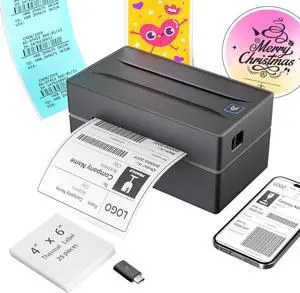
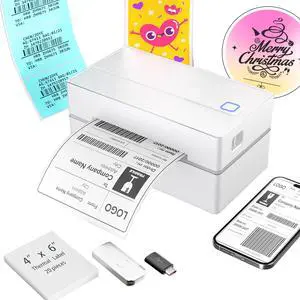
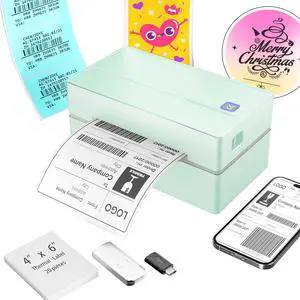
    Bluetooth Thermal Shipping Label Printer: 4x6 Wireless Label Maker with Tape for Small Business - Compatible with iPhone, Android, Windows & Mac

    • Multi-Label Size Support: Supports thermal labels with a width of 1.57" to 4.3", Compatible with 4x6, 3x2, and custom-sized labels to adapt to diverse packaging needs. (Note: thermal printers can only print in black and white, and comes with 25 sheets of waterproof label paper.
    • Wide Usage: The thermal printer is widely used for printing labels from various marketplaces and shipping platforms, such as Amazon, eBay, ShipStation, ShippingEasy, Shopify, UPS, FedEx, USPS, Shippo, etc.
    • Wide Compatibility Across Devices: Effortlessly pair with Windows (7 and later), macOS, iOS, Android, and Chromebook systems for universal office and logistics workflows, simply connect the desktop label printer using a USB cable. (Note: Mac and Chromebook do not support Bluetooth printing.)
    • High-Speed Thermal Printing: Print 4x6 labels at 72 labels/min and delivers 203 dpi high-resolution prints, reducing downtime during peak shipping hours and improving operational efficiency
    • Customer Support: Dedicated Nulltonex support team is here to assist you with any technical issues related to your shipping label printer. We offer comprehensive support through live chat, phone, email, and even remote desktop access when needed. Phone Support: Available Monday to Friday, 9:00 AM 5:30 PM (EST) Email & Live Chat: Reach us Monday to Friday, 8:00 PM 4:30 AM (EST)
    • Target Audience: Small or medium offices, warehouses, e-commerce sellers requiring efficient label printing solutions
    +
    +
    Overview
    Specs
    Reviews
    avatar

    Any questions? Our AI beta will help you find out quickly.

    NULLTONEX Bluetooth Thermal Shipping Label Printer

    Merchant Video

    Connection Method Of NULLTONEX Bluetooth Shipping Label Printer

    NULLTONEX Bluetooth Thermal Shipping Label Printer Phone/Computer/MAC System Connection Method

    NULLTONEX Bluetooth Shipping Label Printer Widely Used Platform

    NULLTONEX Bluetooth Shipping Label Printer Widely Used Platform
    • 1.Use thermal labels.

      2.Ensure labels are placed with the printed side facing up.

    • For light barcodes: Print as PDF (avoid PNG/JPG).

      If text is unclear: Increase density and reduce speed.

      If issues persist: Clean the printhead with alcohol wipes.

    • For USB printing: Make sure the printer is turned on and connected to your computer before installing the driver. If it wasn’t, try uninstalling the driver and reinstalling it with the printer properly connected.

    • *For phones:Download the latest Flashlabel Pro app from App Store*For Windows PCs:Install Bluetooth driver (not USB driver)For MacBooks:M-series chips:Use Flashlabel Pro app from App Store.Non-M-series:Please connect via USB and install USB driver.

    • This normal notification occurs because USB/Bluetooth handle print jobs differently. No action required.

    NULLTONEX Bluetooth Thermal Shipping Label Printer

    https://m.media-amazon.com/images/S/aplus-media-library-service-media/7d3ac834-ae4b-4ade-affa-2c8b8d255741.__AC_SR200,225___.jpg

    Shipping Label Printer

    https://m.media-amazon.com/images/S/aplus-media-library-service-media/3ab5d9ed-1267-4245-a509-84ae5b4ed453.__AC_SR200,225___.jpg

    Tattoo Stencil Printer

    https://m.media-amazon.com/images/S/aplus-media-library-service-media/9f15e120-563d-4814-b624-685dba090a23.__AC_SR200,225___.jpg

    Thermal Shipping Labels

    https://m.media-amazon.com/images/S/aplus-media-library-service-media/b1ae8f9d-b63b-4957-b7c2-48bd33b78995.__AC_SR200,225___.jpg

    Tattoo Transfer Paper

    Customer Reviews
    Price
    Pack
    1 1 500 30
    Hight Quality
    ? ? ? ?
    Color
    Black Black White White
    Support
    Bluetooth, USB Bluetooth, USB / /
    Advantage
    Thermal Label Printer Tattoo Stencil Thermal Printer Using as Shipping Labels Tattoo Transfer Paper

    NULLTONEX Bluetooth Thermal Shipping Label Printer

    Merchant Video

    Connection Method Of NULLTONEX Bluetooth Shipping Label Printer

    NULLTONEX Bluetooth Thermal Shipping Label Printer Phone/Computer/MAC System Connection Method

    NULLTONEX Bluetooth Shipping Label Printer Widely Used Platform

    The platform suitable for NULLTONEX Bluetooth thermal shipping label printer
    • 1.Use thermal labels.

      2.Ensure labels are placed with the printed side facing up.

    • For light barcodes: Print as PDF (avoid PNG/JPG).

      If text is unclear: Increase density and reduce speed.

      If issues persist: Clean the printhead with alcohol wipes.

    • For USB printing: Make sure the printer is turned on and connected to your computer before installing the driver. If it wasn’t, try uninstalling the driver and reinstalling it with the printer properly connected.

    • *For phones:Download the latest Flashlabel Pro app from App Store*For Windows PCs:Install Bluetooth driver (not USB driver)For MacBooks:M-series chips:Use Flashlabel Pro app from App Store.Non-M-series:Please connect via USB and install USB driver.

    • This normal notification occurs because USB/Bluetooth handle print jobs differently. No action required.

    NULLTONEX Bluetooth Thermal Shipping Label Printer

    https://m.media-amazon.com/images/S/aplus-media-library-service-media/7d3ac834-ae4b-4ade-affa-2c8b8d255741.__AC_SR200,225___.jpg

    Shipping Label Printer

    https://m.media-amazon.com/images/S/aplus-media-library-service-media/3ab5d9ed-1267-4245-a509-84ae5b4ed453.__AC_SR200,225___.jpg

    Tattoo Stencil Printer

    https://m.media-amazon.com/images/S/aplus-media-library-service-media/9f15e120-563d-4814-b624-685dba090a23.__AC_SR200,225___.jpg

    Thermal Shipping Labels

    https://m.media-amazon.com/images/S/aplus-media-library-service-media/b1ae8f9d-b63b-4957-b7c2-48bd33b78995.__AC_SR200,225___.jpg

    Tattoo Transfer Paper

    Customer Reviews
    Price
    Pack
    1 1 500 30
    Hight Quality
    ? ? ? ?
    Color
    Black Black White White
    Support
    Bluetooth, USB Bluetooth, USB / /
    Advantage
    Thermal Label Printer Tattoo Stencil Thermal Printer Using as Shipping Labels Tattoo Transfer Paper

    Streamline your shipping and labeling process with this versatile thermal label printer. The sleek black design houses powerful wireless connectivity features, allowing you to print labels directly from your mobile device using the companion app. Compatible with both USB and wireless connections, this printer offers flexibility in how you manage your printing tasks. The printer produces clear, crisp shipping labels and works seamlessly with major shipping platforms. Its compact size makes it perfect for small businesses, home offices, or anyone who regularly ships packages. The thermal printing technology eliminates the need for ink or toner replacements, while the high-resolution output ensures that barcodes and text are perfectly legible. The user-friendly mobile app provides intuitive controls for print settings, label customization, and quick printing options. Whether you're running an online store or simply need to organize your labeling system, this thermal printer delivers professional-quality results with modern convenience.


    Product information

    Brand NULLTONEX
    Connectivity Technology Bluetooth, USB, wireless
    Printing Technology Thermal
    Special Feature Shipping Label Printer, Thermal Printing, bluetooth label printer, label printer for small business, wireless thermal printer
    Color 1 Black
    Model Name Y813 Thermal Printer
    Printer Output Monochrome
    Maximum Print Speed (Color) 72 ppm
    Max Printspeed Monochrome 72 ppm
    Item Weight 1.2 Pounds
    Product Dimensions 8.08"D x 4.73"W x 6.9"H
    Controller Type Mobile App, Usb
    Maximum Media Size 4 X 6 Inches
    Power Consumption 24 Watts
    Included Components 15pieces thermal Labels 4*6 inch, Flash Drive, USB A to C Adapter, label printer
    Print media Labels
    Scanner Type Portable
    Max Input Sheet Capacity 1
    Compatible Devices Laptops, Mac, PC, Smartphones, Tablets
    Maximum Color Print Resolution 203 dpi
    Sheet Size 4x6,3x2,3x1,2x1,2.25x1.25,2" Circle Inches
    Maximum Black and White Print Resolution 203 Dots Per Inch
    Warranty Type Limited
    Color Depth 1.0
    Dual-sided printing No
    Printer resolution color vert max 203 Inches
    Maximum copies per run 100
    Wattage 24 watts
    Initial page print time 1 Seconds
    Max copy resolution color 203 x 203 DPI
    Printer resolution bw horiz max 203 Inches
    Max copy resolution black-white 203 Dpi
    Duplex False
    Hardware Interface USB Type C
    Printer resolution bw vert max 203 Inches
    Ink Color Black
    Additional Printer functions Print Only

    Warranty & Returns

    Warranty, Returns, And Additional Information

    Warranty

    • Please contact the Seller directly for warranty information. Warranty information may also be found on the Manufacturer's website.
    • CONTACT

    Return Policies

    • Return for refund within: 30 days
    • Return for replacement within: 30 days
    • This item is covered by BelTie Return Policy

    Manufacturer Contact Info

    LOADING...