• $23.99
  • Price alert
    Shop it at NeweggBusiness.

    Meet Your Seller

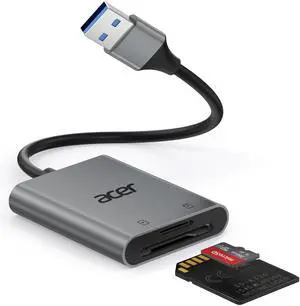
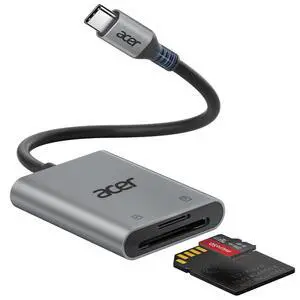
    SD Card Reader USB C, Dual Slots Type C to Memory Card Reader, Aluminum Micro SD Card Camera Adapter for MicroSD, SDHC, SDXC, Compatible with iPhone16/15, MacBook, iPad Pro, Android, Laptop

    • Ultra High-Speed TransferEnjoy fast, stable transfers up to 5Gbps with our USB C 3.0 SD Card Reader. Compatible with USB 2.0/1.1, easily view and transfer files from security cams, wildlife monitors, car cams, or GoPro. (Note:Not compatible with Lightning and "USB-A" port devices)
    • Read & Write 2 Cards SimultaneouslyThis Micro SD Card Reader USB C lets you transfer, sync, and copy files between two cards at the same timeno need to keep plugging and unplugging. Supports up to 2TB, so you wont run out of space. (Note: Thick cases may block full insertion.)
    • Thoughtful DesignThe USBC to SD Card Reader cable is 15cm long, so you won't block the other ports of your computers. Ultra-lightweight and space-saving ideal for travel, remote shoots, or mobile workstations. Slip it in your pocket and youre good to go.(Note: "SD"card and "Micro SD" card not included)
    • Reliable Aluminum CoolingCrafted with a high-grade aluminum alloy exterior, this SD Card to USB C Adapter offers excellent heat dissipation to keep internal components cool during long transfers. Enjoy consistent speed and enhanced device protection with every use.(Note: Not compatible with CF, SIM, V90, mini SD, MS, SDUC, UFS, XQD, credit Card, Type A/B/C Cards and SSD Cards)
    +
    +
    Overview
    Specs
    Reviews
    avatar

    Any questions? Our AI beta will help you find out quickly.

    2-in-1 USB-C SD card reader device shown connected to laptop. Features USB-C connector, SD and microSD card slots. Photographer using camera in background.

    Matters for Attention

    Q1 Incompatible devices
    - 1. Devices that do not support the "Lightning" and "USB-A" interface(such as only "USB-A" port of PC)
    - Some SD cards were exFAT/NTFS with encryption or special formats (such as camera-specific formats)
    - 3. Android phones and tablets that do not support OTG function (OTG support can be checked in settings or official specifications)
    Q2 What to do if the card reader does not work?
    - 1. Make sure the card is inserted in the correct orientation
    - 2. Devices that support the OTG function, enable OTG on your device and find the SD card in the settings.
    - 3. If it still does not work, you can always ask us and we will help you solve it as soon as possible.
    Q3 How to find files on SD Card on iPhone?
    - Insert the SD card into the reader > plug the device card reader into thhe iPhone(TYPE-C) > click on the "FILES" app > click on iCloud Drive's "Browse" > click on Browse's SD card name>Now you can view your files from your SD card on "Your SD card name"
    Q4 How to easily insert and remove the card?
    - Insert the micro SD first, then the SD. To remove, take out the SD first, then the micro SD — it’s easier this way.
    Q5 Data transfer speed is slow?
    - Data transfer rates are subject to the speed of the memory card itselfand your computer's USB-C ports.The SD card reader is USB 3.0 version, the theoretical of USB-C port transfer speed is 5Gbps; for micro SD/SD slot, theoretical speed is UHS-I (104MB/s).
    Q6 Error message when transferring files?
    - (1)If you fail to transfer large files, please try to format the SD/MicroSD cards to the right format for your devices. Recommend using MS-DOS (FAT) for 32GB or smaller cards, and exFAT for 64GB cards; (2)macOS system devices can only read NTFS by default, but not write.

    Acer SD Card Reader

    https://m.media-amazon.com/images/S/aplus-media-library-service-media/704a4f8b-c808-40f4-8e53-d223d76af776.__AC_SR200,225___.jpg

    USB C SD Card Reader

    https://m.media-amazon.com/images/S/aplus-media-library-service-media/d4c6c627-d8dc-4ccd-b6fe-5c90bab8ca8d.__CR0,0,400,450_PT0_SX200_V1___.jpg

    Type B SD Card Rader

    https://m.media-amazon.com/images/I/41UsPaBhOIL.__AC_SR200,225___.jpg

    3 in 1 SD 3.0 Card Reader

    https://m.media-amazon.com/images/I/41MgPQ%2BKZuL.__AC_SR200,225___.jpg

    USB-A SD Card Reader

    https://m.media-amazon.com/images/S/aplus-media-library-service-media/f13b0cd8-301c-457e-b3b6-ae64dbadb1c3.__AC_SR200,225___.jpg

    3 in 1 SD 4.0 Card Reader

    https://m.media-amazon.com/images/S/aplus-media-library-service-media/49581d1d-9c36-47b2-ab14-7a1c43a30d6f.__AC_SR200,225___.jpg

    2 in 1 SD 3.0 Card Reader

    Customer Reviews
    Price
    Input
    USB-C USB-C & USB-A USB-C USB-A USB-C USB-C & USB-A
    SD / micro SD Slot
    104MB/S ? 104MB/S 104MB/S 312MB/S 104MB/S
    CFexpress Type B Slot
    ? 1250MB/S ? ? ? ?
    USB-A Data Port
    ? ? 5Gbps ? ? ?
    Charging Port
    ? ? ? ? USB-C PD 100W ?
    Material
    Aluminum Aluminum Aluminum Aluminum Aluminum Aluminum
    2-in-1 USB CSD Card Reader with USB-C connection, 5Gbps speed, and support for SD and microSD cards. Connected to a laptop, with a photographer using a camera in the background.

    Matters for Attention

    Q1 Incompatible devices
    - 1. Devices that do not support the "Lightning" and "USB-A" interface(such as only "USB-A" port of PC)
    - Some SD cards were exFAT/NTFS with encryption or special formats (such as camera-specific formats)
    - 3. Android phones and tablets that do not support OTG function (OTG support can be checked in settings or official specifications)
    Q2 What to do if the card reader does not work?
    - 1. Make sure the card is inserted in the correct orientation
    - 2. Devices that support the OTG function, enable OTG on your device and find the SD card in the settings.
    - 3. If it still does not work, you can always ask us and we will help you solve it as soon as possible.
    Q3 How to find files on SD Card on iPhone?
    - Insert the SD card into the reader > plug the device card reader into thhe iPhone(TYPE-C) > click on the "FILES" app > click on iCloud Drive's "Browse" > click on Browse's SD card name>Now you can view your files from your SD card on "Your SD card name"
    Q4 How to easily insert and remove the card?
    - Insert the micro SD first, then the SD. To remove, take out the SD first, then the micro SD — it’s easier this way.
    Q5 Data transfer speed is slow?
    - Data transfer rates are subject to the speed of the memory card itselfand your computer's USB-C ports.The SD card reader is USB 3.0 version, the theoretical of USB-C port transfer speed is 5Gbps; for micro SD/SD slot, theoretical speed is UHS-I (104MB/s).
    Q6 Error message when transferring files?
    - (1)If you fail to transfer large files, please try to format the SD/MicroSD cards to the right format for your devices. Recommend using MS-DOS (FAT) for 32GB or smaller cards, and exFAT for 64GB cards; (2)macOS system devices can only read NTFS by default, but not write.

    Acer SD Card Reader

    https://m.media-amazon.com/images/S/aplus-media-library-service-media/704a4f8b-c808-40f4-8e53-d223d76af776.__AC_SR200,225___.jpg

    USB C SD Card Reader

    https://m.media-amazon.com/images/S/aplus-media-library-service-media/d4c6c627-d8dc-4ccd-b6fe-5c90bab8ca8d.__CR0,0,400,450_PT0_SX200_V1___.jpg

    Type B SD Card Rader

    https://m.media-amazon.com/images/I/41UsPaBhOIL.__AC_SR200,225___.jpg

    3 in 1 SD 3.0 Card Reader

    https://m.media-amazon.com/images/I/41MgPQ%2BKZuL.__AC_SR200,225___.jpg

    USB-A SD Card Reader

    https://m.media-amazon.com/images/S/aplus-media-library-service-media/f13b0cd8-301c-457e-b3b6-ae64dbadb1c3.__AC_SR200,225___.jpg

    3 in 1 SD 4.0 Card Reader

    https://m.media-amazon.com/images/S/aplus-media-library-service-media/49581d1d-9c36-47b2-ab14-7a1c43a30d6f.__AC_SR200,225___.jpg

    2 in 1 SD 3.0 Card Reader

    Customer Reviews
    Price
    Input
    USB-C USB-C & USB-A USB-C USB-A USB-C USB-C & USB-A
    SD / micro SD Slot
    104MB/S ? 104MB/S 104MB/S 312MB/S 104MB/S
    CFexpress Type B Slot
    ? 1250MB/S ? ? ? ?
    USB-A Data Port
    ? ? 5Gbps ? ? ?
    Charging Port
    ? ? ? ? USB-C PD 100W ?
    Material
    Aluminum Aluminum Aluminum Aluminum Aluminum Aluminum
    SD Card Reader USB C, Dual Slots Type C to Memory Card Reader, Aluminum Micro SD Card Camera Adapter for MicroSD, SDHC, SDXC, Compatible with iPhone16/15, MacBook, iPad Pro, Android, Laptop

    Warranty & Returns

    Warranty, Returns, And Additional Information

    Warranty

    • Please contact the Seller directly for warranty information. Warranty information may also be found on the Manufacturer's website.
    • CONTACT

    Return Policies

    Manufacturer Contact Info

    LOADING...