The video showcases the product in use.The video guides you through product setup.The video compares multiple products.The video shows the product being unpacked. Merchant Video Important Tips:
1. Before use, you need to download and install the driver on the corresponding website (please download the driver according to the steps in the second picture in the product description), at the same time, you need to turn off the antivirus software on your computer and add the driver to the whitelist of the antivirus software before downloading.
2. The product itself will not cause audio and video delay, but due to the download and installation of the driver needs to take up some computer resources, if your computer configuration is too low, not enough memory, may lead to sound delay and video delay, it is recommended to close the computer part of the running program before use.
3. Before using, you need to check whether there is an external monitor detected, if no external monitor is detected, you need to open the computer's display settings during use, and then set up as an external monitor.
4. During use, you need to set the expansion mode in your computer's display settings in order to use the expansion mode normally.
5. Our product package includes a USB 3.0 to USB C cable, we recommend using the included cable to connect the input port of the product and your device.
You must follow the steps in the manual to install the driver before use, supports Windows and Mac OS system copy mode (AAA) and 2 extended modes (ABC/ABB).
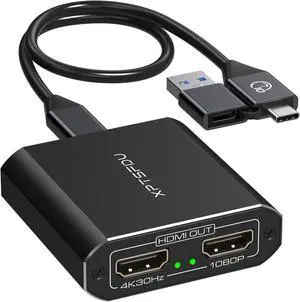
The Adapter comes with a hybrid 2-in-1 USB to HDMI cablefor compatibility with most computers
USB A or USB C to Dual HDMI Splitter Supports Windows and Mac OS system copy mode (AAA) 2 extended modes (ABC/ABB)