
Your Browsing History
- In Stock
- Sold by Newegg
- Make an Offer
- New

Any questions? Our AI beta will help you find out quickly.
Try me now
Quick View
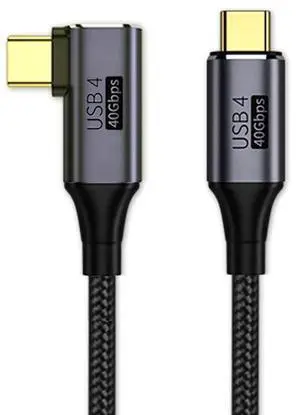
xiwai Right Angled 90 Degree USB4.0 to Straight USB4.0 Cable 40Gbps with 100W Charging and 5K@60Hz K@60Hz Compatible with Thunderbolt3/4 (1.0)
- Model #: 910390672551
- $45.99 –
- $5.99 Shipping
Quick View
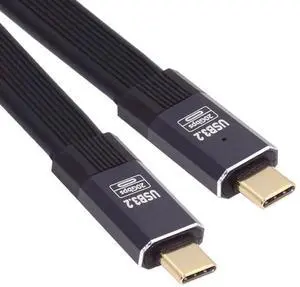
0.2M USB4 Cable 20Gbps Flat Slim FPC Cable with 100W and 8K@60Hz 5K@60Hz USB4.0 Compatible with Thunderbolt3/4
Limited time offer, ends 01/15
- Model #: C32P.111993
- $12.99 –
- Free Shipping
Quick View
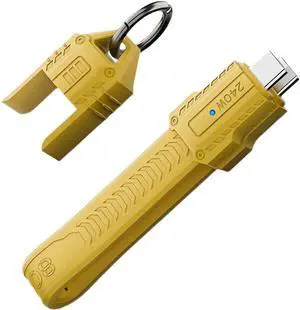
USB5.0 80Gbps Flat Slim FPC Cable 240W 16K@30hz 8K 60Hz 5K Lanyard Strap Chain Compatible with 40Gbps USB4.0 Thunderbolt3/4/5 (Yellow Color)
Limited time offer, ends 01/15
- Model #: C32P.112422
- $14.98 –
- Free Shipping
Quick View
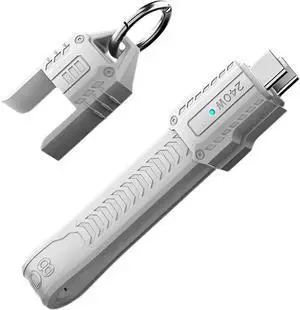
Cable USB5.0 80Gbps Flat Slim FPC Cable 240W 16K@30hz 8K 60Hz 5K Lanyard Strap Chain Compatible with 40Gbps USB4.0 Thunderbolt3/4/5 (White Color)
Limited time offer, ends 01/15
- Model #: C32P.112145
- $14.98 –
- Free Shipping

Quick View
Vszerda Right Angled 90 Degree USB4.0 to Straight USB4.0 Cable 40Gbps with 100W Charging and 5K@60Hz K@60Hz Compatible with Thunderbolt3/4 (2M)
Limited time offer, ends 02/03
- Model #: UC-076-RI
- $30.99 –
- Free Shipping
![DockCase USB C to USB C Cable(2-Pack), USB C 3.2 GEN2 10Gbps Data Transfer Cable, 100WPD Fast Charging, 4K Video Monitor for MBook Pro,Pad Pro, 15/15Pro/15Plus, T5 LaCie SSD[3.28ft]](https://c1.neweggimages.com/productimage/nb300/B7Y1S250626029CVF2B.jpg "DockCase USB C to USB C Cable(2-Pack), USB C 3.2 GEN2 10Gbps Data Transfer Cable, 100WPD Fast Charging, 4K Video Monitor for MBook Pro,Pad Pro, 15/15Pro/15Plus, T5 LaCie SSD[3.28ft]")
Quick View
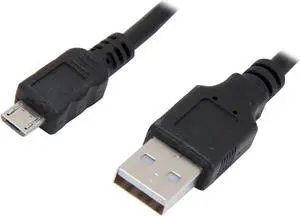
VCOM VC-MICRO10 Black USB 2.0 Type A Male to Micro USB 5pin Male Cable
- Type: USB
- Connector Type: USB A to Micro USB
- Connector Number: 2
- Connector Detail: USB 2.0 Type A Male to Micro USB 5pin Male
- Model #: CU271-10FEET
- $23.34 –
- Free Shipping
Quick View
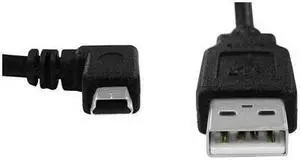
Ambir 6ft USB 2.0 Cable A to mini-B
- Type: USB
- Connector Number: 1
- Connector Detail: Connector on First End:1 x Type A Male USB Connector on Second End:1 x Mini Type B Male USB
- Model #: SA116-CB
Quick View
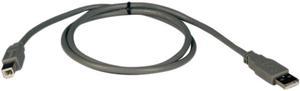
Tripp Lite U021-003 Black USB2.0 A/B Device Cable (A Male to B Male)
- Type: USB 2.0
- Connector Type: USB A to USB B
- Connector Number: 2
- Terminal Gender: Male to Male
- Model #: U021-003
- $6.48 –
- More options from $6.48 - $34.99
- Free Shipping
Quick View
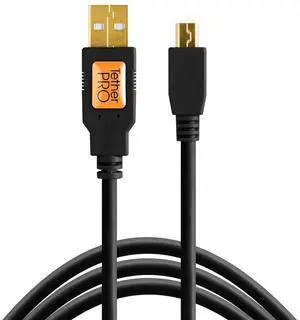
Tether Tools CU5450 Tetherpro USB 2.0 Cable, 15ft, Gold
- Model #: CU5450
- $52.94 –
- Free Shipping
Quick View
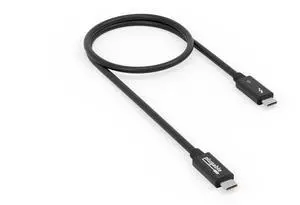
Plugable Thunderbolt 5 Cable
- Connector Type: Thunderbolt 5
- Model #: TBT5-240W1M

Quick View
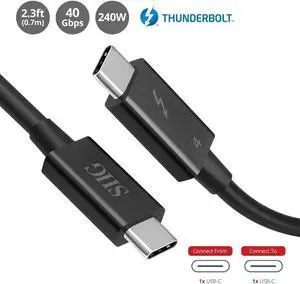
SIIG Thunderbolt 4 Cable 2.3ft 0.7M 8K@60Hz Display 40Gbps Data Transfer Up to 240W Charging Intel Thunderbolt Certified CB-TB0211-S1 Brown Box
- Connector Type: type
- Model #: CBTB0211S1
Quick View
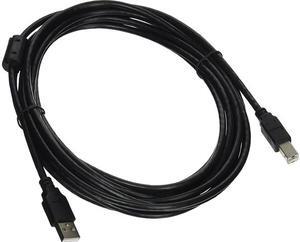
AddOn USBEXTAB15 Black USB Cable
- Type: USB
- Connector Type: USB A to USB B
- Connector Number: 2
- Connector Detail: Connector on First End: 1 x Type A Male USB 2.0 USB Connector on Second End: 1 x Type B Male USB 2.0 USB
- Model #: USBEXTAB15
- $13.95 –
- More options from $13.95 - $18.28
- Free Shipping
Choosing the Right Printer for Your Office Needs
When it comes to office solutions, printers and scanners are essential tools for any business. Whether you need to print important documents, scan invoices, or create professional-quality marketing materials, having the right equipment is crucial. In this article, we will explore the different types of printers and scanners available in the market and provide tips on how to choose the best one for your office.
All-in-One Printers: Versatility and Convenience
all-in-one printers, also known as multifunction printers, are a popular choice for offices. These devices combine the functionality of a printer, scanner, copier, and sometimes even a fax machine into a single unit. They offer versatility and convenience, allowing you to perform multiple tasks without the need for separate devices. All-in-one printers are available in both inkjet and laser options, catering to different printing needs and budgets.
Specialized Printers for Specific Tasks
In addition to all-in-one printers, there are specialized printers designed for specific tasks. For example, 3D printers are ideal for creating prototypes or intricate models, while barcode and label printers are perfect for businesses that require efficient inventory management. laser printers are known for their fast printing speeds and high-quality output, making them suitable for offices with high-volume printing needs. inkjet printers, on the other hand, are more cost-effective and can produce vibrant color prints.
Choosing the Right Supplies
Once you have selected the right printer for your office, it is important to choose the right supplies to ensure optimal performance and longevity. When it comes to inkjet printers, using high-quality ink cartridges is essential to achieve the best print quality and prevent clogging. For laser printers, it is important to choose the right type of toner cartridges that are compatible with your printer model. Additionally, investing in high-quality paper can make a significant difference in the final print results.
FAQs: Common Questions about Printers and Scanners
| Q: How often should I replace the ink cartridges? | A: The frequency of replacing ink cartridges depends on your printing volume. However, it is recommended to replace them when the print quality starts to degrade. |
|---|---|
| Q: Can I use third-party ink cartridges with my printer? | A: While it is possible to use third-party ink cartridges, it is important to ensure compatibility with your printer model. Using incompatible cartridges may result in poor print quality or damage to the printer. |
| Q: How do I clean the scanner glass? | A: To clean the scanner glass, use a soft, lint-free cloth slightly dampened with glass cleaner. Gently wipe the glass surface to remove any smudges or debris. |
| Q: What is the difference between optical and interpolated resolution in scanners? | A: Optical resolution refers to the actual hardware resolution of the scanner, while interpolated resolution is achieved through software enhancements. Optical resolution provides more accurate and detailed scans. |
| Q: How can I improve the scanning speed? | A: To improve scanning speed, reduce the scanning resolution, use black and white mode instead of color, and ensure that the scanner is connected to a high-speed USB port. |