• In Stock
  • Sold by Newegg
  • Make an Offer
  • New
Department
Show More
Brands
Show More
Price
Show More
Black Print Speed
Max. Duty Cycle
Series
Output Type
Connectivity Technology
Recommended Use
Duplex printing
USB Ports
Network Ports
Sold by
All Top Brands
Availability
Condition
Current Promotion
Discount
Useful Links
Customer Ratings
avatar

Any questions? Our AI beta will help you find out quickly.

Sort By:
View:
Brother MFC-J6555DW INKvestment Tank Color Inkjet All-In-One Printer with up to 1 Year of Ink In-box1 and 11” x 17” print, copy, scan, and fax capabilities
Quick View
Brother MFC-J6555DW INKvestment Tank Color Inkjet All-In-One Printer with up to 1 Year of Ink In-box1 and 11” x 17” print, copy, scan, and fax capabilities
  • Recommended Use: All-In-One Inkjet
  • Brand: Brother
  • Series: INKvestment Tank
  • Print Technology: InkJet
  • Model #: MFC-J6555dw
Blackbox 6.5ft USB 3.1 Type C Male USB 2.0 Type B Male Cable
Quick View
Blackbox 6.5ft USB 3.1 Type C Male USB 2.0 Type B Male Cable
  • Brand: Black Box
  • Model: USBC2TYPEB-2M 14817885
  • Type: USB
  • Connector Type: USB C to USB B
  • Model #: USBC2TYPEB2M
black box usb30-0006-mm 6 ft. usb version 3.0 type a male to type b male cable black
Quick View
Cyan High Yield Toner Cartridge for Lexmark C748H1CG C748DE, C748DTE, C748E, Genuine Lexmark Brand
Quick View
Cyan High Yield Toner Cartridge for Lexmark C748H1CG C748DE, C748DTE, C748E, Genuine Lexmark Brand
  • Cartridge Quantity: Single Pack
  • Compatible Products: Lexmark C748DE,Lexmark C748E,Lexmark C748DTE
  • Approximate Page Yield: 10000 Pages
  • Coverage: 5%
  • Model #: C748H1CG
Black Box USB 2.0 Extension Cable Type-A Male/Female Black 3-ft. 0.9-m
Quick View
Black Box USB 2.0 Extension Cable Type-A Male/Female Black 3-ft. 0.9-m
  • Brand: Black Box Innovations
  • Connector Type: USB A to USB A
  • Model #:
Black Box USB 2.0 Active Repeater Cable Type-A USBR01-0016-R4
Quick View
Black Box USB 2.0 Active Repeater Cable Type-A USBR01-0016-R4
  • Brand: Black Box Innovations
  • Connector Type: USB A to USB A
  • Model #:
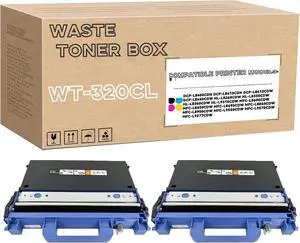
BROTHER INTERNATIONAL WT320CL Waste toner box
Quick View
BROTHER INTERNATIONAL WT320CL Waste toner box
  • Product Sort: Printer Accessories
  • Product Type: Toner Collection/Waste Toner Unit
  • Color: Black
  • Compatibility: HL-L8250CDN, HL-L8350CDW, HL-L8350CDWT, HL-L9200CDWT, MFC-L8600CDW, MFC-L8850CDW, MFC-L9550CDW
  • Model #: WT320CL
Black Box USB 2.0 Cable Type-A to Type-B Male/Male Black
Quick View
Black Box USB 2.0 Cable Type-A to Type-B Male/Male Black
  • Brand: Black Box Innovations
  • Connector Type: type
  • Model #:
PRINT CARTRIDGE SP 330L
Quick View
Brother TN-221 Original Standard Yield Laser Toner Cartridge - Twin-pack - Black - 2 / Box  TN-221BK
Quick View
  •  
  • $169.99 
  • $2.99 Shipping
Lexmark 75M0H40 Original Laser Toner Cartridge - Box - Yellow - 1 Pack - 8800 Pages
Quick View
Lexmark 75M0H40 Original Laser Toner Cartridge - Box - Yellow - 1 Pack - 8800 Pages
  • Brand: LEXMARK
  • Model: 75M0H40
  • Part Number: 75M0H40
  • Cartridge Quantity: 1
  • Model #: 75M0H40
Epson WF-78XX / ET-58XX /ET-166XX / L65XX / L151XX Maintenance Box C12C934591
Quick View
  •  
  • $36.00 
  • Free Shipping
HID Global 050000 Fargo DTC1250e Single-sided ID Direct-to-Card Printer & Encoder, Base Model (NA), USB
Quick View
HID Global 050000 Fargo DTC1250e Single-sided ID Direct-to-Card Printer & Encoder, Base Model (NA), USB
  • Printer Type: Single-Side
  • Memory: 32 MB RAM
  • MSR: N/A
  • Media Type: PVC or polyester cards with polished PVC finish; monochrome resin required for100% polyester cards; optical memory cards with PVC finish; rewrite
  • Model #: 050000
Lexmark Waste Tray
Quick View
Lexmark Waste Tray
  • Brand: LEXMARK
  • Product Type: Waste Toner Box
  • Model #:
Cognitive TPG CXD4-1300 Direct Thermal Desktop Label Printer, 300 dpi, 8 ips, 4.2" 2-Line LCD Display, Serial, Parallel, USB A/B, Ethernet
Quick View
Cognitive TPG CXD4-1300 Direct Thermal Desktop Label Printer, 300 dpi, 8 ips, 4.2" 2-Line LCD Display, Serial, Parallel, USB A/B, Ethernet
  • Printer Type: Desktop
  • Memory: RAM - 16 MB, Flash - 8 MB
  • Fonts Included: Bitmapped: 7 styles with up to 10x10 magnification, variable boldness and spacing International: Sans serif font in 7 pt. sizes, up to 4x4 magnification, variable boldness and spacing Scalable Smooth Fonts: 3 Ultra Font styles for smooth characters in any size and boldness Rotations: 0, 90, 180, 270 degrees Optional: Kanji, Korean, and OCR fonts available
  • Barcode Type: Add2, Add5, Codabar, Code39, Code93, Code 128A/B/C, D2of5, I2of5, S20f5, EAN8, EAN13, EAN128, MSI/I1, Plessey, Postnet, UPCA/A+/E/E1
  • Model #: CXD4-1300
Xerox Phaser 7800 Black High Capacity Toner-Cartridge (24000 Pages) - 106R01569
Quick View
Xerox Phaser 7800 Black High Capacity Toner-Cartridge (24000 Pages) - 106R01569
  • Product Type: Toner Collection/Waste Toner Unit
  • Model #: PB00612XEKY
Staple Cartridge, Box of 3 for Kyocera SH-10 BF720, DF420, DF470, DF710, DF760, DF770, DF780, Genuine Kyocera Brand
Quick View
Staple Cartridge, Box of 3 for Kyocera SH-10 BF720, DF420, DF470, DF710, DF760, DF770, DF780, Genuine Kyocera Brand
  • Series: SH-10
  • Product Sort: Printer Accessories
  • Product Type: Staple Cartridge Refill
  • Model #: SH-10
Lexmark 85D0Q00 Photoconductor Unit - 87,000 Page-Yield - Black - 3/Box
Quick View
Lexmark 85D0Q00 Photoconductor Unit - 87,000 Page-Yield - Black - 3/Box
  • Brand: LEXMARK
  • Product Type: Photoconductor Unit
  • Model #: 85D0Q00
GENUINE YELLOW STD CAP TONER
Quick View
  • $226.09
Zebra Technologies - DS2208-SR7U2100AZW Corded 1D/2D Handheld Barcode Scanner and Imager
Quick View
Zebra Technologies - DS2208-SR7U2100AZW Corded 1D/2D Handheld Barcode Scanner and Imager
  • Part Number: DS2208-SR7U2100AZW
  • Form Factor: Handheld
  • Connectivity: Corded
  • Light Source: Aiming Pattern: Linear 624nm Amber LED
  • Model #: DS2208-SR7U2100AZW
Xerox 008R12990 Waste Toner Cartridge
Quick View
Xerox 008R12990 Waste Toner Cartridge
  • Product Sort: Printer Accessories
  • Product Type: Waste Toner Box
  • Compatibility: Xerox Color 700/700i/770, Xerox Color C60/C70, and Xerox Versant 2100
  • Weight: 1.50 lbs.
  • Model #: 008R12990
Canon Standard Staple Cartridges for Canon IR2200/2800/More, Three Cartridges, 15,000 Staples
Quick View
Canon Standard Staple Cartridges for Canon IR2200/2800/More, Three Cartridges, 15,000 Staples
  • Series: (6707A001)
  • Product Sort: Printer Ink & Toner
  • Product Type: Staple
  • Compatibility: Canon IR2200/2800/More
  • Model #: 6707A001AA
usb 2.0 cable type a male to
Quick View
usb 2.0 cable type a male to
  • Cable Length: 6 ft
  • Brand: Black Box
  • Type: USB
  • Connector Type: Micro USB to USB A
  • Model #: SYN2893819
HP 910XL | Ink Cartridge | Black | 3YL65AN
Quick View
HP
HP 910XL | Ink Cartridge | Black | 3YL65AN
  • Cartridge Quantity: Single Pack
  • Compatible Products: HP OfficeJet Pro 8025 (1KR57A#B1H); HP OfficeJet Pro 8035 (5LJ23A#B1H); HP OfficeJet Pro 8035 (4KJ65A#B1H); HP OfficeJet Pro 8035 (3UC66A#B1H)
  • Ink Type: Pigment-based
  • Approximate Page Yield: 825 Pages
  • Model #: 3YL65AN#140
  •  
  • $69.99 
  • $2.99 Shipping
Xerox Waste Cartridge For The VersaLink C620/C625
Quick View
Xerox Waste Cartridge For The VersaLink C620/C625
  • Product Type: Waste Toner Box
  • Model #: 008R13334
HP T3V27A LaserJet 550-sheet Paper Tray
Quick View
HP
HP T3V27A LaserJet 550-sheet Paper Tray
  • Product Sort: Printer Accessories
  • Product Type: Paper Tray
  • Compatibility: HP Color LaserJet Enterprise M751n, HP Color LaserJet Enterprise M751dn, HP Color LaserJet Enterprise M856dn, HP Color LaserJet Enterprise M856x, HP Color LaserJet Managed E75245dn, HP Color LaserJet Managed E85055dn, HP Color LaserJet Ent MFP M776dn, HP Color LaserJet Ent Flow MFP M776z, HP Color LaserJet Ent Flow MFP M776zs
  • Specifications: Input capacity: Up to 550 sheets Media sizes, custom: 5.8 x 5.8 to 12.6 x 18 in What's in the box: HP LaserJet 550 Sheet Paper Tray; Install Guide; Warranty information
  • Model #: T3V27A
P15 Ribbon Label Printer, Custom Text/Icon Mini Bluetooth Portable Label Maker Machine with Tape for Gift, Christmas Decorations, Cloth Tags, DIY Crafts, Wedding Bouquets, Party Favors
Quick View
  •  
  • $80.33 
  • Free Shipping
Brother WT4CL Waste Toner Pack for HL-2700 and MFC-9420CN
Quick View
Brother WT4CL Waste Toner Pack for HL-2700 and MFC-9420CN
  • Product Sort: Printer Accessories
  • Product Type: Waste Toner Box
  • Compatibility: HL-2700 and MFC-9420CN Brother MFC 9420CN, 9420CNLT
  • Specifications: Yields approx. 12,000 images when printing on A4/Letter sized paper
  • Model #: WT4CL
  •  
  • $27.99 
  • Free Shipping
black box lhc021a adapter cord - for media converter
Quick View
black box lhc021a adapter cord - for media converter
  • Connector Type: Micro USB to USB A
  • Model #: SYN2891526
Xerox C235/DNI Color Multifunction Printer, Print/Scan/Copy/Fax, Laser, Wireless, All in One
Quick View
  •  
  • $1,095.00 
  • Free Shipping

Choosing the Right Printer for Your Office Needs

When it comes to office solutions, printers and scanners are essential tools for any business. Whether you need to print important documents, scan invoices, or create professional-quality marketing materials, having the right equipment is crucial. In this article, we will explore the different types of printers and scanners available in the market and provide tips on how to choose the best one for your office.

All-in-One Printers: Versatility and Convenience

all-in-one printers, also known as multifunction printers, are a popular choice for offices. These devices combine the functionality of a printer, scanner, copier, and sometimes even a fax machine into a single unit. They offer versatility and convenience, allowing you to perform multiple tasks without the need for separate devices. All-in-one printers are available in both inkjet and laser options, catering to different printing needs and budgets.

Specialized Printers for Specific Tasks

In addition to all-in-one printers, there are specialized printers designed for specific tasks. For example, 3D printers are ideal for creating prototypes or intricate models, while barcode and label printers are perfect for businesses that require efficient inventory management. laser printers are known for their fast printing speeds and high-quality output, making them suitable for offices with high-volume printing needs. inkjet printers, on the other hand, are more cost-effective and can produce vibrant color prints.

Choosing the Right Supplies

Once you have selected the right printer for your office, it is important to choose the right supplies to ensure optimal performance and longevity. When it comes to inkjet printers, using high-quality ink cartridges is essential to achieve the best print quality and prevent clogging. For laser printers, it is important to choose the right type of toner cartridges that are compatible with your printer model. Additionally, investing in high-quality paper can make a significant difference in the final print results.

FAQs: Common Questions about Printers and Scanners

Q: How often should I replace the ink cartridges?A: The frequency of replacing ink cartridges depends on your printing volume. However, it is recommended to replace them when the print quality starts to degrade.
Q: Can I use third-party ink cartridges with my printer?A: While it is possible to use third-party ink cartridges, it is important to ensure compatibility with your printer model. Using incompatible cartridges may result in poor print quality or damage to the printer.
Q: How do I clean the scanner glass?A: To clean the scanner glass, use a soft, lint-free cloth slightly dampened with glass cleaner. Gently wipe the glass surface to remove any smudges or debris.
Q: What is the difference between optical and interpolated resolution in scanners?A: Optical resolution refers to the actual hardware resolution of the scanner, while interpolated resolution is achieved through software enhancements. Optical resolution provides more accurate and detailed scans.
Q: How can I improve the scanning speed?A: To improve scanning speed, reduce the scanning resolution, use black and white mode instead of color, and ensure that the scanner is connected to a high-speed USB port.