




 here!
I’m your shopping assistant for PC builds, upgrades, and everything tech.
Got questions? Ask away!
Start a conversation
here!
I’m your shopping assistant for PC builds, upgrades, and everything tech.
Got questions? Ask away!
Start a conversation




Any questions? Ask CelesteSM will help you find out quickly.
Overview
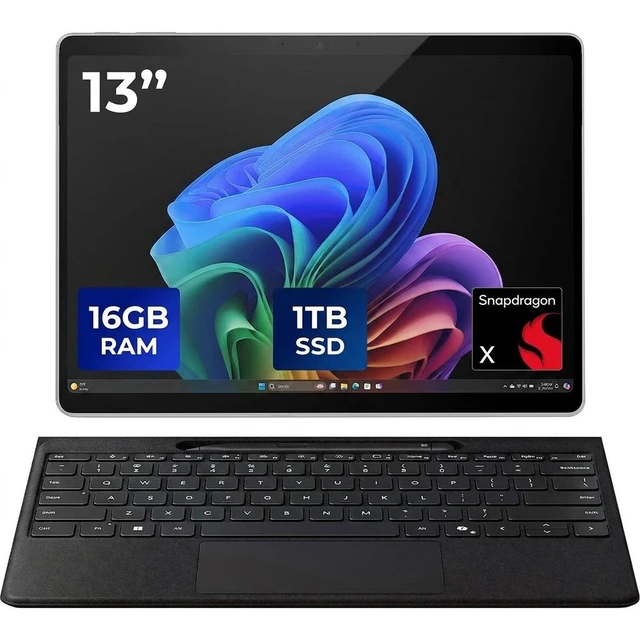
The Microsoft Surface Pro 11 is a Copilot+ PC tablet that combines tablet portability with laptop-style functionality. Its 13.0-inch PixelSense touchscreen, Snapdragon X Elite processor, 16GB memory, and 1TB SSD support productivity, browsing, note-taking, creative work, and entertainment.
Key Features
Performance
The Qualcomm Snapdragon X Elite X1E-84-100 processor operates at 3.40 GHz. The dedicated NPU provides 45 trillion operations per second for AI workloads. Maximum battery time is 14 hours for video and 10 hours for web surfing.
Design
The Surface Pro 11 uses a slate design in Platinum with a built-in kickstand for adjustable viewing angles. It measures 8.2 inches wide, 11.3 inches deep, and 0.4 inches high, and weighs 1.97 lb. The 13.0-inch display features a PixelSense touchscreen, OLED panel, 2880 x 1920 resolution, and 120Hz refresh rate.
Connectivity & Compatibility
Wireless connectivity includes Wi-Fi 7 through 802.11be Wireless LAN and Bluetooth 5.4. The tablet has 2 USB-C / USB4 ports and a Surface Connect port. It runs Windows 11 Pro and supports use with an optional Surface Pro Keyboard (Type Cover) and optional Surface Pen.
Software & Tools
As a Copilot+ PC, the Surface Pro 11 supports AI features described in the listing, including Recall, Live Captions with Translation, Cocreator in Paint, and Windows Studio Effects with background blur, eye contact correction, and automatic framing.
Specifications
What's in the Box
We want to ensure your holiday shopping this year is hassle-free. That’s why we’re automatically extending our return policies on almost every product! For purchases placed between November 1st, 2026 and December 31, 2026 you will have until January 31, 2027 to return your product.
Microsoft Surface Pro 11 Copilot+ PC is a premium 13-inch 2-in-1 tablet for professionals who want a highly portable Windows 11 Pro device with Snapdragon X Elite performance, 16GB RAM, a 1TB SSD, and a sharp 120Hz OLED touch display for work, notes, and everyday multitasking.
| Attribute | Value |
|---|---|
| Best For | Business and productivity users who want a Windows 11 Pro Copilot+ 13" PixelSense OLED tablet with Snapdragon X Elite performance, long battery life, 1 TB internal storage, keyboard and stylus compatibility, and cellular (5G) connectivity |
| Model Identifiers | Microsoft Surface Pro 11 (Surface Pro 11th Edition), Model/Part ZIP-00001 |
| Display Spec | 13.0" PixelSense OLED touchscreen with 2880 x 1920 native resolution |
| Processor And Core Count | Qualcomm Snapdragon X Elite X1E-84-100 (3.40 GHz) |
| Memory Configuration | 16 GB LPDDR5X RAM |
| Storage And Expansion | 1 TB SSD (1000 GB) internal storage |
| GPU And VRAM | Integrated Adreno graphics (integrated GPU); video capture up to FHD 1080p |
| Ports And High Speed I O | 2 x USB-C / USB4 ports; hardware interface listing also includes DisplayPort and USB-C |
| Wired And Wireless Networking | Wi‑Fi 7 (802.11be) wireless LAN, Bluetooth 5.4, and 5G cellular listed; connectivity technologies include Wi‑Fi and Bluetooth |
| Webcam And Privacy | Front and rear cameras with rear 10 MP sensor and FHD 1080p video capture; includes face recognition biometric and Trusted Platform Module (TPM) |
| Battery And Power | Single Lithium Ion battery (1 cell), 4000 mAh; up to 14 hours video playback battery time and ~10 hours web browsing; package includes 39 W power supply |
| Package Contents | Surface Pro 11 Tablet, Quick Start Guide, Safety and Warranty Documents, 39 W Power Supply |
| Build And Extras | Platinum-colored slate design with built-in kickstand, Corning Gorilla Glass 5, and volume control button |
| Portability | 11.3 x 8.2 x 0.4 inches; weight 1.97 lb |
| Compatibility And Input | Compatible with keyboard and stylus pen; touch-screen input |
| Sensors | Includes accelerometer |
Q: Who should choose the Surface Pro 11 over a standard clamshell laptop?
A: Choose the Surface Pro 11 if you want one device to work as both a Windows tablet and a laptop. Its detachable design, kickstand, touch display, and pen support make it a better fit for note-taking, drawing, reading, travel, and flexible use around the house or office. A standard clamshell laptop is usually the better fit when your work is mostly desk-based or lap-based and you rarely use touch or tablet mode.
Q: Is this Surface Pro 11 configuration worth choosing over a lower-tier Copilot+ PC?
A: This configuration makes sense when you specifically want the Surface Pro form factor and want more premium hardware than entry Copilot+ PCs usually offer. Compared with lower-tier Copilot+ models, this version adds a 13-inch 120Hz OLED display, Snapdragon X Elite, and 1TB storage, which better suit users who keep many files locally, multitask heavily, or care about display quality. A lower-tier Copilot+ PC is often the more practical choice if your priorities are lower cost and mainstream productivity rather than detachable-tablet flexibility or the OLED upgrade.
Q: When is a higher-tier Surface Pro configuration worth paying for over this one?
A: A higher-tier Surface Pro is worth paying for mainly if you need more than 16GB of memory for large creative projects, heavier multitasking, or professional workloads that stay open all day. For general office work, web apps, meetings, media, and typical mobile productivity, this 16GB and 1TB Snapdragon X Elite configuration already covers the premium Surface Pro experience with the OLED display and fast storage. In other words, moving higher is usually about memory headroom, not a major change in everyday use.
Q: Is the Surface Pro 11 a good upgrade from an older Surface Pro, such as Surface Pro 9?
A: Yes, it is a meaningful upgrade if you want longer unplugged use, a faster and quieter ARM-based platform, and access to Copilot+ PC features. Microsoft positions Surface Pro 11 as substantially faster than Surface Pro 9, and reviewers consistently describe the new generation as a bigger step forward than the usual annual update. The main trade-off is software compatibility: if your current workflow depends on older Windows apps, drivers, or peripherals that work best on Intel systems, it is worth checking ARM support before upgrading.
Q: Is the Surface Pro 11 better for travel and portable use than for desk-first productivity?
A: Yes. The Surface Pro 11 is especially well suited to portability-focused use because the tablet body is light, the kickstand works in tight spaces, and the detachable design is convenient for flights, meetings, couch use, and handwritten input. For desk-first productivity it still works well, but many users and reviewers find a traditional laptop shape more natural for long lap sessions and fixed-desk typing. The Surface Pro 11 is the stronger choice when portability and flexibility matter more than a conventional laptop posture.
Q: Is the Surface Pro 11 a good travel work device?
A: Yes, if you want a very portable Windows 2-in-1 for email, web apps, documents, meetings, and light multitasking. Its 13-inch touch display, built-in kickstand, Wi-Fi 7, and tablet form factor make it easier to carry than many laptops. The main trade-off is that it works best as a travel productivity device when paired with the optional keyboard, since the tablet alone is less comfortable for long typing sessions.
Q: Is it good for note-taking, meetings, and office work?
A: Yes. This model is well suited to note-taking, video meetings, Microsoft 365 work, browsing, presentations, and general office tasks. The 13-inch 2880x1920 OLED touch display and 120Hz panel are useful for reading, inking, and smooth navigation. For handwritten notes or sketching, you will get the best experience with a compatible optional pen.
Q: Can the Surface Pro 11 replace a laptop?
A: For many users, yes. It can replace a laptop for everyday productivity, remote work, note-taking, media use, and light creative tasks because it runs full Windows 11 Pro and uses a high-end Snapdragon X Elite chip with 16GB RAM. The trade-off is ergonomics: for long typing sessions, lap use, or a more stable desk setup, a traditional clamshell laptop is usually more comfortable.
Q: Who is the Surface Pro 11 best for?
A: It is best for buyers who want one device for tablet use and Windows productivity: travelers, students, hybrid workers, consultants, and meeting-heavy office users. It is a stronger fit for people who value portability, touch input, and flexibility than for buyers who mainly want a fixed-keyboard laptop for desk work all day.
Q: What are the main trade-offs versus a regular laptop?
A: The Surface Pro 11 gives you better tablet flexibility, touch use, and a more compact travel-friendly design than a regular laptop. In return, you usually give up some comfort for extended typing and lap use, and accessories such as the keyboard and pen may be separate purchases. In short: it is more versatile than a laptop, but usually less convenient as a full-time typing machine unless your setup includes the keyboard.
Q: Is the Surface Pro 11 a good buy if I want one device for both tablet use and laptop-style work?
A: Yes, if your priority is a portable 2-in-1 that can handle full Windows work in a tablet form factor. Reddit discussions repeatedly frame the Surface Pro 11 as attractive for people who want note-taking, PDF work, travel, and regular desktop apps in one device. The main trade-off is that it is still a Windows tablet, so the tablet experience is less touch-optimized than an iPad and some buyers prefer a traditional laptop if they mostly type at a desk.
Q: Is the Surface Pro 11 good for note-taking and PDF annotation?
A: It can be a good fit if you want pen input plus full Windows software, especially for notes, PDFs, and light productivity in one device. Reddit users repeatedly mention note-taking and PDF editing as valid reasons to choose it. The trade-off is that if note-taking is your main priority, some users still find an iPad or dedicated note device more comfortable because Windows 11 is less tablet-first and the Surface Pro is heavier to hold.
Q: Is the Snapdragon X Elite Surface Pro 11 suitable as a work or travel machine?
A: Usually yes for general productivity, web work, Office, meetings, and mobile use. Reddit discussion around Snapdragon Surface devices consistently highlights good battery life, quiet operation, and strong portability as reasons to choose them for travel and everyday work. It is a better fit for mainstream Windows tasks than for specialized workflows that depend on older x86 software, niche peripherals, or heavier developer setups.
Q: What is the main trade-off of buying the ARM-based Surface Pro 11 instead of an Intel laptop?
A: The main trade-off is software and accessory compatibility. Community discussion repeatedly treats ARM compatibility as the key decision factor: if your apps are common Windows apps, web apps, or Microsoft productivity tools, the device is easier to recommend; if you rely on specific legacy programs, niche hardware, virtualization, or certain developer tools, you should verify compatibility before buying. In short, the hardware is attractive, but the software fit matters more than usual.
Q: What are the main features of the display on the Microsoft Surface Pro 11?
A: The display is a 13-inch OLED touchscreen with a resolution of 2880 x 1920 and a 120Hz refresh rate, offering a vibrant viewing experience.
Q: What is the maximum battery life of the Microsoft Surface Pro 11?
A: The maximum battery life is 14 hours for video playback and 10 hours for web surfing.


