Your Browsing History
Meet Your Seller
Visit Smays Store
FOLLOW
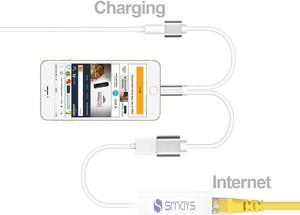
iPhone iPad Ethernet Adapter with Power Charging - Lightning to RJ45 LAN Wired Network - Apple OTG USB
- Support iOS 10.1 or newer iPad iPhone with Lightning port
- 10M / 100M LAN adapter, stable & fast internet speed
- Power charging while enjoying wired network
- Accessory for game player
- It's a 2-in-1 combined kit
- - Apple OTG adapter -
- Connect with USB keyboard, Electric piano MIDI, microphone, Sound card
+
+
Overview
Specs
Reviews
See all Q & A
Any questions? Our AI beta will help you find out quickly.
Try me now
Play and
Play: not software needed, no settings needed, so easy to use.
- It is a Apple OTG adapter -
Connect with: - USB keyboard to improve typing speed and enjoying chatting online, - Electric piano MIDI, microphone, - USB camera kit to show image at iPad/iPhone's Retina screen and transfer images videos - USB sound card include Garage
Band, Bias, Jam
Up, Amplitube etc music App
HOW to USE:
1. Turn off "WLAN", or switch to "Airplane mode" on iPad/iPhone
2. Plug lightning cable to iPad / iPhone
3. Open iPad/iPhone "Setting" menu, an "Ethernet" logo will be added automatically (wait a second or plug again when "Ethernet" menu does not appear)
4. Connect Ethernet cable to LAN adapter
5. Tap "Ethernet" to get an IP address like 192.168. 1.108, and it's connected
Follow the step and make sure it get an IP address.
LAN adapter size: W58 x D23 x H16 mm; cable length: 3 feet;
Weight: 26.4 g; Internet speed: 10/100Mbps
Support iOS version: iOS 10. x or up
(iOS 10.0. 1 - iOS 10.3. 3); iOS 11. x ( 11.0. 1 - 11.2. 3 or later); support iPad Pro, iPad Air 2, iPad Air, iPad, iPad mini4, iPad mini 3, iPad mini2; iPod touch; iPhone X / iPhone 8 / iPhone8 Plus / iPhone 7 / iPhone7 Plus / 6s / 6s Plus / 6 / 6Plus / SE / 5S
ITEM INCLUDE:
1 x lightning to RJ45 LAN adapter for iPhone/iPad
Play: not software needed, no settings needed, so easy to use.
- It is a Apple OTG adapter -
Connect with: - USB keyboard to improve typing speed and enjoying chatting online, - Electric piano MIDI, microphone, - USB camera kit to show image at iPad/iPhone's Retina screen and transfer images videos - USB sound card include Garage
Band, Bias, Jam
Up, Amplitube etc music App
HOW to USE:
1. Turn off "WLAN", or switch to "Airplane mode" on iPad/iPhone
2. Plug lightning cable to iPad / iPhone
3. Open iPad/iPhone "Setting" menu, an "Ethernet" logo will be added automatically (wait a second or plug again when "Ethernet" menu does not appear)
4. Connect Ethernet cable to LAN adapter
5. Tap "Ethernet" to get an IP address like 192.168. 1.108, and it's connected
Follow the step and make sure it get an IP address.
LAN adapter size: W58 x D23 x H16 mm; cable length: 3 feet;
Weight: 26.4 g; Internet speed: 10/100Mbps
Support iOS version: iOS 10. x or up
(iOS 10.0. 1 - iOS 10.3. 3); iOS 11. x ( 11.0. 1 - 11.2. 3 or later); support iPad Pro, iPad Air 2, iPad Air, iPad, iPad mini4, iPad mini 3, iPad mini2; iPod touch; iPhone X / iPhone 8 / iPhone8 Plus / iPhone 7 / iPhone7 Plus / 6s / 6s Plus / 6 / 6Plus / SE / 5S
ITEM INCLUDE:
1 x lightning to RJ45 LAN adapter for iPhone/iPad
Warranty & Returns
Warranty, Returns, And Additional Information
Warranty
- Please contact the Seller directly for warranty information. Warranty information may also be found on the Manufacturer's website.
- CONTACT
Return Policies
- Return for refund within: 30 days
- Return for replacement within: 30 days
- This item is covered by Smays Return Policy
Manufacturer Contact Info
- For a directory of all our manufacturers, please click below.
- Manufacturers Directory
LOADING...