

Your Browsing History
- Free 30-day Returns
$82.19
Ships from China.

Meet Your Seller

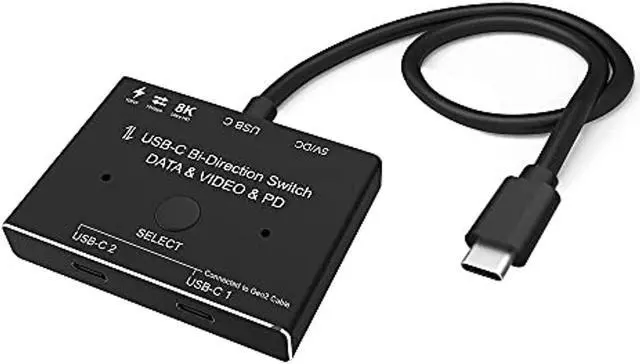

cabledeconn usb-c type-c 8k updated switch usb 3.1 c gen 2 cable for video bi-direction 8k@30hz 4k@120hz power delivery 100w 10gbps data transfer splitter converter
Limited time offer, ends 08/05 By xiatiandianzi
- ******Very Important,It is not compatible with Macbook Pro or Mac Series Devices with M1 Chip and LG Monitor.Very Important,You must USB C Gen-2 Cable to ensure Video Output in your Displays.USB-C 8K Bi-Direction Video Transmissions&Data&Power Switch/Splitter:The USB-C switcher allow you to connect two USB-C sources to one USB-C display or connect one USB-C source to toggle between two displays,(Two displays CANNOT display simultaneously) | ***Please do not connect our switcher to USB-C Docking Station..USB-C 8K Switch for Video 2in 1Out,you are allowed to connect two sources to the Port "USB-C 1" and "USB-C 2"in the switch,then connect to the display with the supplied Fixed USB-C Cable.For the USB-C Cable connected between the source devices and Our Switch,these kind of cable should all supporting video transmissiomns.Press"Select"Button to switch between two sources | USB-C 8K Splitter for Two Displays 1in 2Out,you are allowed to connect the source device from the USB C end via the
+
+
Overview
Specs
Reviews

Any questions? Our AI beta will help you find out quickly.
Try me now
******Very Important, It is not compatible with Macbook Pro or Mac Series Devices with M1 Chip and LG Monitor. Very Important, You must USB C Gen-2 Cable to ensure Video Output in your Displays. USB-C 8K Bi-Direction
VideoTransmissions&Data&PowerSwitch/Splitter: The USB-C switcher allow you to connect two USB-C sources to one USB-C display or connect one USB-C source to toggle between two displays, (Two displays CANNOT display simultaneously) | ***Please do not connect our switcher to USB-C Docking Station.. USB-C 8K Switch for Video 2in 1Out, you are allowed to connect two sources to the Port "USB-C 1" and "USB-C 2"in the switch, then connect to the display with the supplied Fixed USB-C Cable. For the USB-C Cable connected between the source devices and Our Switch, these kind of cable should all supporting video transmissiomns. Press"Select"Button to switch between two sources | USB-C 8K Splitter for Two Displays 1in 2Out, you are allowed to connect the source device from the USB C end via the supplied fixed USB C Cable, then connect to two USB-C displays to the port "USB-C 1" and port "USB-C 2"in the switch. In this connection, you can connect via USB-C to HDMI or DP Cable to your monitor. {Two Displays can not connect at the same time}, the USB-C Cable you used should support for video transfer. Press"Select"Button to switch between two displays.
| ***USB-C Gen-2 cable must be used, otherwise the video signal cannot be transmitted. {USB-C Switch with Power and Data Function}, It supports Max 100w Power Delivery and Max Transmissions Speed 10Gbps(USB 3.1 Gen2), With our switch, you can charge your mobile phone, computer, tablet and other devices, and you can also transfer data from your computer, mobile phone, etc. to your U disk and other devices. Both data and charging functions require your USB-C cable to support the above functions. | ***Do not connect our usb-c switcher to your docking station. Ultra 8K Video Output, you can output max 8K@30Hz 4K@120Hz 1080P@165Hz via our USB-C Switch/Splitter to your USB-C Displays, The maximum resolution of your output depends on your Source device, monitor and cable used. When you use our switcher to realize the video function, we recommend that you do not use too long cables? The sum of the cables at both ends does not exceed 3 meters)
VideoTransmissions&Data&PowerSwitch/Splitter: The USB-C switcher allow you to connect two USB-C sources to one USB-C display or connect one USB-C source to toggle between two displays, (Two displays CANNOT display simultaneously) | ***Please do not connect our switcher to USB-C Docking Station.. USB-C 8K Switch for Video 2in 1Out, you are allowed to connect two sources to the Port "USB-C 1" and "USB-C 2"in the switch, then connect to the display with the supplied Fixed USB-C Cable. For the USB-C Cable connected between the source devices and Our Switch, these kind of cable should all supporting video transmissiomns. Press"Select"Button to switch between two sources | USB-C 8K Splitter for Two Displays 1in 2Out, you are allowed to connect the source device from the USB C end via the supplied fixed USB C Cable, then connect to two USB-C displays to the port "USB-C 1" and port "USB-C 2"in the switch. In this connection, you can connect via USB-C to HDMI or DP Cable to your monitor. {Two Displays can not connect at the same time}, the USB-C Cable you used should support for video transfer. Press"Select"Button to switch between two displays.
| ***USB-C Gen-2 cable must be used, otherwise the video signal cannot be transmitted. {USB-C Switch with Power and Data Function}, It supports Max 100w Power Delivery and Max Transmissions Speed 10Gbps(USB 3.1 Gen2), With our switch, you can charge your mobile phone, computer, tablet and other devices, and you can also transfer data from your computer, mobile phone, etc. to your U disk and other devices. Both data and charging functions require your USB-C cable to support the above functions. | ***Do not connect our usb-c switcher to your docking station. Ultra 8K Video Output, you can output max 8K@30Hz 4K@120Hz 1080P@165Hz via our USB-C Switch/Splitter to your USB-C Displays, The maximum resolution of your output depends on your Source device, monitor and cable used. When you use our switcher to realize the video function, we recommend that you do not use too long cables? The sum of the cables at both ends does not exceed 3 meters)
Warranty & Returns
Warranty, Returns, And Additional Information
Warranty
- Please contact the Seller directly for warranty information. Warranty information may also be found on the Manufacturer's website.
- CONTACT
Return Policies
- Return for refund within: 30 days
- Return for replacement within: 30 days
- This item is covered by xiatiandianzi Return Policy
Manufacturer Contact Info
- For a directory of all our manufacturers, please click below.
- Manufacturers Directory
LOADING...