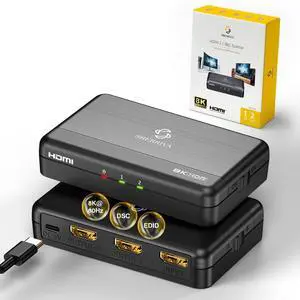
When using the connection, connect one first and then the other to test the use
This product does not support ARC/eARC, frame rate conversion, or downscaling to 720p/480p
1Compatibility2Real 8K3Setup1Special2Includes1Gaming2Classroom3Home Theater4Sports Bar5Meeting Room What are the suitable scenarios for the A/B mode
1. Mode A:4K TV + 1080P monitor / HDR /TV + capture card / When unsure about the resolution limits
2. Mode B: 4K HDR TV or gaming monitor / High-end display + capture card / Full HDR or Dolby Vision / Gaming monitor+Regular TV
Why doesnt EDID switching work
Toggle the EDID switch on the side of the splitter. The splitter must be power-cycled after changing the EDID mode.
Why does the screen go black intermittently?
This is usually caused by unstable resolution/refresh rate, HDMI cable signal loss, or device compatibility issues. Use HDMI 2.1 certified cables, avoid long cables, and try switching to Mode A.
No audio from soundbar or speaker
Most HDMI splitters (including this model) do not support eARC functionality. For eARC decoding or audio return channel use, we recommend pairing with a dedicated eARC audio extractor or eARC-compatible sound system.
Why isn't my 8K content displaying in full 8K resolution?
1. Please verify that your device all support 8K output.
2. Connect your 8K display to the OUTPUT-1 port. Use Mode B.
3. Some TVs require manually enabling 8K Mode or Enhanced Format in settings.
Ultra HD 8K HDMI Splitter 1 Input, 4 Outputs 8K HDMI SPLITTER Introduction and Operation Video How to use 8K HDMI SPLITTER 1 in 4 OUT About A/B Mode What are the suitable scenarios for the A/B mode
Why doesnt EDID switching work
Why does the screen go black intermittently?
No audio from soundbar or speaker
Why isn't my 8K content displaying in full 8K resolution?