




 here!
I’m your shopping assistant for PC builds, upgrades, and everything tech.
Got questions? Ask away!
Start a conversation
here!
I’m your shopping assistant for PC builds, upgrades, and everything tech.
Got questions? Ask away!
Start a conversationShipped by Newegg



| Best Seller Ranking | #51 in Computer Monitor |
|---|
| Brand | MSI |
|---|---|
| Model | PRO MAX 341QPXW14G |
| Cabinet Color | Silver |
| Screen Size | 34" |
|---|---|
| Glare Screen | Anti-Glare Low Reflection |
| Widescreen | Yes |
| Resolution | 3440 x 1440 |
| Refresh Rate | 144Hz |
| Viewing Angle | 178° (H) / 178° (V) |
| Monitor Pixel Density | 0.2315mm |
| Display Colors | 1.07 Billion |
| Brightness | 300 cd/m2 |
| Contrast Ratio | 1,500,000:1 |
| Aspect Ratio | 21:9 |
| Response Time | 0.03ms (GtG) |
| Panel | QD-OLED |
| Display Type | UWQHD |
| Color Gamut | 97.4% Adobe RGB / 99% DCI-P3 / 99.8% sRGB overlap |
| VESA Certified DisplayHDR | DisplayHDR True Black 500 |
| Adaptive Sync Technology | Adaptive Sync |
| Curved Surface Screen | Flat Panel |
| Video Ports | 1 x DisplayPort 1.4a / 2 x HDMI 2.1 / 2 x USB-C (DP Alternative) |
|---|---|
| USB Ports | 4 x USB 5Gbps Type-A, 1 x USB 5Gbps Type-B |
| Headphone | 1 |
| Power Supply | 100 - 240 VAC, 50/60Hz |
|---|
| Stand Adjustments | Height, Pivot, Swivel, Tilt |
|---|---|
| Built-in Speakers | 2 x 3W |
| Built-in Webcam | No |
| HDCP Support | Yes |
| VESA Compatibility - Mountable | 100 x 100mm |
| Dimensions | 21.62" x 32.2" x 7.9" with stand 14.7" x 32.2" x 2.9" without stand |
|---|---|
| Weight | 18.96 lbs. |
| Package Contents | 1 x HDMI Cable (2.1) 1 x DisplayPort Cable (1.4a) 1 x Type-C Cable (3.2 Gen 1) 1 x USB Type-B to A Cable (3.2 Gen 1) 1 x Power Cord 1 x Quick Guide 4 x VESA Wall Mount Screw 1 x VESA Plate 4 x VESA Plate Screw 1 x VESA Adaptor Kit 1 x Cable Clip 1 x Fliber Cloth Color Report |
|---|
| First Listed on Newegg | October 02, 2026 |
|---|
We want to ensure your holiday shopping this year is hassle-free. That’s why we’re automatically extending our return policies on almost every product! For purchases placed between November 1st, 2026 and December 31, 2026 you will have until January 31, 2027 to return your product.
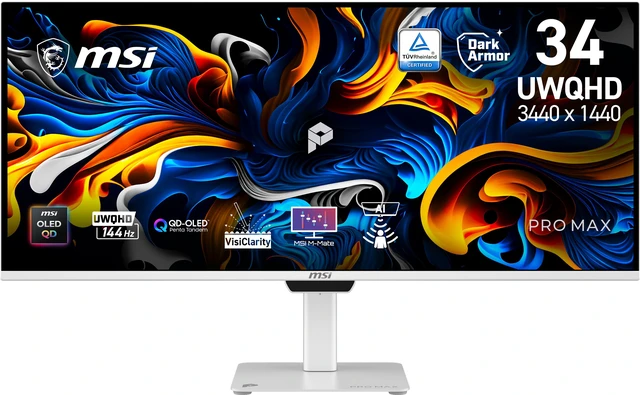
The MSI PRO MAX 341QPXW14G is a 34-inch, 3440 × 1440 QD-OLED ultrawide monitor with a 144Hz refresh rate, 0.03ms response time, and Adaptive Sync, making it suitable for gamers who want fast motion and a wide field of view.
| Attribute | Value |
|---|---|
| Best For | Ultrawide gaming and multitasking, with a 34-inch 21:9 display, 3440 × 1440 resolution, 144Hz refresh rate, and Adaptive Sync |
| Panel And Resolution | 34-inch flat QD-OLED panel with UWQHD resolution of 3440 × 1440, 21:9 aspect ratio, 0.2315mm pixel density, and 178° horizontal and vertical viewing angles |
| Image Quality And HDR | Anti-glare low-reflection screen with 1.07 billion display colors, 300 cd/m² brightness, 1,500,000:1 contrast ratio, 97.4% Adobe RGB, 99% DCI-P3, and 99.8% sRGB overlap; VESA DisplayHDR True Black 500 |
| Refresh Rate And Response | 144Hz refresh rate, 0.03ms GtG response time, and Adaptive Sync |
| Ports And Connectivity | 2 HDMI 2.1, 1 DisplayPort 1.4a, 2 USB-C with DisplayPort Alternate Mode, 4 USB 5Gbps Type-A, 1 USB 5Gbps Type-B, and 1 headphone port; HDCP supported |
| Stand And Mounting | Stand supports height adjustment, pivot, swivel, and tilt; VESA mount compatible at 100 × 100mm |
| Audio | Built-in dual 3W speakers |
| Physical Specifications | 18.96 lb; 32.2 × 21.62 × 7.9 inches with stand and 32.2 × 14.7 × 2.9 inches without stand |
| Power | 100–240 VAC, 50/60Hz |
| In The Box | HDMI 2.1 cable, DisplayPort 1.4a cable, USB-C 3.2 Gen 1 cable, USB Type-B to Type-A 3.2 Gen 1 cable, power cord, quick guide, VESA wall-mount screws and plate, VESA adaptor kit, cable clip, and fiber cloth |
| Model Identifiers | MSI PRO MAX 341QPXW14G; silver cabinet |
Q: MSI PRO MAX 341QPXW14G or MPG 341CQPX: which is better for work and gaming?
A: Choose the PRO MAX 341QPXW14G for a flat screen, Mac-focused controls, RGB-stripe text clarity, and dual USB-C power delivery (98W and 15W). Choose the curved MPG 341CQPX if a 240Hz refresh rate is the priority; both are 34-inch, 3440 × 1440 QD-OLED monitors with 0.03ms response times.
Q: Should I get the PRO MAX 341QPXW14G or the MPG 341CQR QD-OLED X36?
A: Choose the PRO MAX 341QPXW14G for a flat ultrawide workspace, Mac integration, and dual USB-C connections with 98W and 15W power delivery. Choose the curved MPG 341CQR QD-OLED X36 for its 360Hz refresh rate and gaming-focused design. Both use a 34-inch, 3440 × 1440, fifth-generation QD-OLED panel.
Q: How does the PRO MAX 341QPXW14G compare with the MSI PRO MP341CQ E12?
A: Choose the PRO MAX 341QPXW14G for QD-OLED contrast, DisplayHDR True Black 500, 144Hz refresh, adjustable pivot, and USB-C connectivity with up to 98W power delivery. The PRO MP341CQ E12 is a curved VA ultrawide with a 120Hz refresh rate, making it a straightforward option for a traditional productivity setup.
Q: Is the PRO MAX 341QPXW14G a good upgrade from the MSI MAG 341CQP QD-OLED?
A: Choose the PRO MAX 341QPXW14G for a flat screen, fifth-generation QD-OLED with RGB-stripe text rendering, DisplayHDR True Black 500, OLED Care 3.0, and dual USB-C power delivery. The curved MAG 341CQP QD-OLED offers a 175Hz refresh rate and a 1800R curve, so it suits buyers who prefer that gaming-oriented format.
Q: Is this monitor suitable for office work and multitasking?
A: It can suit mixed office and entertainment use: the 34-inch 3440 × 1440 ultrawide screen provides room for multiple windows, and USB-C supports display input and up to 98W power delivery. Because it uses an OLED panel, people who keep the same static work interface on screen for long periods should consider the burn-in risk; OLED Care 3.0 is designed to reduce that risk, not eliminate it. It has built-in speakers but no webcam.
Q: Can I connect a laptop to the monitor with USB-C and charge it?
A: Yes. The monitor has two USB-C ports with DisplayPort Alt Mode; one supports up to 98W power delivery and the other up to 15W. A laptop must support video output over USB-C, and whether 98W is enough to charge it depends on the laptop.
Q: Is it a good choice for gaming?
A: It is suited to gaming on a compatible system, with a 144Hz refresh rate, 0.03ms GtG response time, Adaptive Sync, and a 3440 × 1440 ultrawide resolution. To use the full refresh rate and ultrawide format, check that the computer or console and game support them. The provided specifications do not state NVIDIA G-Sync certification.
Q: Can I mount it on a monitor arm, and is the stand adjustable?
A: Yes. It supports 100 × 100mm VESA mounting. The included stand adjusts for height, pivot, swivel, and tilt.
Q: Is the MSI PRO MAX 341QPXW14G a good choice for both work and gaming?
A: It may suit people who want one 34-inch ultrawide for productivity and gaming: it has a 3440 × 1440 resolution, 144Hz refresh rate, and USB-C with up to 98W power delivery. A Reddit discussion describes this mixed-use scenario, while noting that gaming-focused alternatives can offer higher refresh rates. ([reddit.com](https://www.reddit.com/r/OLED_Gaming/comments/1wtiddx/msi_pro_max_341qpxw14g_for_gaming/?utm_source=openai))
Q: Should I choose this over a faster gaming monitor?
A: Choose it if its work-oriented connectivity and 144Hz refresh rate fit your needs; consider a gaming-focused alternative if you specifically want a higher refresh rate. A Reddit comparison discusses the PRO MAX against a higher-refresh MSI gaming model. ([reddit.com](https://www.reddit.com/r/OLED_Gaming/comments/1wtiddx/msi_pro_max_341qpxw14g_for_gaming/?utm_source=openai))
Q: Is this QD-OLED monitor a sensible option for long workdays with static screen content?
A: OLED image sticking or burn-in remains a consideration for static content. MSI OLED Care 3.0 is specified to reduce that risk, not eliminate it; weigh those protections against your work habits. A Reddit post about this model raises the same concern for prolonged work sessions. ([reddit.com](https://www.reddit.com/r/OLED_Gaming/comments/1xjt6on/upgrade_path_from_benq_gw2780_msi_pro_max/?utm_source=openai))


