• In Stock
  • Sold by Newegg
  • Make an Offer
  • New
Department
Show More
Brands
Show More
Price
Show More
Thunderbolt 3
Sold by
All Top Brands
Availability
Condition
Useful Links
avatar

Any questions? Our AI beta will help you find out quickly.

Sort By:
View:
WAVLINK 10K USB C DisplayLink Docking Station, 2xDisplayPort(1.4)&2xHDMI2.0, Single 10K@60Hz, Dual 8K@60Hz,Quad 4K@60Hz with 100W PD Charging, 2.5G LAN, for New MacBook Neo, Windows 10/11 Mac M1/2/3
Quick View
WAVLINK 10K USB C DisplayLink Docking Station, 2xDisplayPort(1.4)&2xHDMI2.0, Single 10K@60Hz, Dual 8K@60Hz,Quad 4K@60Hz with 100W PD Charging, 2.5G LAN, for New MacBook Neo, Windows 10/11 Mac M1/2/3

Limited time offer, ends 07/26

  • Part Number: 2xDisplayPort++(1.4) &2xHDMI(2.0) ports, 2.5G Ethernet port, USB C 3.2(10Gbps+PD30W), 2xUSB C 3.2(10Gbps), 3xUSB A 3.2(10Gbps), SD4.0 slot(312MB/s), DC in, 100W PD charging port, 3.5mm Audio & Mic jack.
  • Compatibility: -Windows 11/10 -Mac OS 11.x-13.x or later -Chrome OS -Ubuntu
  • Ports Spec: 2xDisplayPort++(1.4) &2xHDMI(2.0) ports, 2.5G Ethernet port, USB C 3.2(10Gbps+PD30W), 2xUSB C 3.2(10Gbps), 3xUSB A 3.2(10Gbps), SD4.0 slot(312MB/s), DC in, 100W PD charging port, 3.5mm Audio & Mic jack. Driver required for this product, pls go to the displaylink website to download the driver....
  • Model #: WL-UG75PD1-DH2
Direct from Wavlink Direct from Wavlink
Sponsored
WAVLINK DisplayLink Docking Station 3 Monitors, MacBook Neo Triple Monitor, Dual 2K + 4K with 100W Charging, 3 HDMI, 5 USB Ports, Ethernet, SD/TF, Audio for New MacBook Neo, Mac M1/M2/M3/M4 & Windows
Quick View
in 30 days
WAVLINK DisplayLink Docking Station 3 Monitors, MacBook Neo Triple Monitor, Dual 2K + 4K with 100W Charging, 3 HDMI, 5 USB Ports, Ethernet, SD/TF, Audio for New MacBook Neo, Mac M1/M2/M3/M4 & Windows

Limited time offer, ends 07/26

  • Part Number: Ports: Side 1: Power LED; 3x USB-A 5Gbps; 1x 3.5mm Earphone; 1x 3.5mm Mic; SD/TF Card Reader(312MB/s) Side 2: 1x RJ45(10/100/1000Mbps); 2x HDMI (2K@60Hz); 1x 4K HDMI(Alt. Mode); 2x USB-A 5Gbps; 1x USB-C Upstream (Host, PD100W); 1x DC IN(20V)
  • Compatibility: Works with Windows 10/11, Mac OS 11.x-15.x and later, Chrome OS, Ubuntu, Android, and HarmonyOS. Compatible with popular laptops like M1/M2/M3/M4 MacBooks, Dell, ASUS, etc. *Not compatible with Linux, Unix, iOS, iPadOS. Requires DisplayLink driver installation; not plug-and-play.
  • Features: - Three HDMI ports support video output simultaneously: one HDMI port can support the resolution up to 4K@60Hz and the other two support up to 2K@60Hz. - Extend/Mirror video modes are available for multiple tasks. - 130W Power Supply delivers maximum 100W power upstream to charge your laptop. - A...
  • Model #: WL-UG39PD11
Direct from Wavlink Direct from Wavlink
Sponsored
WAVLINK USB C 4K Laptop Docking Station Triple Display With 100W PD3.0 Charging (65W for PC), Dual HDMI, 1 Displayport, 4xUSB-A 3.0 , Gigabit Ethernet, SD&TF Card Slot Audio Jack For Windows, Mac
Quick View
WAVLINK USB C 4K Laptop Docking Station Triple Display With 100W PD3.0 Charging (65W for PC), Dual HDMI, 1 Displayport, 4xUSB-A 3.0 , Gigabit Ethernet, SD&TF Card Slot Audio Jack For Windows, Mac

Limited time offer, ends 07/26

  • Compatibility: Installation Before using this dock, please make sure that the latest PC/laptop drivers are installed (including USB, graphics card etc) because the network port needs specific drivers. For Windows 10, the system detects and automatically installs them after the dock is connected to the network. If drivers cannot be automatically installed, the network port can’t perform properly. Please install them manually. For MAC OS system, you need to install the network port driver manually, please visit www.wavlink.com > Support > Driver > PC peripherals > USB Docking. 1. The dock is driver free, therefore you don’t need to install any driver before using it. 2. Plug the power adapter of the dock in a power outlet. 3. Connect the USB-C connector of the dock to your host laptop/PC, the LED light on the dock will turn blue. 4. Connect your monitor(s) to video ports of ...
  • Model #: WL-UMD05
Direct from Wavlink Direct from Wavlink
Sponsored
Wavlink DisplayLink Laptop Docking Station Triple Monitor 4K@60Hz, 100W Charging For Thunderbolt 3/4, New MacBook Neo, M1 M2 M3 Mac/Windows/Chrome, 3 HDMI, 2 DP, 6 USB Ports, 160W Power, LAN,Audio
Quick View
Wavlink DisplayLink Laptop Docking Station Triple Monitor 4K@60Hz, 100W Charging For Thunderbolt 3/4, New MacBook Neo, M1 M2 M3 Mac/Windows/Chrome, 3 HDMI, 2 DP, 6 USB Ports, 160W Power, LAN,Audio
  • Compatibility: Perfect for laptops with USB 3.1 full-function type c port or thunderbolt 3/4 port. Support Windows 11/10/8.1/8/7; Mac OS 10.14-13.x and latest, Chrome OS, Ubuntu 20.04, 22.04, Android and Harmony OS. Unsupported with Unix systems, Linux and iPad OS. (Follow the instructions to download the latest DisplayLink drivers before use.)
  • Ports Spec: 3 x HDMI (HDMI2.0) + 2 x DP (DP1.2), supports up to triple 4K@60Hz resolution display Supports USB Power delivery(PD3.0) up to 100W upstream Charging to a connected laptop Four USB3.1 Type-A (10G) and Two USB-C Gen2 (10G) ports to extend more connectivity to USB devices LAN port supports up to 1Gbps (10/100/1000Mbps),providing
  • Dimension: Unit Size: 22.3x9.1x2.9cm/8.7x3.6x1.1in( L x W x H ) USB-C to C Cable Length: 100cm/39.4in...
  • Model #: WL-UG69PD25 Pro
Direct from Wavlink Direct from Wavlink
Sponsored
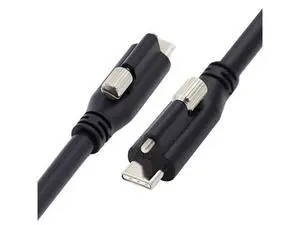
USB 3.1 Type-C to Type-C Cable Reversible Connector | Supports USB 3.1 (10 Gbps), USB 2.0 (480 Mbps) | Compatible with Tablets, Laptops, Phones, etc
Quick View
  •  
  • $37.41 
  • Free Shipping
Plugable 10Gbps USB C to USB C Cable, 3.3 feet (1 Meter), 5A, USB-IF Certified, USB 3.1 Gen 2 Type-C - Driverless (Pack of 5)
Quick View
  •  
  • $182.12 
  • Free Shipping