Warm Tips
- The speakers set is composed of an active speaker and a passive speaker. Wire connection is required between the speakers(speaker wire is included).
- When the bookshelf speaker is connected to the record player, please switch the audio output of the record player to LINE instead of PHONO.If your record player has no Line out audio output, only PHONO output, please connect the bookshelf speakers to the record player through a preamplifier.
- For optical connections, please change your TV audio output to optical, and change the audio format setting to PCM. Please make sure the protective caps at the ends of the optical cable are removed before plugging it in.


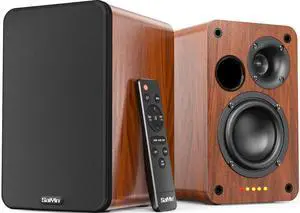
30W*2 Active Bookshelf Speakers
- 65mm silk dome HORN tweeter
- 3.75 inch woofer
- Active bookshelf speakers work without the need of connecting with amp

Multiple Inputs (Cables Included)
- 3.5MM (AUX)
- RCA (AUX)
- Bluetooth
- Coaxial
- Optical
- Plug the speaker wire into "L SPK OUT" on the active speaker to Connect the two speakers.

Buttons & Remote Control
- Control the speakers with buttons on top
- Control the speakers with remote included
- The IR code of remote is not compatible with TV or universal remotes.

What's in the Box
- An active bookshelf speaker
- A passive bookshelf speaker
- US power adapter: 100-240V, DC 18V 1.66A, MAX 3.8A
- Remote control Battery Operated, requires 2 X AA' Batteries (Not included)
- Optical cable
- 3.5mm to RCA cable
- Speaker wire: 2 meters
- Speaker Dimensions (L X D X H): 5.3" x 6.3" x 8.6" -inches (Each)

Frequently Asked Questions
- Q: When I use APPs such as Netflix on the TV, the speakers have no sound.
A: The speakers do not support Dolby and DTS, please kindly disable the Dolby and DTS on your TV audio settings or streaming video APPs like Netflix, Prime Video, HBO, Hulu, Youtube.
- Q: How to quickly disconnect the current Bluetooth device connected with speakers?
A: Press and hold the BT button on remote /M button on speakers for about 2 seconds to disconnect the current Bluetooth device.
- Q: My dog chewed my remote, how do l get a replacement remote?
A: Please do not hesitate to reach out to us to get replacement remotes.
- Q: How do I use TV remote to control the speakers?
A: The IR code of the remote control is not compatible with universal remotes and TV remotes.


Warm Tips
- The speakers set is composed of an active speaker and a passive speaker. Wire connection is required between the speakers(speaker wire is included).
- When the bookshelf speaker is connected to the record player, please switch the audio output of the record player to LINE instead of PHONO.If your record player has no Line out audio output, only PHONO output, please connect the bookshelf speakers to the record player through a preamplifier.
- For optical connections, please change your TV audio output to optical, and change the audio format setting to PCM. Please make sure the protective caps at the ends of the optical cable are removed before plugging it in.


30W*2 Active Bookshelf Speakers
- 65mm silk dome HORN tweeter
- 3.75 inch woofer
- Active bookshelf speakers work without the need of connecting with amp

Multiple Inputs (Cables Included)
- 3.5MM (AUX)
- RCA (AUX)
- Bluetooth
- Coaxial
- Optical
- Plug the speaker wire into "L SPK OUT" on the active speaker to Connect the two speakers.

Buttons & Remote Control
- Control the speakers with buttons on top
- Control the speakers with remote included
- The IR code of remote is not compatible with TV or universal remotes.

What's in the Box
- An active bookshelf speaker
- A passive bookshelf speaker
- US power adapter: 100-240V, DC 18V 1.66A, MAX 3.8A
- Remote control Battery Operated, requires 2 X AA' Batteries (Not included)
- Optical cable
- 3.5mm to RCA cable
- Speaker wire: 2 meters
- Speaker Dimensions (L X D X H): 5.3" x 6.3" x 8.6" -inches (Each)

Frequently Asked Questions
- Q: When I use APPs such as Netflix on the TV, the speakers have no sound.
A: The speakers do not support Dolby and DTS, please kindly disable the Dolby and DTS on your TV audio settings or streaming video APPs like Netflix, Prime Video, HBO, Hulu, Youtube.
- Q: How to quickly disconnect the current Bluetooth device connected with speakers?
A: Press and hold the BT button on remote /M button on speakers for about 2 seconds to disconnect the current Bluetooth device.
- Q: My dog chewed my remote, how do l get a replacement remote?
A: Please do not hesitate to reach out to us to get replacement remotes.
- Q: How do I use TV remote to control the speakers?
A: The IR code of the remote control is not compatible with universal remotes and TV remotes.