




 here!
I’m your shopping assistant for PC builds, upgrades, and everything tech.
Got questions? Ask away!
Start a conversation
here!
I’m your shopping assistant for PC builds, upgrades, and everything tech.
Got questions? Ask away!
Start a conversationShipped by Newegg
 Hot Seller





Combo Up Savings Up To $830+
The more you add, the more you'll save!
Any questions? Ask CelesteSM will help you find out quickly.
We want to ensure your holiday shopping this year is hassle-free. That’s why we’re automatically extending our return policies on almost every product! For purchases placed between November 1st, 2026 and December 31, 2026 you will have until January 31, 2027 to return your product.
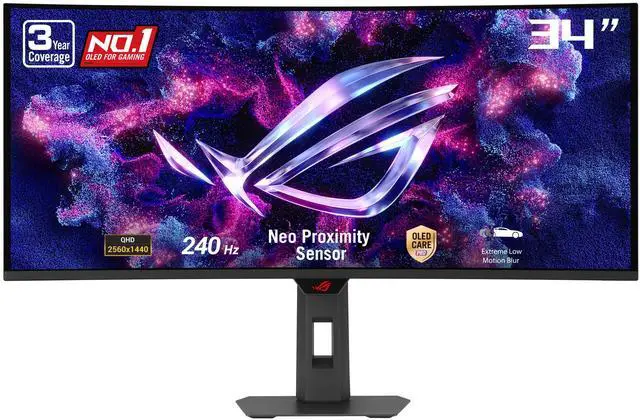
The ASUS ROG Strix XG34WCDMTG is a 34-inch curved QD-OLED ultrawide gaming monitor with 3440 × 1440 resolution, 240Hz refresh, Google TV, and built-in speakers, suited to gamers who want high-speed play and streaming in one display.
| Attribute | Value |
|---|---|
| Best For | Gaming, streaming, and entertainment, with support for home or business display use and photo/video editing |
| Panel And Resolution | 34-inch curved OLED ultrawide display with 3440 × 1440 UWQHD resolution, 21:9 aspect ratio, 1800R curvature, matte finish, and 178° horizontal and vertical viewing angles |
| Refresh Rate And Response | 240Hz refresh rate, 0.03ms response time, and FreeSync Premium Pro and G-SYNC Compatible adaptive sync |
| Image Quality | 99% DCI-P3 and 99% sRGB color gamut, 1.073 billion display colors, 1,500,000:1 contrast ratio, and brightness rated at 250 cd/m² typical and 1,000 cd/m² HDR peak |
| Smart Features And Audio | Android 14 Google TV with Wi-Fi 6 and remote control, plus two built-in 5W speakers and an earphone jack |
| Ports And Connectivity | Two HDMI 2.1 ports, one DisplayPort 1.4, one USB-C with DisplayPort Alt Mode and 90W Power Delivery, two USB 2.0 Type-A ports, and an audio jack |
| Stand And Ergonomics | Height-, swivel-, and tilt-adjustable stand; TÜV flicker-free and low-blue-light features |
| Dimensions And Mounting | 31.96 × 21.46 × 4.69 inches with stand; 31.96 × 14.08 × 4.27 inches without stand; 19.40 lb with stand and 13.67 lb without; VESA 100 × 100mm mounting |
| Power | 100–240 VAC, 50/60Hz supply; 41.5W power consumption, under 0.5W in power-saving mode, and under 0.3W when off |
| Model Identifiers | ASUS ROG Strix XG34WCDMTG, black |
Q: ASUS ROG Strix XG34WCDMTG vs MSI MPG 341CQPX: which should I choose?
A: Choose the ASUS if you want a 34-inch, 3440 × 1440, 240Hz QD-OLED gaming monitor that also has Google TV, Wi-Fi 6, GeForce NOW, and built-in speakers. The MSI offers a similar 240Hz ultrawide gaming format and higher USB-C power delivery (98W versus ASUS’s 90W), which may suit a laptop-centered setup better.
Q: Is the ASUS XG34WCDMTG worth choosing over the Samsung Odyssey OLED G8 G85SD?
A: Choose the ASUS if you want the higher refresh-rate ceiling—240Hz versus the Samsung G85SD’s 175Hz—or want Google TV, GeForce NOW, and built-in speakers. The Samsung shares the 34-inch, 3440 × 1440 OLED ultrawide format and is a practical alternative if 175Hz meets your needs and its price is more appealing.
Q: Should I upgrade from a 175Hz 34-inch OLED ultrawide to the ASUS XG34WCDMTG?
A: The ASUS is an upgrade if you specifically want a 240Hz refresh rate, plus integrated Google TV, Wi-Fi 6, and streaming or cloud-gaming features. If your current 175Hz monitor already suits your gaming and entertainment use, the main performance difference is the higher refresh-rate ceiling; both formats provide a 34-inch, 3440 × 1440 OLED ultrawide experience.
Q: Is this monitor good for both gaming and office work?
A: It can suit someone who wants one large display for gaming and everyday desk work. The 34-inch 3440 × 1440 ultrawide screen, adjustable stand, and USB-C connectivity support a flexible desk setup. It has no built-in webcam, so video meetings require a separate camera.
Q: Can I connect and charge a laptop with one USB-C cable?
A: The monitor’s USB-C port supports DisplayPort Alt Mode and up to 90W Power Delivery, so a compatible laptop can send video and receive power over USB-C. Whether 90W is enough to charge a particular laptop depends on that laptop’s requirements.
Q: Can I use it with a game console?
A: It has two HDMI 2.1 inputs, but the console and game determine which resolutions and refresh rates are available. Because the monitor is 21:9, some console content may not fill the screen and could show side bars; check the console and game’s ultrawide-resolution support before buying.
Q: Does it have built-in speakers, or do I need separate speakers?
A: It has two built-in 5W speakers, so separate speakers are not required for basic audio. You can also use the headphone jack; choose external speakers or headphones if you prefer a different audio setup.
Q: Should I choose this 34-inch ultrawide over a 4K OLED for gaming and work?
A: Choose the XG34WCDMTG if you prefer a 21:9 ultrawide and its 240Hz refresh rate for gaming. Its 3440×1440 resolution is not 4K, so it is a less suitable choice if maximum image sharpness is your priority. Reddit discussions raise this same trade-off for mixed gaming and work use.
Q: Is this a good upgrade from a 27-inch 1440p OLED?
A: It is an upgrade in screen width and refresh rate, not resolution: this monitor is 3440×1440 at 34 inches, while the Reddit poster’s current OLED was 27-inch 1440p. Consider it if you want a wider gaming or desktop view; do not expect it to be a move to 4K-level detail.
Q: Are the built-in Google TV features useful if I already use a PC with the monitor?
A: They can provide a separate way to stream content or use GeForce NOW, but may duplicate features you already access on a connected PC. Reddit discussion of the monitor specifically includes concerns about having Google TV built into a computer display, so their value depends on whether standalone smart features matter to you.


