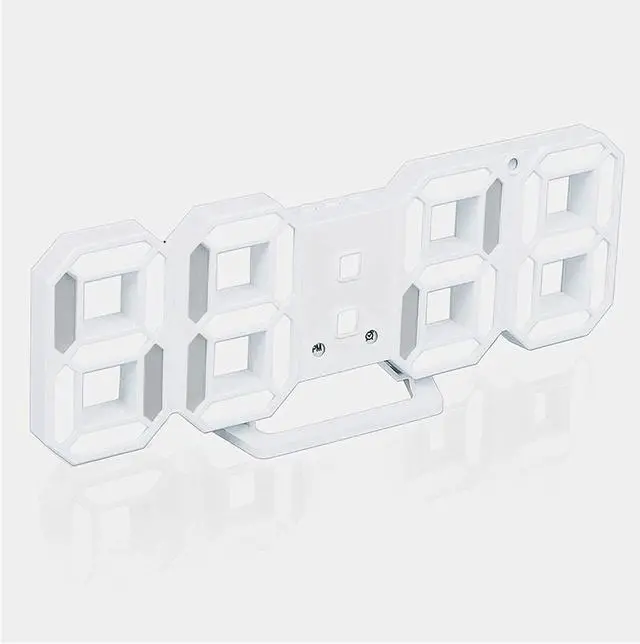
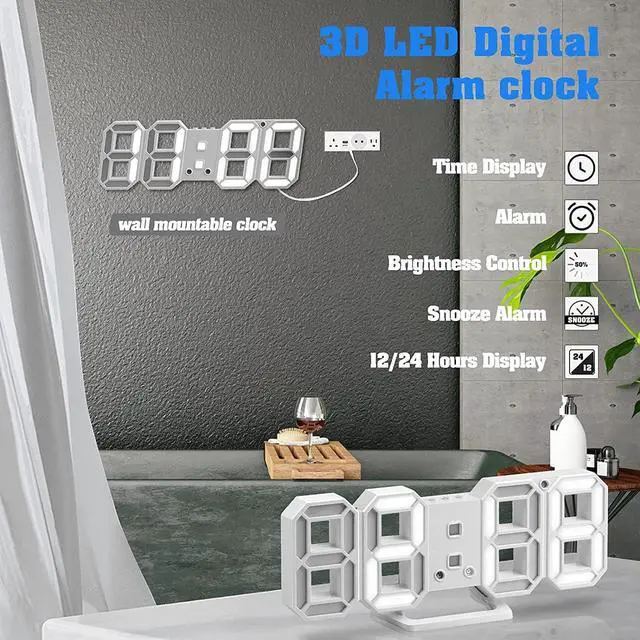
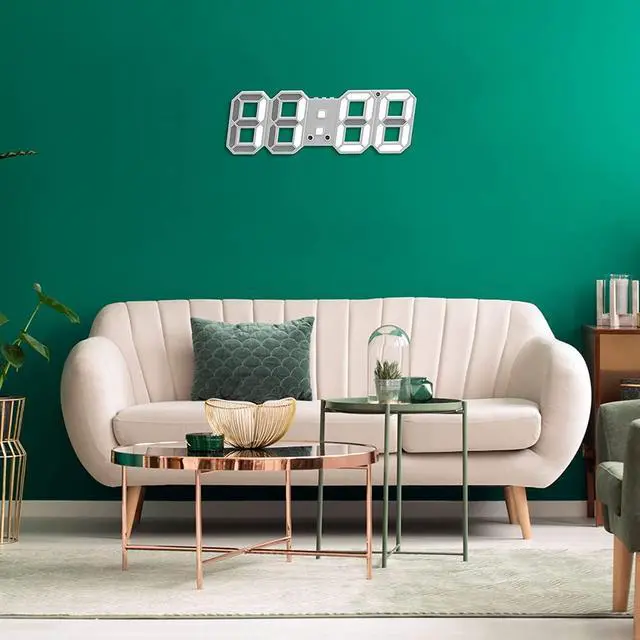
Modern 3D DesignThe clock has a modern and beautiful 3D design that makes it a stylish addition to any room. It can be placed on a table or mounted on the wall
Large 9.5 Inch 3D LED DispalyThe clock features a large 9.5 inch 3D LED display that can be easily read from a distance. It is suitable for a variety of places including bedrooms, living rooms, offices and classrooms
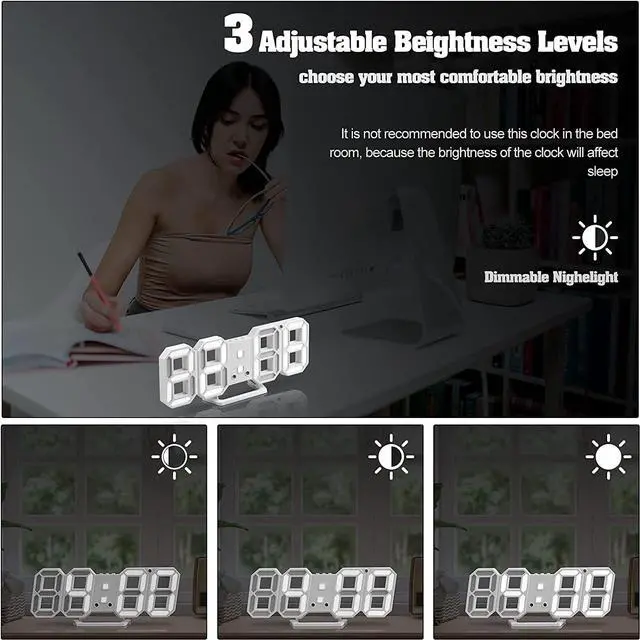
Adjustable Brightness and Night LightWith 3 levels of brightness, you can dim or brighten the LED display to your liking. It offers a low light mode for a warm and quiet environment at night. If you need a night light. This electronic wall clock is the perfect choice
Alarm Clock and Snooze FunctionLED alarm clock has wake-up function and snooze function. And the nap time can be adjusted freely. With an eye-catching and novel design, this digital LED digital clock can be used as a fashionable decoration or a great gift for family and friends
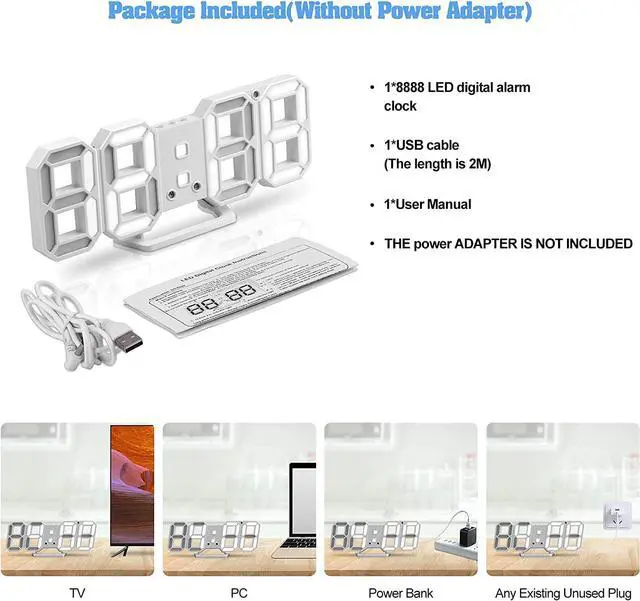
Power SupplyThe 3d Night Light LED Desk Clock is powered by the USB cable only. The built-in CR2032 battery is for time memory function only and is not a power source. ( Note: the USB adapter is not included in the package, but a cable is provided )
+
+
Overview
Specs
Reviews
Any questions? Our AI beta will help you find out quickly.
Try me now
3D Digital Alarm Clock, Electronic Desk Clock, With Snooze Model, 3 Adjustable Brightness, LED Clock for Bedroom Nightstand
Digital Clock
Display mode:
1. Only display time.
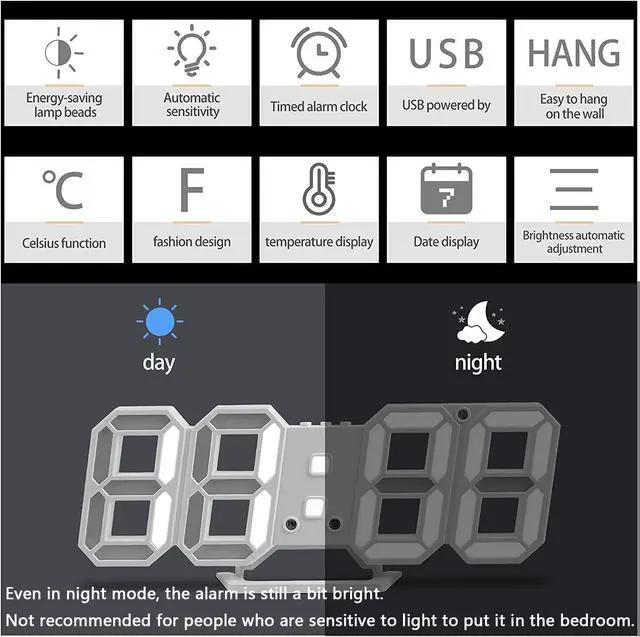
2. Display time, day, temperature(?/?) in turns.
Adjust brightness:
1. 3 Brightness Automatic Adjustment Levels by the photosensitive sensor
2. Sleep Mode + 3 Brightness Automatic Adjustment Levels by the photosensitive sensor
3. 3 Brightness Adjustment Levels by button
4. Turn OFF display
Memory mode:
1. Real-time clock with CR2032 battery
2. keep last time without CR2032 battery
Alarm function:
1. Snooze Mode
2. Weekend Holiday mode
3. Daily alarm mode
Wall Clock
3D clock can be placed on the table or hung on the wall: There is a removable stable base. You can remove the base and hang it on the wall as a wall clock, beautiful and easy to read. You can also put it directly on the table without removing it, you can use it as an ornament or as an alarm clock.
Modern stylish clocks, simple and creative design, novel shape, suitable for any modern, industrial or contemporary environment. Note: Even in night mode, the alarm clock is still a bit bright. We do not recommend people who are sensitive to light to put it in the bedroom.
Multifunction and usage: 3D led wall clock can display time and temperature, and has an alarm clock function. It can automatically sense the light, and automatically adjust the brightness according to the light intensity in the photosensitive mode.
General settings
(Two operations can not exceed 6 seconds, otherwise it will automatically exit the setting mode):
1. Set 12/24H mode: Enter set mode by keeping press the’ SET ’ button for 3 seconds at normal display status.
2. Press ’ + ’ or ’ - ’ button to select 12H or 24H.
3. Set Hour: Press the short ’ SET ’ button for the 1st time and then press the ’ + ’ or ’ - ’ button to change the value.
4. Set Minute: Press the short ’ SET ’ button for the 2nd time and then press the’ + ’ or ’ - ’ button to change the value.
5. Set Year: Press the short ’ SET ’ button for the 3rd time and then press the’ + ’ or ’ - ’ button to change value.
6. Set Month: Press the short ’ SET ’ button for the 4th time and then press the’ + ’ or ’ - ’ button to change value.
7. Set Day: Press the short ’ SET ’ button for the 5th time and then press the’ + ’ or ’ - ’ button to change the value.
8. Set temperature unit C/F: Press the short ’ SET ’ button for the 6th time and then press the’ + ’ or ’ - ’ button to change C or F.
9. Save and exit: Press the short ’ SET ’ button for the 7th time to save parameters and return to normal display status.
Set Alarm:
1. Turn ON/OFF alarm:
- Press the ‘ - ’ button to turn ON or off the alarm. It will display alarm time for 3 seconds and the alarm indicator keep ON if turn ON alarm. The alarm indicator will turn OFF if turn OFF alarm.
-Keep press the ‘ - ’ button for 3 seconds enter into alarm set mode. (Note 12/24H mode)
-Two operations can not exceed 6 seconds, otherwise, it will automatically exit the setting mode.
2. Set Alarm time:
- Set Alarm Hour: Press the ’ + ’ or ’ - ’ button to change the value.
- Set Alarm Minute: Press the short ’ SET ’ button for the 1st time and then press the’ + ’ or ’ - ’ button to change the value.
- Set Alarm Snooze Time: Press the short ’ SET ’ button for the 2nd time and then press the’ + ’ or ’ - ’ button to change the value. It is set to range is 5 minutes to 60 minutes (S-05 to S-60)
- Set Alarm Day: Press the short ’ SET ’ button for the 3rd time and then press the’ + ’ or ’ - ’ button to change value.
3. Turn ON Snooze Time:
- Press any button to turn on Snooze Time when the alarm clock is on. The alarm indicator will keep flashing slowly.
4. Turn OFF Alarm: Keep press any button for 3 seconds to turn OFF alarm for this time. (It will enter and wait for the next alarm)
Parameters:
Product name: 3D LED Digital Alarm Clock
Material: Acrylic + Plastic
Display Color: Blue/Orange/White/Pink
Display: Digital Display
Powered by: USB ( USB cord included)
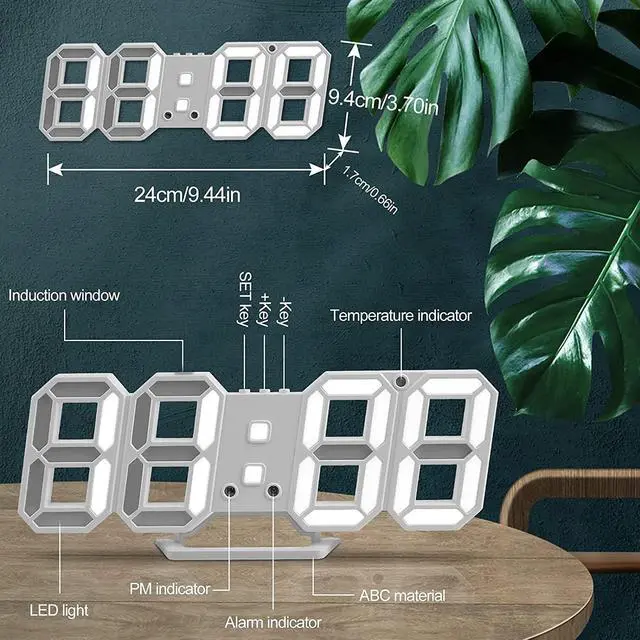
Size: 23.5*9.2*4.2cm/9.5in x 3.6in x 1.7in
Package: 1 x 3D LED Wall Clock,1 x USB Charger Cable,1 x Clock Manual
Adjust brightness:
1. Press the ’ + ’ button at normal display status to adjust brightness.
2. ’ L-5L ’: Sleep Mode + 3 brightness automatic adjustment levels by the photosensitive sensor.
3. ’ L-AU ’: 3 brightness automatic adjustment levels by the photosensitive sensor.
4. ’ L-01 ’: The first brightness levels(darkest).
5. ’ L-02 ’: The second brightness level.
3D Digital Alarm Clock, Electronic Desk Clock, With Snooze Model, 3 Adjustable Brightness, LED Clock for Bedroom Nightstand
Digital Clock
Display mode:
1. Only display time.
2. Display time, day, temperature(?/?) in turns.
Adjust brightness:
1. 3 Brightness Automatic Adjustment Levels by the photosensitive sensor
2. Sleep Mode + 3 Brightness Automatic Adjustment Levels by the photosensitive sensor
3. 3 Brightness Adjustment Levels by button
4. Turn OFF display
Memory mode:
1. Real-time clock with CR2032 battery
2. keep last time without CR2032 battery
Alarm function:
1. Snooze Mode
2. Weekend Holiday mode
3. Daily alarm mode
Wall Clock
3D clock can be placed on the table or hung on the wall: There is a removable stable base. You can remove the base and hang it on the wall as a wall clock, beautiful and easy to read. You can also put it directly on the table without removing it, you can use it as an ornament or as an alarm clock.
Modern stylish clocks, simple and creative design, novel shape, suitable for any modern, industrial or contemporary environment. Note: Even in night mode, the alarm clock is still a bit bright. We do not recommend people who are sensitive to light to put it in the bedroom.
Multifunction and usage: 3D led wall clock can display time and temperature, and has an alarm clock function. It can automatically sense the light, and automatically adjust the brightness according to the light intensity in the photosensitive mode.
General settings
(Two operations can not exceed 6 seconds, otherwise it will automatically exit the setting mode):
1. Set 12/24H mode: Enter set mode by keeping press the’ SET ’ button for 3 seconds at normal display status.
2. Press ’ + ’ or ’ - ’ button to select 12H or 24H.
3. Set Hour: Press the short ’ SET ’ button for the 1st time and then press the ’ + ’ or ’ - ’ button to change the value.
4. Set Minute: Press the short ’ SET ’ button for the 2nd time and then press the’ + ’ or ’ - ’ button to change the value.
5. Set Year: Press the short ’ SET ’ button for the 3rd time and then press the’ + ’ or ’ - ’ button to change value.
6. Set Month: Press the short ’ SET ’ button for the 4th time and then press the’ + ’ or ’ - ’ button to change value.
7. Set Day: Press the short ’ SET ’ button for the 5th time and then press the’ + ’ or ’ - ’ button to change the value.
8. Set temperature unit C/F: Press the short ’ SET ’ button for the 6th time and then press the’ + ’ or ’ - ’ button to change C or F.
9. Save and exit: Press the short ’ SET ’ button for the 7th time to save parameters and return to normal display status.
Set Alarm:
1. Turn ON/OFF alarm:
- Press the ‘ - ’ button to turn ON or off the alarm. It will display alarm time for 3 seconds and the alarm indicator keep ON if turn ON alarm. The alarm indicator will turn OFF if turn OFF alarm.
-Keep press the ‘ - ’ button for 3 seconds enter into alarm set mode. (Note 12/24H mode)
-Two operations can not exceed 6 seconds, otherwise, it will automatically exit the setting mode.
2. Set Alarm time:
- Set Alarm Hour: Press the ’ + ’ or ’ - ’ button to change the value.
- Set Alarm Minute: Press the short ’ SET ’ button for the 1st time and then press the’ + ’ or ’ - ’ button to change the value.
- Set Alarm Snooze Time: Press the short ’ SET ’ button for the 2nd time and then press the’ + ’ or ’ - ’ button to change the value. It is set to range is 5 minutes to 60 minutes (S-05 to S-60)
- Set Alarm Day: Press the short ’ SET ’ button for the 3rd time and then press the’ + ’ or ’ - ’ button to change value.
3. Turn ON Snooze Time:
- Press any button to turn on Snooze Time when the alarm clock is on. The alarm indicator will keep flashing slowly.
4. Turn OFF Alarm: Keep press any button for 3 seconds to turn OFF alarm for this time. (It will enter and wait for the next alarm)
Parameters:
Product name: 3D LED Digital Alarm Clock
Material: Acrylic + Plastic
Display Color: Blue/Orange/White/Pink
Display: Digital Display
Powered by: USB ( USB cord included)
Size: 23.5*9.2*4.2cm/9.5in x 3.6in x 1.7in
Package: 1 x 3D LED Wall Clock,1 x USB Charger Cable,1 x Clock Manual
Adjust brightness:
1. Press the ’ + ’ button at normal display status to adjust brightness.
2. ’ L-5L ’: Sleep Mode + 3 brightness automatic adjustment levels by the photosensitive sensor.
3. ’ L-AU ’: 3 brightness automatic adjustment levels by the photosensitive sensor.
4. ’ L-01 ’: The first brightness levels(darkest).
5. ’ L-02 ’: The second brightness level.
3D LED Digital Wall Clock, 9.5" Desk Alarm Clock, with 3 Adjust Brightness Levels, 12/24H Temperature Display (White)
Learn more about the Generic Brand 6609
Details
Type
Digital
Size/Dimensions
9.5 in x 1.5 in x 4.0 in
Color/Finish
White
Color Mapping
White
Brand
Petilleur
Model
6609
Additional Information
First Listed on Newegg
April 12, 2026
Customer Reviews of the Generic Brand 6609
There are no reviews yet.
Do you own this product?
Warranty & Returns
Warranty, Returns, And Additional Information
Warranty
Please contact the Seller directly for warranty information. Warranty information may also be found on the Manufacturer's website.