Out of stock
This item is currently out of stock and it may or may not be restocked.
Sold by Newegg

Shipped by Newegg

Shop it at NeweggBusiness.

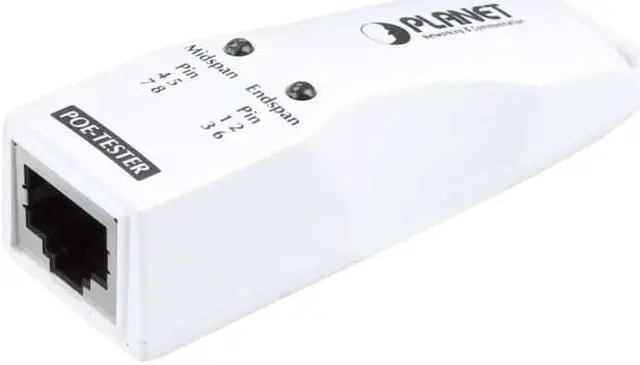
Planet POE-TESTER IEEE 802.3af/at Power Over Ethernet Tester

  • Quickly tests RJ-45 outlet for Power over Ethernet existence
  • LEDs indicate the types of PSE (power source equipment)
  • Compliant with IEEE 802.3at/af PoE standard
  • Compact size, Plug and Play design
Overview
Specs
Reviews
avatar

Any questions? Our AI beta will help you find out quickly.

general information

POE-TESTER IEEE 802.3af/at Power over Ethernet Tester

general information

Quick and Easy Test on RJ-45 Outlet for Power over Ethernet Existence

PLANET POE-TESTER is a compact, easy-to-use PoE diagnostic adapter, offering a simple, fast way for network installers/ company MIS /even home users to identify the existence of Power over Ethernet on applications network.

The POE-TESTER can quickly detect if the IEEE 802.3af/at PoE voltage runs over the UTP cable. It features two LEDs to indicate the types of PSE (power source equipment), making it easier to troubleshoot. Plus, it’s plug-and-play for easy setup.

general information

Key Features at a Glance

  • Quickly tests RJ-45 outlet for Power over Ethernet existence
  • Two LEDs indicate the types of PSE (power source equipment)

- End-span PoE switch

- Mid-span PoE injector / injector hub

- 4-pair, 60-watt ultra PoE injector

  • Compliant with IEEE 802.3af/at PoE standard
  • Compact size
  • Plug-and-Play design

Plug and Show LED Indicators

Simply connect the POE-TESTER to the PSE or the RJ-45 outlet and the LED will light up when it detects the PoE voltage via the UTP cable and identifies the PSE to be mid-span, end-span, or even the latest 4-pair 60-watt ultra PoE in a second.

general information

Identify PoE PSE Modes

The POE-TESTER provides two LEDs for quick and easy PSE mode identification. A Power over Ethernet system comprises a PSE (Power Sourcing Equipment) and a PD (Powered Device). The PSE is a device that will provide power in a PoE setup. There are two types of PSE, Mode A and Mode B. The PSE may either be a Mode A, end-span PoE switch or a Mode B, mid-span PoE injector.

general information

The PD is a PoE-enabled terminal by PSE and thus consumes energy, such as IP network cameras, VoIP phones and wireless access points and more.

PoE Installation Troubleshooting

Although PDs that implement only Mode A with end-span or Mode B with mid-span are disallowed by the IEEE 802.3af/at standard, there are still some of the PDs that are designed to work with only one of the modes. Thus, it will cause the PoE PSE and PD not to be compatible with each other in the applications. For example, an end-span designed PoE switch cannot power on the remote mid-span only wireless access point. But most of the time, the installers would not exactly know what the remote PSE devices are. PLANET POE-TESTER checks your UTP cable for power and identifies its source, mid-span or end-span. Make sure at the end of UTP cable there is existence of PoE, and then the next step is to check if the PD is compatible with the PSE, or it is a malfunctioned PD.

Applications

With compact size and configure free design, the POE-TESTER is truly the best handy PoE test tool for the installation of PD device to test if IEEE 802.3af/at PoE power is sent to wireless access points, IP surveillance cameras, VoIP phones and other PoE devices. It offers plug-and-play PoE diagnostic and PoE installation for installers and system integrators.

general information

Quick and easy test on RJ-45 outlet for Power over Ethernet existence in a secondPLANET POE-TESTER is an easy-to-use PoE diagnostic adapter for network installers company MIS and even home users to quickly identify the existence of Power over Ethernet on applications network. It is designed to detect if the IEEE 802.3af/at PoE voltage runs over the UTP cable and identify the type of PSE (Power Source Equipment) for troubleshooting. Plug and Show LED IndicatorsSimply connect the POE-TESTER to the PSE or the RJ-45 outlet and the LED will light up when it detects the PoE voltage via the UTP cable and identifies the PSE to be mid-span end-span or even the latest 4-pair 60-watt ultra PoE in a second. Identify PoE PSE ModesThe POE-TESTER provides two LEDs for quick and easy PSE mode identification. A Power over Ethernet system comprises a PSE (Power Sourcing Equipment) and a PD (Powered Device). The PSE is a device that will provide power in a PoE setup. There are two types of PSE Mode A and Mode B. The PSE may either be a Mode A end-span PoE switch or a Mode B mid-span PoE injector.  PoE PSE Modes UTP Power Pin Assignment PSE Devices Mode A / End-span Pin 1 2 3 6 PoE Switch Mode B / Mid-span Pin 4 5 7 8 PoE Single-port InjectorPoE Multi-port Injector Hub  The PD is a PoE-enabled terminal by PSE and thus consumes energy such as IP network cameras VoIP phones and wireless access points and more. PoE Installation TroubleshootingAlthough PDs that implement only Mode A with end-span or Mode B with mid-span are disallowed by the IEEE 802.3af/at standard there are still some of the PDs that are designed to work with only one of the modes. Thus it will cause the PoE PSE and PD not to be compatible with each other in the applications. For example an end-span designed PoE switch cannot power on the remote mid-span only wireless access point. But most of the time the installers would not exactly know what the remote PSE devices are. PLANET POE-TESTER checks your UTP cable for power and identifies its source mid-span or end-span. Make sure at the end of UTP cable there is existence of PoE and then the next step is to check if the PD is compatible with the PSE or it is a malfunctioned PD. Quickly tests RJ-45 outlet for Power over Ethernet existence Two LEDs indicate the types of PSE (power source equipment)   - End-span PoE switch   - Mid-span PoE injector / injector hub   - 4-pair 60-watt ultra PoE injector Compliant with IEEE 802.3at/af Po E standard Compact size Plug and Play design

Warranty & Returns

Warranty, Returns, And Additional Information

Warranty

  • Limited Warranty period (parts): 2 years
  • Limited Warranty period (labor): 2 years
  • Read full details

Return Policies

LOADING...
LOADING...