















Plugable USB-C to VGA Adapter Cable
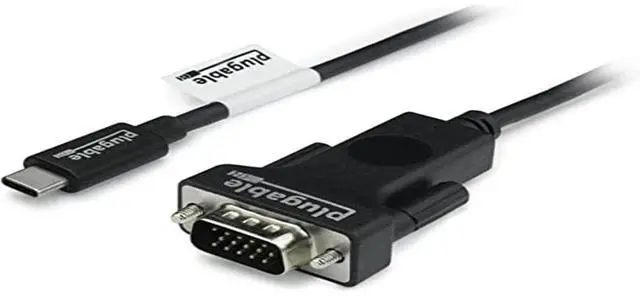
The Plugable USB-C to VGA Adapter Cable enables VGA displays and projectors to be connected to a device via a Thunderbolt 4, USB4, Thunderbolt 3, or USB-C port with DisplayPort Alternate Mode video output.
6 foot/1.8m usb-c to vga cable is a seamless, single-cable solution for connecting your host to a VGA display or projector, allowing for tidy installation and cable management without the need for additional dongles and VGA extension cables.
Supports resolutions up to 1920x1080 (1080p) at 60Hz on VGA-equipped monitors, TVs or projectors.
Can be used to connect a display with vga to usb c ports on Mac, Windows, ChromeOS, and Linux devices. Works as an adapter to connect popular display models like Acer, LG, and Dell monitor cord to laptop. Displays can be used in mirrored or extended mode.

Uncompromising Performance
Alt Mode adapters like this usb c to vga cable allow you to add an additional display output easily and inexpensively on supported systems. Since DisplayPort Alternate Mode is a direct pipeline to the host graphics processor (GPU) in your system, the connected display will function with the same uncompromising performance of a natively attached display.
Video and photo editing, gaming, and other resource-intensive tasks are possible assuming that the system's GPU capabilities are sufficient for the application being used.

Compatibility
Popular Use Cases:
Business: Connect your laptop to a projector or large display to present to a crowd.
Education: Allows your computer or tablet to connect to a projector for slides or subject material for a class
Personal: Add a VGA monitor to your setup to increase productivity and screen space
Compatible Systems: Plug and Play installation on any Windows, Mac, ChromeOS, or Linux host which supports DisplayPort Alternate Mode (Alt Mode) video output functionality.
The Fine Print: This adapter does not support DisplayLink or SMI InstantView technology, so it will not work with their respective softwares.
Note: Not all phones and tablets with USB-C ports support Alt Mode video output.
 USBC-VGA-CABLE |  USBC-HDMI-CABLE |  USBC-DP | |
|---|---|---|---|
| Customer Reviews | — | — | — |
| Price | — | — | — |
| Video Output | VGA | HDMI 2.0 | DisplayPort 1.2 |
| Max Resolution | 1920 x 1200 @ 60Hz | 3840 x 2160 @ 60Hz | 3840 x 2160 @ 60Hz |
| Length | 6.0 ft | 6.0 ft | 6.0 ft |
| Audio Support | no data | ? | ? |
Plugable USB-C to VGA Adapter Cable
The Plugable USB-C to VGA Adapter Cable enables VGA displays and projectors to be connected to a device via a Thunderbolt 4, USB4, Thunderbolt 3, or USB-C port with DisplayPort Alternate Mode video output.
6 foot/1.8m usb-c to vga cable is a seamless, single-cable solution for connecting your host to a VGA display or projector, allowing for tidy installation and cable management without the need for additional dongles and VGA extension cables.
Supports resolutions up to 1920x1080 (1080p) at 60Hz on VGA-equipped monitors, TVs or projectors.
Can be used to connect a display with vga to usb c ports on Mac, Windows, ChromeOS, and Linux devices. Works as an adapter to connect popular display models like Acer, LG, and Dell monitor cord to laptop. Displays can be used in mirrored or extended mode.
Uncompromising Performance
Alt Mode adapters like this usb c to vga cable allow you to add an additional display output easily and inexpensively on supported systems. Since DisplayPort Alternate Mode is a direct pipeline to the host graphics processor (GPU) in your system, the connected display will function with the same uncompromising performance of a natively attached display.
Video and photo editing, gaming, and other resource-intensive tasks are possible assuming that the system's GPU capabilities are sufficient for the application being used.
Compatibility
Popular Use Cases:
Business: Connect your laptop to a projector or large display to present to a crowd.
Education: Allows your computer or tablet to connect to a projector for slides or subject material for a class
Personal: Add a VGA monitor to your setup to increase productivity and screen space
Compatible Systems: Plug and Play installation on any Windows, Mac, ChromeOS, or Linux host which supports DisplayPort Alternate Mode (Alt Mode) video output functionality.
The Fine Print: This adapter does not support DisplayLink or SMI InstantView technology, so it will not work with their respective softwares.
Note: Not all phones and tablets with USB-C ports support Alt Mode video output.
USBC-VGA-CABLE | USBC-HDMI-CABLE |  USBC-DP | |
|---|---|---|---|
| Customer Reviews | — | — | — |
| Price | — | — | — |
| Video Output | VGA | HDMI 2.0 | DisplayPort 1.2 |
| Max Resolution | 1920 x 1200 @ 60Hz | 3840 x 2160 @ 60Hz | 3840 x 2160 @ 60Hz |
| Length | 6.0 ft | 6.0 ft | 6.0 ft |
| Audio Support | no data | ? | ? |


Find Your Docking Station

Shop for Mac

Shop for Windows


Shop Universal Compatability


Shop for Business