

Your Browsing History


Abram J.
Joined on 05/31/07
0
0
product reviews
- 8
The least deep uATX case you can buy
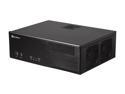
SILVERSTONE Grandia Series GD05B-USB3.0 Aluminum / 0.8mm SECC micro-ATX / Mini-DTX / Mini-ITX MB, 1x5.25", 2x3.5"+1x2.5"HDD or 1x3.5"+2x2.5"HDD, 3x120mm golf bladed fan, 11" expansion card capable HTPC Case with 2X USB3.0 ports (Black)
Pros: Update: I've been using this case for three years without any major problems. With the silver feet, it still looks awesome. I'm going to try to keep using it as I upgrade components. The only minor issue is that I had a lot of interference with a Bluetooth receiver plugged into the front ports, and the back ports are not helpful for this purpose. I'm using a 6" USB extension cord to move the Bluetooth receiver slightly. I searched the whole internet for cases that would fit in my entertainment center (it's a Hemnes shelf from IKEA) with only 350 mm of depth. There are many Mini-ITX cases that would fit, but there are exactly two on the whole internet that support Micro-ATX. This is the only one that also has an optical bay.
Cons: I recommend you put this case in the center compartment in the three-shelf Hemnes. It doesn't fit behind the lip in the left and right compartments. I have mine in the left compartment, and the two case fans on the right are nearly right up to the shelf divider. I'm not very happy with the fan arrangement of the case. There is room for extra PSU cables in this case, but if you use it you are blocking the left case fan. There isn't much airflow for the HD once that is blocked, and even this would be additionally blocked if you have a long graphics card. I'd prefer the case was taller to support some top fans - the only place there is any room in my entertainment center. If you're using a Hemnes, you'll also want to buy right-angle cables or it won't sit flush. Note that our universe's physics does not support right-angle optical audio cables (use HDMI or analog).
Overall Review: The other case that I think is shallow enough to fit in a Hemnes shelf is the Rosewill Legacy U3-S, which does not have an optical bay. Newegg, please please please let us sort by case dimensions! You have by far the best searching and purchasing experience out of all the websites I tried, but we need case measurements! I had to eyeball cases from the category to see what looks sort of shallow, and then click through to the specifications :(
7/15/2018See more detail
Eggcelent choice

HP Spectre x360 13 13.3" 1080 TouchScreen Laptop/Notebook/Tablet Convertible, 8th Gen Quad Core i7-8550U 1.8GHz, 8GB Ram Memory, 512GB SSD, WiFi AC, Bluetooth, Backlit, W10, Pale Rose Gold Color
Pros: The HP Spectre x360 is one of 2017's best laptops, let alone convertibles, in both the 13" and 15" varieties. This variant's spec list hit the perfect spot for me. This arrived in a manufacturer's box (HP Certified Refurbished) in totally like new condition. To me it looks like the case and screen may actually be new. Setting up Windows was no problem, but there are a few bundled programs to remove.
Cons: The active pen that comes in the box doesn't have an off button. I've seen other reviews that the battery dies in a day or two unless you remove the battery between uses. Mine's not dead yet, but it's only been 24 hours so far. The pen is model SPEN-HP-01 if you want to look it up.
Overall Review: Be sure you are getting the 8th gen Intel processor line, i.e. i#-8###, or otherwise be sure to pay a lot less! My recommendation is to get at least 8GB of memory. 256GB of storage is sufficient for most people.
7/2/2019See more detail
Love the fit
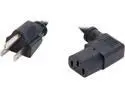
C2G 03152 18 AWG Universal Right Angle Power Cord - NEMA 5-15P to IEC320C13R, TAA Compliant, Black (6 feet, 1.82 Meters)
Pros: My HTPC build was going to just barely fit into my entertainment center. I only had about 2.5 cm of depth clearance, so I couldn't afford cables - particularly stiff power supply cables - pointing straight out the back of the case. This cable fit the bill.
Cons: Ideally, this cable would point the other direction as the plug on power supplies is usually near the bottom of the case. It still fit for me though.
Overall Review: A little expensive, but when you have the only one on the market I guess you can charge what you want.
4/15/2014See more detail
CPUs these days
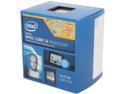
Intel Core i3-4130 - Core i3 4th Gen Haswell Dual-Core 3.4 GHz LGA 1150 54W Intel HD Graphics 4400 Desktop Processor - BX80646I34130
Pros: I'm personally of the opinion that the i3 has been the best price-point in processors for the last few years. The i3 is so much better than my last high-end Core 2 Duo (E8200), that the choice is very simple; particularly in the Haswell generation. I have this paired with a GeForce 650 Ti. I think they are about evenly matched for gaming (right below the power of the One and PS4).
Cons: The stock heatsink is a stock Intel heatsink, but it stays plenty cool in my (admittedly large) case. If you need better cooling, you will want to throw away the stock heatsink and buy something after-market.
Overall Review: Has the low-end i3 ever been priced something other than a little more than a hundred bucks? I'm glad to see Haswell continues the tradition. If you're also thinking about a more expensive processor from an earlier generation (Ivy Bridge), I highly recommend you get this one.
4/15/2014See more detail
Low price uATX
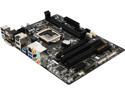
GIGABYTE GA-H81M-HD3 LGA 1150 Intel H81 HDMI USB 3.0 Micro ATX Intel Motherboard
Pros: This was the cheapest micro ATX motherboard that had all the features I needed; the hardest thing to find was the analog audio ports for 5.1 audio. It's been working very well in my desktop since installation.
Cons: No complaints for now.
Overall Review: It seems this mobo is sold out now; I hope it comes back.
4/15/2014See more detail
Nice Gold PSU
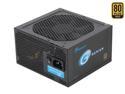
SeaSonic SSR-360GP 360W ATX12V v2.31 80 PLUS GOLD Certified Active PFC Power Supply New 4th Gen CPU Certified Haswell Ready
Pros: This is my first SeaSonic, but I've been happy with it. I was looking for a PSU that supports the Haswell low power state and was Gold rated. This power supply nicely does this, and at a low price! I'm also very happy with how quiet it is, even though the airflow in my case is not at all ideal.
Cons: This has lots more cables than I need and my case is very small, so I ended up having to block one of my case fans with all the cables (including cables from other components). I could have paid a lot more for a modular unit to help out, but I'm still glad I didn't.
4/15/2014See more detail