
Your Browsing History


Kevin H.
Joined on 11/11/02
0
0
product reviews
- 38
So far...fantastic
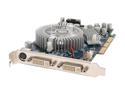
BFG Tech GeForce 6600GT 128MB GDDR3 AGP 4X/8X Graphics Card BFGW6600GTOC
Pros: I got it and all looked good, no loose components or lose heat sink or anything out of the ordinary. Installed it to test and booted perfectly. Not a single problem. Tested with World of Warcraft and no problems. And then I have been running the Dawn Demo on it all night long. Not a single glitch. And I have periodically been feeling the temperature of the heat sink and it is remaining quite cool. So no heat issue here. The card is for a friend who is using my 9700 Pro right now. I had a 7800 GS in the machine, which has worked flawlessly as well, in there and just switched cards to test this card. So no driver issues here.
Cons: none
Overall Review: The heat sink on mine is different than in the picture. It is circular like the one in the picture, but it is like CPU heat sinks with thin zig zagged metal, giving alot better surface area to keep it cool. And it works great. I'm not having any cooling issues or it running warm here.
3/2/2007See more detail
Completely unnecessary and uncomplimentary modular design
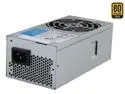
SeaSonic SS-350TGM Bulk 350W TFX12V (v2.31) 80 PLUS GOLD Certified Full Modular Active PFC Power Supply - OEM
Pros: Great efficiency and wattage for a TFX power supply.
Cons: I agree with Larry. and those who say it isn't helpful are not objective about this power supply. There is NO way to tell this will work without buying it and trying it and hoping this unconventional and proprietary and non-beneficial design will work for you. Buy at your own risk. The modular design serves absolutely no purpose. Modular design is supposed to give different connection options. This modular design not does not provide any connection options from if it was hard wired, none whatsoever. There is either use the power supply with the modular connection or not at all. Those are the only two options: All the modular connection does is cause an unconventional design that can only restrict it's use. I agree with Larry, the power supply is noisy, has a constant buzzing sound and a modular connection that serves no purpose, provides no connection options any different than if it was hard wired.
3/15/2015See more detail
Works as advertised -- NOT ANYMORE.
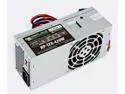
TFX0250D5W Replacement Power Supply Bestec Dell Inspiron 530s 531s Slimline SFF
Pros: It does what I expect, allows moderate gaming on my HTPC, which is an AM1 AMD Athlon 5350. And it works fine. World of Warcraft is nice and smooth.
Cons: I do have a con though. It is a little noisy, which isn't ideal for an HTPC. I can hear the fan from across the room. It's not loud, but it's not quiet either. UPDATE: The fan on this thing didn't last more than five months and is now going out with a noisy, not noisy as I meant before of loud air noise, but the noise of a fan going out, grinding noise. Why can't someone make an enthusiast grade, 400 watt TFX power supply that's made of high quality components and is quiet and lasts at least a few years?
Overall Review: I bought it so that I could use a Radeon HD 7750 in my HTPC.
12/12/2019See more detail
Solved Hypertransport sync flood error
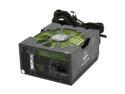
XFX XXX Edition P1-650X-CAG9 650 W ATX12V 2.2 / ESP12V 2.91 SLI Certified CrossFire Ready 80 PLUS BRONZE Certified Modular Active PFC Power Supply
Pros: Great single rail amperage, 52A. I was getting hypertransport sync flood errors with my old power supply. Replaced it with this and problem solved.
Cons: None - absolutely none. UPDATE: 7 years later, the fan is going out, making alot of noise. I'm a bit disappointed. I know the warranty is only for 5 years, but as well built as this seemed to be, I would think the fan, which is usually not what goes out on a power supply, would last at least 10 years. This has plenty of wattage for most current PCs, but if the fan goes out, there is nothing that can feasibly be done.
Overall Review: If you get a MSI 790FX-GD70 motherboard, upgrade your power supply, too, to a quality supply like this one, unless yours is very current and has good wattage, 550 or more. It will save you from alot of headaches like I went through. I learned my lesson.
11/10/2017See more detail
Works with Ryzen
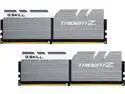
G.SKILL TridentZ Series 16GB (2 x 8GB) DDR4 3200 (PC4 25600) Desktop Memory Model F4-3200C15D-16GTZSW
Pros: I want to clarify a mistake in my review, if it gets posted that is. I wrote in the "Other Thoughts" section: "THEN, I got the bright idea to look at the manual and found that on the Asrock X370 Professional Gaming motherboard they need to be in slot A1 and skip A2 and put the other one in B2 and voila! XMP worked and ALL IS GOOD" I meant they need to be in slot A1, skip A2, and put the other one in B1, NOT B2, because I bet if you put it in B2, you will only get single channel mode and get the three beep memory error if you try to get these to work above 2133 mhz up to their rated 3200 mhz.
Cons: STILL NONE!
Overall Review: Remember, CHECK the manual for your motherboard on the correct slots to put this memory in! If you are smarter than I am, you already do this though.
5/6/2017See more detail
Long time running solid board
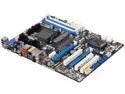
ASRock 880G PRO3 AM3+ AMD 880G USB 3.0 HDMI ATX AMD Motherboard
Pros: Is future proof with the AM3+ socket, has USB 3.0. Just a solid board.
Cons: None that I can see.
Overall Review: I bought this motherboard for a friend to upgrade his Pentium III computer back in 2011. He has been using it since then, with an Athlon II X2 255, since May 2011, nearly 5 years ago, without a single problem. He had been using Windows XP, with 4 GB (3 GB usable) until this past weekend and I recommended he upgrade his memory and upgrade his Windows XP. He added two sticks of Corsair CAS 9, 8 GB (2x 4 GB) Vengeance memory and upgraded to Windows 10 without a hitch. What can I say but that this board is for the long haul. All we need to do is upgrade to an FX processor and he will really be future proof. Kevin T. and network issues. He gets a low budget board for commercial purposes and then complains. The comment ought to be, he knows what brand of motherboard to avoid when trying to be cheap and use it in an abnormal commercial environment that it wasn't designed for. Because, his problem with the network doesn't come into play at all when used for non-commercial, residential home use, and therefore an illegitimate reason make a blanket criticism against the Asrock brand.
3/7/2016See more detail