




 here!
here!
I’m your shopping assistant for PC builds, upgrades, and everything tech.
Got questions? Ask away!
Start a conversation
here!
I’m your shopping assistant for PC builds, upgrades, and everything tech.
Got questions? Ask away!
Start a conversation

Joined on 09/18/05
Starting to like Zotac - Alot
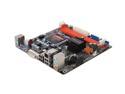
Pros: Modern - Support 45nm chips, although it is not specifically stated anywhere I can find. Good chipset, including decent video, DDR2800 support, and SATA II. It's about as tiny as you'd expect, but maybe more-so if you aren't familiar with ITX boards (this is my 4th). Versatile - Huge variety of processors in the 775 family, and all should work in this board. Room for four drives, which I can't expect you'd need more in a case designed for a board this small. Has one PCIEx1 expansion slot... for? Will accept 4 gigs of ddr2, which is dirt cheap anymore, and should run any OS just fine on that. The onboard video chipset is nice if you use it as a mobile, "luggable" pc because it can be connected to 3 common formats (VGA, DVI, HDMI). Price - About half the price of intel's similar itx offering, and certainly better in some ways. You may notice this thing sold out almost immediately, so expect the price to go up.
Cons: Expandability - Only one PCIEx1 slot, which is very limited in functionality to begin with. That said, many TV tuners come in this format, as well as raid cards. Would like instead to see a single PCIEX16 (2.0)... but that's a pipe dream on a board this size, especially at this price. Case limitations - ITX is really just starting to be accepted as a form factor, and there are very few decent ITX cases out there. That of course, is not the fault of this board, and in fact may be corrected by boards like this creating a wider market for the format.
Overall Review: Really starting to like ZOTAC: between this and two video cards I purchased recently, which are both amazing in terms of quality and temperature management (not to mention price). Dropped this in a modified ITX box which I managed to shove a 120mm intake and a 92mm exhaust fan into. Added a C2D e7200 and 4 gigs crucial ram to make a sweet little terabyte machine that I can carry around on my pinky (it has a handle). Idles around 25C and load doesn't break 35C on an Intel stock cooler (applied with MX-2 paste). Ubuntu recognized everything on this board and installed all the drivers automatically, except of course the Nvidia ones... which aren't open source so you have accept their license. Everything however works like a charm, and even compiz-fusion runs perfectly at 1240-1024, and beyond I'm sure. Only had it running for a day... and I'm already debating about putting at q9400 in it; just because I can. If anything should go horribly awry however, I will write an update.
Great Design but Some issues
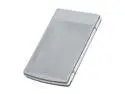
Pros: Appearance - This is an attractive and somewhat unique enclosure. I found the mesh/plastic look quite appealing and it matches my white antec p180 perfectly, although that was a coincidence. Size - Very near the size of the drive plus maybe an inch on the back for the adapter. Materials - The mesh actually allows this enclosure to be thinner (and lighter) than any of my other 2.5" enclosures. Between the shock-absorbing, plastic ring in the center of the enclosure and the natural spring of the mesh I have no doubt it will survive significant shock despite the small size. The extreme ventilation of the drive should also keep drive temperatures down, although it allows every sound to pass through as well. Features - Mini USB is nice, since we all have and need them for other devices anyway. Every other Nippon Lab's 2.5" enclosure I've had has had a USB A to USB A cable, which is actually quite uncommon. The separate power/activity LEDs are also nice for diagnostic purposes.
Cons: Quality Issues - The design requires many, small screws which are fairly weak and easily stripped. This problem is exacerbated by the tiny screw driver which comes with the enclosure, which is simply too small for the screws. They did decide to add 2 extra screws which I needed after stripping out the first 2. Build Issues - Lining those screws up to the corresponding pre-drilled holes is difficult. Like every other Nippon labs enclosure I've owned I had to decide what was "good enough" and was left with screws inserted at minor angles. Insertion of the drive itself was also somewhat difficult. I should have removed the top mesh as well instead of simply forcing the drive in from the bottom. Accessories - As mentioned above the included screwdriver did more harm than good. The sleeve is horrible, the manual also did not correspond to this model and was no help at all. Price - You can get a drive in an enclosure for $20 anymore; $10 seems a bit steep for just an enclosure
Overall Review: To be honest this review sounds worse than the product really is. If they'd simply stop putting the generic (and damagingly small) screwdriver, and incorrect manual in the box I'd have given it a 4/5. I am happy overall with the finished product, there were just some frustrations getting there. This has become the 4th enclosure for my trusty old 320 gig portable drive. As you might have guessed: I am rather hard on these things. I'm not expecting it to last very long, but maybe it will surprise me.
Well worth the sale price
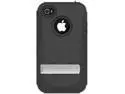
Pros: This case is on par with the otterbox defender series while being both slimmer and cheaper. It also has some additional features otterbox hasn't perfected yet like the metal kickstand; which works very well in both portrait and landscape.
Cons: Some "features" are downright inconvenient, like the phone has to be inserted into the clip facing inward. In reality this is simply the most secure way to mount the phone, but removing the choice is still a con in my book. Additionally the clip itself is difficult to line up, when compared to an otterbox. There is a pair of + shaped holes in the belt clip, which line up with snaps on the case itself. Unless these are lined up perfectly, it will not catch in the clip.
Overall Review: I bought this for a friend who unfortunately is required to use an iPhone for work (Samsung in the pocket ofc). After 3 otterboxes the trident case was a welcome, although somewhat lateral move. The clip alignment is an issue, however muscle memory takes over quickly and it becomes easier and easier.
Nice addition to my new tablet
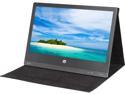
Pros: Good design - ultra lightweight and stylish monitor/case. It feels a bit like carrying around an empty box but looks more like an artists folio. Decent picture - 720p resolution (highest available on usb 2.0) is sufficient for my purposes. The color depth is actually better than what I expected from a 5 watt, portable monitor. The brightness adjustment is also a big plus. Compatibility - So far I have it working under windows 7 and windows 8.1 without any problem. I just downloaded a driver, ran the install and plugged it in. Efficient - 5 watts is not much much of a power draw, but what I'm really impressed with is how effectively the tiny tablet's CPU can feed the monitor. I'd say the display link software has improved dramatically since the last time I've used it.
Cons: Size - As thin as it is, itt's actually a bit thicker than I expected. The incredibly low weight leads me to believe that much of the internal casing is empty. This is a serious wasted opportunity. A battery pack, or card reader, or just simple cable storage could fit into this space and make the device all the more appealing. Outdated Driver - I did try to install the driver from the media only to have it tell me it was incompatible with my version of windows. A simple download fixed the problem, but still. Price - Full price would be a bit steep for what you are getting. That said I got it deeply discounted and it was worth it. Viewing angles - the viewing angles (particularly horizontal) are not great. Honestly I think we're just spoiled by IPS displays; but if you're going to use this, you're going to want to be directly in front of it.
Overall Review: As I mentioned above I'm using this on a dell venue 8 pro via OTG cable with a 1 amp 5 volt USB "power brick" on the power only side of the split USB cable. Combined with a bluetooth mouse and keyboard I can effectively turn my 8 inch tablet into a 15.6 inch laptop. Performance doesn't seem to suffer much either. The few light games I have on the tablet (solitaire, terraria, don't starve) run smoothly. Streaming video also did not stutter in my short test.
Don't bother, really don't
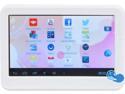
Pros: It's cheap... it has a micro sd slot, and I actually prefer micro usb which this charges over. It plays streaming music apps fairly well, and the wifi signal is fairly strong.
Cons: Terrible battery life coupled with bad viewing and screen resolution make it pretty useless. Launch candy crush as an example; the game takes forever to load and then won't display correctly because the resolution is below recommended. Meanwhile it's hard to see except straight on, and is heating up in your hands and it devours it's battery charge. 3-4 years ago it'd have been ok, but today there are so many capable android phones floating around on clearance that there is no reason to ever buy tablets like this again.
Overall Review: Bought this for my niece for Christmas knowing she'd likely break it (she's 7). However after I purchased this I managed to get 3 android phones for less than I paid for this (roughly 35 bucks total). All were new in box, and are superior in every way except for slightly smaller screens. I gave her one of those for Christmas and am keeping the other 2 in reserve for the eventual loss/breakage. I forgot I had bought this until it was too late to return, so instead I integrated it into the front of an old portable radio... which actually came out pretty neat. It still eats more power than i'd like but at least it's running off rechargeable AAs now.
Feature rich 7 inch alternative in a sea of devices
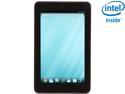
Pros: -Lighter, thinner, and more comfortable than the other 7-8 inch tablet I've owned (5 in total). Construction feels very solid. -Good out of the box "vanilla" android with no modification required -Good hardware features including GTO support, dual cameras. 2 gigs of ram and the micro sd card slot also make this product somewhat "future proof". -Battery life is excellent, and can be charged easily via micro usb. -Intel x86 processor has some major speed advantages in many applications, as well as possible support for full blown operating systems in the future. -Competitively priced, although admittedly I purchased at a discount and may not have at full price, this very capable device is still a fraction of what an ipad mini would cost.
Cons: -intel x86 processor, while amazing that android runs so well on this architecture, many 3d applications are not optimized for x86 and run more slowly than on ARM. -Edge light bleeding is quite bad on the device I received. Most people in most uses would never see it, but launch a letterbox movie in a dark room and it's painfully apparent. I actually contemplated returning it to see if I could get one without the issue, but chose to keep a different tablet on my nightstand instead and keep this one for "pocket" use. -Virtually no accessories - I realize this is somewhat unfair to list as a con, especially being brand new, but as I consider accessories as the only real Pro for apple products at this point I guess I can.
Overall Review: I bought this device partially because I was curious exactly how android runs on an x86 processor. Processor wise, the benchmark falls between the asus nexus 7 (1st gen) and the nook hd (running cm). Hand on however, internet browsing, file managing, and many other activities seem to run smoother/faster. It's only when you get into 3d games that it starts to bog down, and I suspect that's all a matter of optimization not hardware. Although the graphics chipset in this device isn't amazing, the slowdown is more a matter of loading times than of loss of quality or frame rate. I do expect x86 android optimization will improve in the near future, and this device may actually speed up (instead of slow down like most devices do). My other curiousity is whether or not there will be any support for other x86 operating systems in the future for this device. There is no development as of yet, but it would be quite possible to install a full version linux or even windows (although it'd run poorly) on this tiny~$150ish device. Further support will likely be needed from dell in order to actually make that happen however, and unfortunately that is not something dell has been well known for in the past.


