
Your Browsing History
 Holiday Shipping Details & Extended Holiday Returns Holiday Shipping Details & Extended Holiday Returns

Joined on 04/19/09
Completes my PC
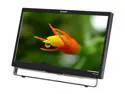
Pros: This is an outstanding monitor for the price! The touch is very responsive and works perfectly with Windows 7 Ultimate and Windows 8 Release Preview- no setup or drivers to install. It comes with a stylus and has both VGA and DVI. The full-HD has outstanding detail and clarity! The 5ms response time is perfect for gaming. Lastly, the screen is a hard plastic, not a matte, so it is very hard to scratch. With the various things I've used as a stylus, it still looks good as new!
Cons: It doesn't track two points simultaneously as well as a capacitive touch screen, but most people probably won't even notice the difference. It does well enough for pinch-to-zoom and what not. Also, I run mirrored monitors with this and my HDTV so I can watch movies, and the color/contrast looks slightly better on my TV than the touch screen. This is probably to be expected, and the Planar still looks better than most monitors I work with. Lastly, I wish it was brighter.
Overall Review: I'm probably just being too picky with the cons, the brightness is the only thing that ever bothers me (especially in Minecraft). I love this monitor, and I may buy a second one for college. The touch screen completes my gaming PC and my friends love it. One of them even went and bought the same model after playing with mine. In fact, I decided to buy mine after playing with the one my teacher bought for the classroom (same model). I guess it is viral, haha. I love using it with Photoshop, and it has allowed me to truly experience Windows 8. Buy this monitor, and I guarantee you will never look back.
I got this for free!
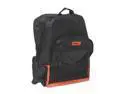
Pros: Came free with a flash drive and mouse I bought in 2010. I got to walk around school with a NewEgg backpack for a month and a half, and it was the envy of all my friends.
Cons: This is the cheapest backpack you will ever get. It WILL shred itself. Might as well be made from paper.
Overall Review: For free, you really can't complain. I never even tried to RMA it, but maybe I will (or buy a new one) and put it on a shelf as a collectors item. I probably like NewEgg a little too much...
Not Compatible with HP Touchpad!!
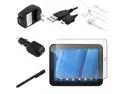
Pros: The stylus is good, and works on my tablet and phone.
Cons: The wall charger IS NOT compatible with the HP TouchPad as advertised. Upon plugging it into the TouchPad, I am greeted with this message: "To reliably charge, please use the charger and cable that came with this device." If my TouchPad is dead, it will not charge at all, displaying the above message instead. If I'm booted into Android, it will charge, but only at the extremely slow pace of 500 milliamps, the same as using a USB port on a computer. I have not tested it with WebOS. I bought this product specifically because it was supposed to be compatible with the TouchPad, and all my other chargers in the house also display this message. About 5 weeks after purchasing this, I found my original charger and it works perfectly, so its not a problem with my TouchPad.
Overall Review: I haven't used the screen protector yet, but it looks good!
Great SSD
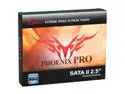
Pros: Was one of the fastest drives available when I bought it Lasted 2+ years so far with no issues or bad cells (sectors) No noticeable speed decrease over time
Cons: Runs a little hot A little small (80GB)
Overall Review: When I bought this drive 2 years ago, the $2.25/GB price was the best you could find. At the time, SSDs were pretty rare and 250MB/s was one of the faster drives available. 80GB got a little cramped, so I upgraded to the 256GB Samsung 830 series with the sale this week ($0.62/GB lol). That will become my main drive and this OCZ drive will go into my Pentium 4 to breathe some life into it. PRO TIP for those using an SSD. I use mine for Windows 7, programs, and games. To organize my files I have a HDD RAID array. I went into my user folder and deleted the following subfolders: Documents, Music, Videos, Pictures, and Downloads. Then I created junction points pointing to folders with the corresponding names on my disk drive. With this setup, putting a file in C:\Program Files\ or C:\Users\KJ4EZJ\ or C:\Users\KJ4EZJ\Appdata puts the file on my SSD. Putting a file in C:\Users\KJ4EZJ\Documents or Music, Videos, or Downloads appears like it's on the SSD but is actually on the HDD. BTW my Windows 7 boot time with startup items on this drive was 32 seconds
Receives DTV signals during bad storms
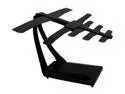
Pros: Very sensitive antenna Long range High quality Easily adjustable
Cons: The coax cable could be longer
Overall Review: Note: Most TV stations transmit with vertical polarization, meaning for best reception, you should set it up so it's elements are vertical. Spring 2011, I was stuck at home during a really bad storm. The storm came out of nowhere, going from a mostly cloudy and eerily calm day, to torrential downpour with 90MPH winds in 5 minutes. We cut cable in favor of internet streaming, so I turned on the local news to see what was going on. The storm completely blocked the signal from my old rabbit ear antennas. A tornado ended up jumping over my house. We suffered little damage, but it could've been much worse. I bought this antenna because I needed something that could get a signal when I need it most. This antenna does.
Works Great!
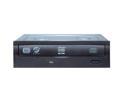
Pros: I bought this as a second disk drive for my Gaming PC, and it works great! It writes DVDs and CDs quickly, reads everything I've put into it, and it doesn't have problems detecting blank disks.
Cons: None
Overall Review: My rig: Intel Core 2 Quad Q9650 @ 3GHz 8GB DDR3 memory @ 1600MHz Zotac 570 AMP! Edition (don't buy a Zotac card) 80 GB SSD, 5.45 TB Raid 5 array Blu-ray, TV tuner, card reader, liquid cooling, touchscreen, and what not This DVD drive Windows 7 Ultimate x64