




 here!
here!
I’m your shopping assistant for PC builds, upgrades, and everything tech.
Got questions? Ask away!
Start a conversation
here!
I’m your shopping assistant for PC builds, upgrades, and everything tech.
Got questions? Ask away!
Start a conversation

Joined on 07/14/01
Does What It Is Supposed To Do
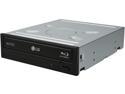
Pros: Reads and writes to just about any media you can find. I've burned tons of DVD-DL and a number of BD-DL disks. I had sooo many problems with other units burning DL disks, but this one has yet to burn a coaster.
Cons: A bit pricey, but it beats spending money on a lesser unit that won't do what it's advertised to do. When burning and fully spun-up, the disk in the tray is really flying, and you can certainly hear it sing. But normal reading is next to silent.
Overall Review: Been through a dozen BD burners, and this is the only one that does everything it's supposed to do without errors or complaint.
USB Woes
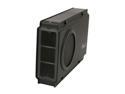
Pros: Hard drive fits like a glove. Quiet fan. Lovely mechanical design. This enclosure is exactly what I was looking for...except...
Cons: ...except USB is totally non-functional. I get decent transfer speeds from eSATA, but not a peep from USB (system doesn't even recognize that a drive has been connected). No amount of fussing or connecting or waiting or re-connecting or rebooting helps. "It's dead, Jim".
Overall Review: After reading the other reviews, I should have known better. Newegg shows these black models as sold out. I'll be returning this one, but I'm torn as to whether I should try the silver one (RX-358 U3C SLV), or simply give up on Rosewill and go with something else.
Punches Above Its Weight
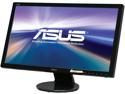
Pros: D-Sub, HDMI, and DVI allow me to connect this monitor to just about anything. No wall-wart...takes a standard three-wire power cord.
Cons: While the stand allows tilting, there's no height adjust. Built-in speakers (accessable only if using HDMI) are pretty wimpy. Asus could have left them out with no complaint. Monitor ships with brightness high enough to burn your retinas (turn it down for a normal looking display).
Overall Review: Really, for what this is selling for, you get a great basic LCD monitor with a very sharp display. Don't be looking for great sound out of the speakers, or a fancy adjustable stand. The effort here is all in the display.
Crucial is it!

Pros: Price, performance, cool LED's.
Cons: As previously noted, LED sensitivity. Full bright, or too dim. Range of adjustment just isn't there.
Overall Review: Works great in my old Asus P6X58D. Bought four so when I move to the 2011 platform I'll be set.
Funky Wheel!

Pros: I was looking for a basic, simple mouse to replace an ancient Logitech, and this one felt great in the store. Fits my hand very nicely.
Cons: Wow!!! What's with the bloody wheel? I noticed in the store that the wheel didn't have 'detents' (steps) to it like my old Logitech. Didn't think much of it till I got home and realized that it basically offers zero resolution for scrolling. Open a pdf document and there's no way to advance page by page except by using the pointer on the icon bar. Use the wheel to select weapons in gaming? Forget it...not gonna happen. Microsoft has basically taken the mouse a giant step backwards and reduced its functionality to nothing more than being able to scroll around web pages. How did this thing ever make it past the user testing phase?? Pitiful.
Overall Review: If Microsoft would change the wheel to the 'stepped' kind and offer some real control via the software, this would be a great product. As it is, I'd have to recommend looking elsewhere for a mouse, unless all you do is mail and web surfing.
Doorstop
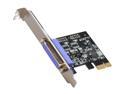
Pros: Win7 detected card just fine, and downloaded drivers for it. Then the old HP 712C was detected, and Windows loaded drivers for it as well. Easy enough...so far...
Cons: No print. Nada. If I sent a print job to the HP, I'm told that the print spooler service is not running (it certainly was before the job was sent). Card installs at LPT3, but can be changed in Device Manager to LPT1, 2, or 3. No matter...there was no setting that would allow the card to function as intended.
Overall Review: Total waste of my time. Looks like I'll have to upgrade to that USB printer after all.


