
Your Browsing History


Andrew B.
Joined on 09/04/06
0
0
product reviews
- 6
HEC Blitz
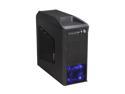
HEC Blitz Black Steel Edition ATX Mid Tower Computer Chassis Gaming Case w/ Front Blue LED 120mm Fan & Top 120mm Fan
Pros: Overall look of the case is great. Almost all of the case is a steel finish except for the sides on the front and the top, and the plastic is good quality. The top "hatch" holds 2 120mm fans and is nicely designed and easy to use. The front buttons give a nice click when they are pressed and look great. Internally the bottom mounted PSU works well blowing air directly out the bottom and not back into the case. There is foam behind the front mesh to prevent dust and sound.
Cons: Instructions were poor at best, but there is not much to do unless you intend to add the 3.5 external. Mesh front ports were very hard to get off and I was only able to do so by bending it in half then pulling it out. Expansion card slots were also very hard to remove but they are more accessible so it was easier.
Overall Review: The 3.5in internal "screw less" assembly works well on some drives and were loose with some others. So I ended up screwing all of them just to be safe. The way fans are added to the top "hatch" is not with screws but a plastic clipping method and works well for a average 120mm fan, but thicker or thinner fans will not fit. The wires from the front ports and buttons were all long enough to reach to the bottom right corner of my motherboard with room to route nicely. There is a well placed hole below the Motherboard for easy fan replacement without removing the whole motherboard. The motherboard sits up just high enough to route some wires below it but not excessively. Had to move the 3.5in drive up one or two to leave room for extra PSU cables since there is really no other room. The metal felt thin at first (0.6mm), but the case feels solid when it is all together and the thinness helps keep the weight down.
3/26/2010See more detail
OK case

HEC 6K28BSOH48D Black / Silver 0.8mm SECC Steel Micro ATX Mini Tower Computer Case 485W Power Supply
Pros: Case is Solid Construction overall Side panel fits well PSU is 485W as listed The removable HDD mount with thumb screw*
Cons: The HDD front light connection had to be adjusted to fit MOBO, beacuse it was separated by a blank pin Looks like it was designed to fit a front fan but there is no easy way to add one. *The removable HDD mount is a good idea, but power cable has to bend tight just to fit in the case and still touches the side panel.
Overall Review: I didn't notice the power button was at a funny angle, kinda annoying. Back fan is a 80mm but could fit up to a 90mm. PSU has about 4 molex, 3 SATA, 1 Floppy, 1 4pin CPU, 20+4 MOBO, and 1 6pin Graphics connections
12/6/2009See more detail
Very Nice Keyboard
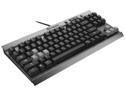
Corsair Vengeance K65 Compact Mechanical Gaming Keyboard - Cherry MX Red Switches
Pros: * The best word to describe the k65 is 'Minimalist" which is what I was going for. It does not have a 10-key, but the keys it does have are full sized. It has basic volume and stop/play/pause/FF/RW and a windows button disable, and that's about it for extras. The color scheme is black/gray and if it wasn't for the slightly off color WASD there would be nothing signifying it as a 'Gaming' keyboard. The back plate is a nice brushed metal finish, and the space bar is textured. The keys are not backlit, but the font is simple, bold and easy to read in most lighting. The thing overall feels sturdy, but not overly heavy. * Mechanical Cherry MX Red switches provide smooth, linear key-press. Unlike my old keyboard where the keys have a initial high resistance and then a let off when the key is pressed, the Cherry MX Red switches have an even smooth resistance all the way down. They also register the key before the key is fully pressed, so if you want you can type by only half depressing the keys down.
Cons: Not back-lit No USB or headphone inputs WASD keys come in slightly lighter color with no replacements.
Overall Review: The front of the keyboard comes with a switch that will disable some of the 'advanced features' of the keyboard so it will work with older BIOSs. This sounds nice, but I didn't see anywhere in the documentation about which selection did what. The keyboard seems to work fine when I have plugged it into several machines, so its not really an issue, but it would be nice to have more documentation on what the button does. The keys are full size and raised off the chassis for easier cleaning. From the chassis to the top of the key is about the width of my finger. My old membrane keyboard had low-profile keys, and was inset more so the top of the keys were only 1/8th" from the chassis. Its not a big deal, but it takes a little getting used to. The right windows button is replaced with from what I can tell is just a right mouse button. I sometimes use the right windows button when locking my screen, but its no big deal to adapt to using the left. I carry the keyboard back and fourth from work and its not too large or heavy. Its narrower than my 17in laptop but when you are using it, it does not feel like it. I do find that I like being able to keep my mouse closer to the keyboard, so it takes less time to switch between the two. I do wish that it came with regular black WASD keys. They seem like just a gimmick to market it as a "Gaming" keyboard. The light grey keys do not stand out that much, so I am not going to complain about it too much.
12/30/2013See more detail
Good Board
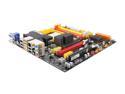
ECS Black Series A785GM-M AM3 AMD 785G HDMI Micro ATX AMD Motherboard
Pros: Nice sound dampening back plate that is black in back. Easy access and logical positioning of connections (PSU, SATA, front ports, fans)
Cons: see other thoughts
Overall Review: The stock cooler from the AMD Athlon II X4 620 was slightly loose, I was able to wiggle side to side even when clipped on. I am not sure if this was the MOBO or the Stock Cooler. Didn't recognize RAM at stock speeds, but G-Skill is not on the tested list so not a big deal.
12/6/2009See more detail
Good Card
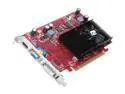
PowerColor Radeon HD 4650 1GB DDR2 PCI Express 2.0 x16 CrossFireX Support Graphics Card AX4650 1GBD2-H
Pros: Cheap but powerful for the money. Larger memory interface than other cards in the same price range and 1GB of memory is good sized for any game that you would play with this card.
Cons: DDR2 is kinda slow for Graphics cards, but hey its cheap
Overall Review: Try http://get.adobe.com/reader/ to open MIR
11/24/2009See more detail
Great Case
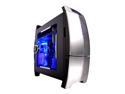
NZXT Lexa Black/ Silver Aluminum Construction
Plastic Front Panel ATX Mid Tower Computer Case 500 WATT PS2 ATX 12V 2.0 Power Supply
Pros: This is a great case, the fans are nice and bright but are not to loud. The front panel has a nice magnet to keep it closed and opens and closes easily. Metal finish is only plastic but looks real. The inside expansion ports are easy to use and nice to have a screw less install. The entire case is very light and has a good finish inside and out.
Cons: The back of the case isn't well thought out. The screws to take off the panel are almost completely covered up so I just left them unscrewed and the case locked. The panel also has to fit in between the plastic covering on the back and the aluminum case and is kinda annoying. The fan on the side has to be unplugged whenever you take off the side panel and the cabling is kinda tight. The latch to secure the PCI slots doesn't lock because of my ATI RADEON X1800 but with a screw it isn't a big deal.
Overall Review: Was very easy to install except the power button was pushed back during shipping. I just simply had to unscrew the panel and push it back in, no big deal.
2/15/2007See more detail