

Your Browsing History


Don R.
Joined on 06/03/08
0
1
product reviews
- 7
Of course its not as good as a Wacom. But its far and above the best graphics tablet for the price. Dont Miss This!
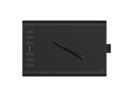
HUION New 1060 Plus 10 x 6.25 Inches Graphics Drawing Pen Tablet with 8192 Levels Pen Pressure 8GB SD Card 12 Express Keys - Upgraded Version
Pros: * Excellent quality. Great size. ** Pen, buttons and surface feel great and work great. *** The price is going to force Wacom to lower their prices .. .. ...... A LOT. (And let's face it, its been a long time coming! I saw a kid playing a video game with a small drawing tablet the other day. Not to speak ill of the dying but, If Wacom would wake up, stop trying to be "Apple" with their prices, and stop generalizing that ALL graphics artists own a business and/or are rich they, could make a lot more money by selling to a much larger demographic in general artists, gamers, and painters.)
Cons: * Though the "feel" quality of the Pen feels even better than Wacom's with a better weight and an awesome rubber coating over the tip (finally) for better grip with less squeeze, the nib itself is quite loose comparatively, forcing a bit of a learning curve at first. It's obviously something you could get used to but considering the quality of the rest of the product, it's a bit annoying. Where the pen meets the surface is THE most important part of a graphics tablet and should be priority one when it comes to contact feel. ** (personal preference) The drawing surface is too smooth at first. I'm not sure yet if this is actually going to be a con since sometimes it feels nice when you're drawing longer lines.
Overall Review: I was kind of forced to buy this product because my Intuos tablet went down at a time when I needed it most and I couldn't afford to just spend $300+ dollars on a new one immediately. I wanted to save and upgrade, not be forced to buy a cheaper tablet or spend money I need because of an unexpected failure. Having bought this Huion tablet now, I'm glad I had a chance to try it out. I was very impressed and would easily buy it again (and probably will). And also after looking into many reviews of other Huion products, I may very well give them my upgrade business as well. If their display tablets are half as nice as their pen tablets then I don't think there's much to think about with a better than $2000 markup on the Wacoms.
10/1/2018See more detail
Disappointed after a year
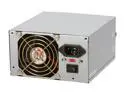
COOLMAX CT-450 450 W ATX12V Power Supply
Pros: Its still shiney and pretty when it dies, didnt even have time to have dust buildup on the fan blades. It tells you how long it going to last right in the warranty. Its very light, incase you cant lift much. Its quiet......Oh wait, its just dead. It does have two 12V rails, but then you'll never know it. It got me to finally buckle down and get that new graphics card I needed when it killed my 8600gt. Oh yea, I didnt need a new card, that one (that they dont sell anymore) played my HD streaming movies perfectly.
Cons: I literally have more than a few 7-10 year old computers with feeble little 200W PS' that are heavier than this thing, and theyre still alive. The price, even this low, isnt worth it. Pay for two years at once and get a better PS from a different company. Im only glad I didnt try putting this in a customers computer, because I would have....... ITS A FRICKN COOLMAX DUAL 12V RAIL 450 WATT POWER SUPPLY!
Overall Review: COOLMAX really disappointed me with this PS. They must have really did theyre research because this thing died weeks within the warranty ending. The price was higher when I bought it and for $50 + shipping, I really feel you should get a PS that last longer than a year, I really expected 2 1/2 or 3 out of it. I mean, theyre two rail PS' start at $24. I almost bought from them again because I know the name and they do make good products but Ive always bought the higher priced stuff and so I was expecting at least a bit of quality from them no matter where the price range. But I was wrong. And this was only a small AMD X2 system. I dont believe a good company should lower its quality just to step into a higher used price range, and after a few hours of debating with myself, I opted not to buy another PS from them. Time to find another company thats trying to impress with quality and not just trying to make a BUCK.
6/8/2010See more detail
3 year review - falling apart but still rocking
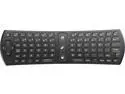
Rocktek RT-MWK24 2.4GHz 2-in-1 Wireless Keyboard with Air Mouse for HTPC Android TV Box
Pros: Pros: Easy to use. Steady mouse pointer (easy to point, keep steady, and click). Perfect for large monitors or tv screens. Theres nothing you can do with a mouse and keyboard that you cant do with this remote.
Cons: Plastic casing is a little flimsy/thin and will eventually start splitting apart on you - but Ive had this thing for 3 years now, and I consistently throw it across the room and on to my bed. But still, for the (retail) price it should have tiny screws holding it together rather than plastic tabs and glue so that it doesnt happen at all.
Overall Review: Overall I couldnt live without this thing now. I bought two at the same time before and gave one to my roommate and after 3 years Im buying my second one now. I have my computer hooked to a 47" Vizio in my bedroom and watch all of my tv and movies on it and I use it every single day/night for hours at a time. Its sits on my bedside table right next to my TV and Audio system remotes and doesnt look out of place at all. It looks and feels so much like a normal remote control that, until I pick it up and start moving the mouse around, no one even notices it. The charge lasts about 5-7 days even after 3 years. Id like to try other ones but for the price of this one on sale theres just no reason to take a chance of not liking a different one. This was EXACTLY what I was hoping it would be when I bought it and it has been perfect ever since. And even though the one I have now is still working, Im buying a second one in case this one finally breaks because without it I would be extremely grumpy.
1/20/2020See more detail
Get a Heatsink/Fan

Intel Core i5-4670K - Core i5 4th Gen Quad-Core 3.4 GHz LGA 1150 84W Intel HD Graphics Desktop Processor - BX80646I54670K
Pros: Overall for CPU is awesome
Cons: - but I knew this heatsink/fan was scrap when I first laid eyes on it. Though I did manage to get it in and tight, I knew that once the heat dried it out, it would only be good for one install. Intel seems to ignore the fact that some people clean their computers or like to change thermal paste at least once a year or so. So the first time I removed it, the whole thing fell apart. Pieces designed to hold the heatsink in and tight broke off and viola, no computer for a week while you wait for another heatsink. If your temps are high, this could be your problem. The snap holders break off and then your heatsink ends up just sitting on your cpu and not cooling it. This is the worst heatsink and fastener design Ive ever encountered installing heatsinks. It certainly seems to be designed with failure and a new purchase in mind. Very sad that intel uses such tactics.
Overall Review: This is the worst heatsink and fastener design Ive ever encountered installing heatsinks. It certainly seems to be designed with failure and a new purchase in mind. Very sad that intel uses such tactics.
9/3/2013See more detail
You people are crazy!!!
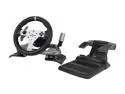
Mad Catz XBOX 360 Wireless Force Feedback Wheel
Pros: PROS???? - its MadCatz!
Cons: Have you all been brainwashed!!?? I understand that XBOX only has Forza, and I understand that most of you arent Sim Racers, just gaming racers. But C'mon! this wheel is more expensive than the Logitech G27! and as a (very) long time Sim Racer I can tell you that the G25 and G27 are at the bottom of the pile for wheels - if you go lower youre gonna miss out on some real quality. This wheel doesnt have a clutch - The shifter doesnt come away from the wheel - the shifter is sequential only - The plastics are cheap and thin and wont last, especially once you start using the FF - A G27's FFeedback will move a desk to the point of knocking a can drink over - the chassis of the unit needs to be able to handle that for YEARS! this isnt going to do that. I would have given this 2 stars except that its obviously a scam. MadCatz thinks if they charge as much as a high quality wheel you will believe it is one - its obviously working on some of you.
Overall Review: My only advice to anyone looking to purchase a wheel? Dont listen to anyone who hasnt played in a Full Simulation Environment (and NO, thats not GT5 - or any other game that comes on a console, sorry. If youre serious and really want to race? - RACE07 series is at the very bottom. RFactor, RF2, and iRacing are at the top. There are very few in between those that equal up). Back to wheels - Do the research and you'll find that $250 is the bare minimal for a good wheel/shifter/pedal setup. And along with the modifications that you can now make to the nicer setups and some of the after market add-ons that are being made these days, your not going to be able to get away cheaply. I would hate for anyone to spend this kind of money FIRST, only to learn a very hard lesson later: that this isnt even in the same ball park of GOOD racing wheels. If this is your maximum allowance for a wheel, trust me and go get a Logitech.
8/15/2012See more detail
(CRASHES) Very Unhappy
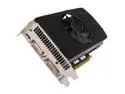
PNY GeForce GTX 560 (Fermi) 1GB GDDR5 PCI Express 2.0 x16 Graphics Card RVCGGTX560XXB
Pros: NONE - There are no pros if I cant use the card for all of its purposes
Cons: Re-certified? for what, this card is still broken! It crashes my computer daily, usually multiple times! Someone on here mentioned crashing to a pink screen on youtube only, I WISH! I cant play video in media player, I cant play video on youtube, Flash, HD, AVI's - I am so sick of this. I work for a church recording and editing their VIDEO for television and I can barely get it done. I wish I hadnt bought this card. The only thing the card will do without crashing is play games, but I just built an intel 2500k system and I need to do more than play games!
Overall Review: Im wondering if Im even going to be able to do anything about this since it was re-certified. I just want a good card that will play games on high AND will let me watch my TV and MOVIES without crashing!
5/17/2012See more detail