

Your Browsing History


Michael L.
Joined on 01/05/06
0
0
100%
100%


product reviews
- 142
MasterLiquid Lite 120 All-in-one CPU Liquid Cooler
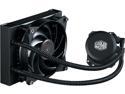
Cooler Master MasterLiquid Lite 120 AIO CPU Liquid Cooler, White Led Pump, FEP Tubing, 120mm Air Balance MF, Dual Dissipation Technology
Pros: The Cooler Master MasterLiquid Lite 120 All-in-one CPU Liquid Cooler fits pretty much every socket CPU (except TR4, but even for that an adapter is available). The specification list up to 180W TDP, more than the 150 on the air based TDP HSF. It is compact and that makes installation a breeze. The flexible tubes are of appropriate length, making installation simple. Remove the motherboard and put the backing plate on the back side of the motherboard. It is low depth and fit readily with no case modification, even with an older case that does not have a cutout behind the CPU area. The instructions are mostly visual and simple enough to follow. The pump and fan connections to the motherboard are straightforward. The entire installation process replacing a conventional air HSF took less than an hour. It is quiet, with the pump listed at < 8 dBA and the fan 6-30 dBA. The pump is described as a dual dissipation pump and the entire thing should be maintenance free. The specs for the pump list 70,000 hours MTTF, which works out to about 8 years, and the fan is listed as more than double that. The fan appears to be high quality and has a high density sine fin design, and qualitatively it was quieter than my case fans. Performance was great, even better than I expected. It had no issue taking a 6600k to 4.6 GHz and in stability testing it stayed below 60 degrees C. That is something I can easily live with and have no concerns.
Cons: The copper block had clear machining marks, as shown in gallery images, and was not particularly smooth or polished. I considered polishing it and then testing again to see if there is any improvement in cooling performance, but given the above performance it did not seem like it would be worth the time.
Overall Review: This is my second CPU liquid cooler, with the other cooling a 4770k. I may obtain another one of these to use with a currently air cooled 5820k.
4/1/2018See more detail
First one DOA, second one is fine
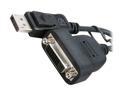
POWERCOLOR Active DisplayPort to Single-Link DVI-D Adapter DP-SL DVI-D ADAPTER
Pros: One active displayport needed for three monitors. Works well for Eyefinity with a 5570, after a defective one was returned for replacement.
Cons: First one was DOA, has to return for a replacement.
11/5/2011See more detail
DDR5 32 GB RAM in two sticks overclocking with good CAS

Crucial Pro Overclocking 32GB (2 x 16GB) DDR5 6400 (PC5 51200) Desktop Memory Model CP2K16G64C32U5B
Pros: The 32GB RAM kit was a simple install in two DDR5 RAM slots. The looks of the aluminum heat spreaders are minimalistic with a low height in case you use air cooling and certain hsf cpu coolers. The appearance is good against a black and silver motherboard.
Cons: The package seal was not attached to one side, but that did not cause any issue. There were no indications like fingerprints to indicate that it was used.
Overall Review: The visual appearance of the RAM is understated with the white heat spreaders. The neutral color matches particularly well with any neutral color motherboard. The motherboard I am using is an Asus Prime Z690A with an Intel Core i7-12700KF, so I can confirm good compatibility with 12th gen Intel processors. After installation and boot into the BIOS, XMP was selected and matched the timings at 32-40-40-103 at 1.35 V. A save a reboot into Windows showed these settings. The memory has been stable at the stock voltage and timings. After some initial testing, the XNPI was changed to XMPII, which for my case changed some auto setting in the bios to specific values for DRAM command rate (2N), DRAM REF Cycle Time 2 (512), DRAM REF Cycle time same bank (416), and DRAM VPP Voltage (1.8). The CAS latency of 32 is attractive in this set compared to 40 in many other ram sets. In stability testing in games, calculations, and stress tests the ram was stable in over a week of testing. Performance was smooth in each usage scenario. Overall, very satisfied with this RAM.
12/19/2025See more detail
ASUS Prime Z690-A three years issue free
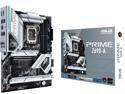
ASUS Prime Z690-A LGA 1700(Intel®12th&13th) ATX motherboard (16+1 DrMOS,PCIe 5.0,DDR5,4x M.2, Intel® 2.5 Gb LAN,USB 3.2 Gen 2 front panel Type-C,Thunderbolt™ 4,Aura Sync RGB lighting)
Pros: Stable and solid motherboard
Overall Review: The base build was simple with no installation issues in Windows 11. I've used both 32 GB and 64 GB RAM combination and different speeds, brands, and voltages. BIOS updates have been issue free. Handles five connected drives with a mix of M.2 and SATA SSDs and HDDs. Has good features with RBG AIO, etc. Overclocking is decent with good airflow.
12/1/2025See more detail
OLOy Blade RGB 32G
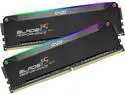
OLOy Blade RGB 32GB (2 x 16GB) DDR5 4800 (PC5 38400) Desktop Memory Model ND5U1648400BRKDE
Pros: The set has good compatibility and low voltage requirement.
Cons: Speed and latency is baseline.
Overall Review: Install was easy and XMP worked as expected. RBG is bright, be sure that is what you want. These have been used for three years with no issues.
12/1/2025See more detail
Thermaltake TH360 solid over three years
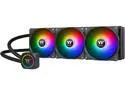
Thermaltake TH360 ARGB Motherboard Sync Edition Intel LGA1700 Ready/AMD All-in-One Liquid Cooling System 360mm High Efficiency Radiator CPU Cooler CL-W300-PL12SW-B
Pros: 360mm cooling and room to grow. The block is compatible with most common Intel/AMD options.
Cons: Warranty is only 1 year.
Overall Review: The installation was relatively easy. I have it vertically mounted in the front of a Corsair 4000D case. Make sure you case will fit it in the orientation you want. It does take some time to hide all the control/cables. The fans are decently quiet with sufficient airflow, but easily replaceable if needed. The RGB options are varied, but once I had it set to my liking I haven't changed it much. I am using it to cool a i7-12700KF for the past three years and it has been reliable with no issues.
12/1/2025See more detail