




 here!
here!
I’m your shopping assistant for PC builds, upgrades, and everything tech.
Got questions? Ask away!
Start a conversation
here!
I’m your shopping assistant for PC builds, upgrades, and everything tech.
Got questions? Ask away!
Start a conversation

Joined on 07/03/04
Works fine
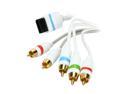
Pros: It shipped promptly. It works as intended, it enables the 480P option to be enabled and works fine. Affordable but yet quality.
Cons: The limitations of the Wii itself I suppose.
Overall Review: Mileage varies on the difference you'll see with this cable. Like I had a really high end tube based Sony HDTV and this cable made all the difference... on alldigital tvs, it may not make such a drastic change.
Day-3 Update
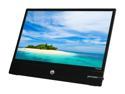
Pros: Price. Delivery time. Thin. Interesting. Very cool running, like it barely warms up even a little, even after extended use.
Cons: *Never ending tweaking. I didn't realize how little I knew about the Catalyst Control center. I suppose this could be a pro since learning is good. * I've had monitors that only had power and brightness buttons, but they were more elegant in their proper functioning. This brightness control as I mentioned earlier creates a buzzing sound and also dims the display non-uniformly. So basically it's full brightness or bust. I think this could work just great if my particular Catalyst Control Center (AMD video card adjustments) weren't glitchin. But they are, so adjusting the brightness takes a bit of time. * Its limitations get old. While it was fun at first to have the kickstand with no height adjustments, on day three I'm already missing having a proper stand. * I'm not sure how I missed it before, but this is one of the slower displays I've come across in a while when it comes to refresh rate.
Overall Review: * There's some confusion stemming from the fact that there exist both passive and active DisplayPort adapters, then of the active ones there are also Dual-Link DVI active ones. This has made it appear that their could be hope in adapting the port on this display. This is not the case, it doesn't matter how fancy your adapter, you will need a DisplayPort source (and DP sources may be adapted to DVI or VGA or whatever). I got this information from DisplayPort.org. Only get this monitor for a DisplayPort source and whatever you do, don't go around spending money on an adapter that has no hope of working with this. A DVI port will never ever ever ever work on this. In the end, I don't regret purchasing one of these. Buying an additional two was hot headed and I'm seeing it's limitations more clearly now. Nevertheless, I think this could be a really nice companion for laptops with (mini) DisplayPorts or Thunderbolt ports. I still think this could be a good monitor to tide users over while they find "the one". * I wish I hadn't gone down the rabbit hole of reviewing this thing. It's complicated. Please don't hate me.
Mini DP is NOT Thunderbolt
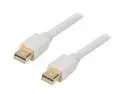
Pros: It's a Mini DisplayPort to Mini DisplayPort cable. It's 3 ft long.
Cons: Well, actually, while many displays have a full size DisplayPort cable, seldom have the mini DisplayPort cable. Radeon video cards with mini DisplayPort abound, and laptops are common too. So check your usage.
Overall Review: Shane Z: this is a mini DisplayPort cable meant for connecting a compatible display to a compatible video card. This is NOT a thunderbolt cable, those cost about $40.00 and have a totally different spec to them.
Best Available Display August 2014
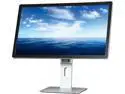
Pros: Amazing display. I really think that the 15" Retina MacBook sets a high expectation, this display exceeds that expectation. The single best display I have ever seen in my life. And it's somewhat affordable. USB Hub, dual DisplayPort input with clever cable included that ensures you'll be set to go. 27"+ displays are just not polite on a desk, this awesome thing does the amazing thing of really making it possible to have a nice size display that doesn't clutter a desk while having the absolute best quality available. The USB 3.0 hub also reduces clutter. My aging and inexpensive Radeon HD 7870 runs it great after updating the video card driver. Initially this basic video card only ran it at 30Hz, but now it's 60Hz and I'm loving that. Will be looking to upgrade video cards a number of times over the expected lifetime of this display. Handsome case, looks far sleeker than my U2711 (which in itself is an awesome, sleek display).
Cons: Ridiculously, SEVERAL people have found it logical to reduce it's overall rating of this product because their video card (or windows) doesn't support 60Hz on portrait mode. As if somehow that was something that this monitor has anything to do with. I enjoy smaller, affordable laptops and unfortunately I don't know of any that can drive this display at 60Hz yet. Sluggish overall. Most 1080P displays are fuzzy as hell but also fast. I think the coming years are going to be great for display technology. Video card companies have been rebranding old technology for years, and it has been fine because games are designed for XBOX 360 anyway and they looked great, but now, with 4K we're really do some updates. But I'd call that another plus of this display. It promotes progress.
Overall Review: Everything about this display is of a flawless quality. It's not comparable to any other product of any brand in that regard. It's not pretentious and sleek like an Apple product, instead it ships in a secure, plain box, and unlike an Apple product it is designed to last five or ten years. Truly, no corners were cut on this product, I'm really glad I didn't wait for 2nd gen because this is already the display for me. 3-year warranty is amazing too, because if I can have this display for JUST 3-years I'll be thrilled with the money paid. More than likely it'll last 6-10 years. Brightness range is incredible on this display. Truly. This is the one thing to have on your desk. I am not easily stunned but everything about this display is just so thoughtfully made, so flawless. Two DisplayPorts: One for your 15" retina MacBook, one for your desktop PC. And USB 3.0 built-in for additional tidiness and awesomeness. At $800 or less, there are few things I could recommend more for the money. If we're talking about fine electronics, and if you have a 15" retina MacBook, a latest model Dell 15" XPS, or a 14" RazerBlade or anything absolutely awesome...this is the display to get. I'll add too, that the 24" size works out really quite well for this resolution. It may seem small, but it's actually quite large compared to a 11" - 15" laptop with 4K range resolutions. In an ideal world, there would be a display out there that was 2560x1440 in a 21"-24" size range, in the $400-$500 price range because then you could really pair it to just about any great laptop and be good to go. That's too obvious and will likely not happen for several years. I was waiting around for my "perfect" monitor... like I said, 23", 2560x1440, and $500... but you know what? Yes, that would be more compatible with more devices, but at $800 this is actually even more perfect. And it's not a daydream, but an actual awesome thing on your desk. I also wanted to know, and had no way of knowing this pre-purchase: This thing is a plug-and-play monitor at 30Hz, so you can plug it in, it'll work even if you don't have an amazing laptop (still has to be somewhat amazing to have DisplayPort). Wow. Few things I've ever bought really merit a 5-egg rating. This by far does.
The right software

Pros: I got hooked on SketchBook Pro from using the Android version. While this is harder to use than that, it is also vastly more powerful. I love this so much better than Photoshop for drawing and sketching purposes... but I'm more of a freehand kind of guy. Works pretty great with my Surface Pro. Dream team.
Cons: In some ways, some of the intuitiveness and ease of use of the little baby app is lost in the translation. I'm 100% happy that this is a "desktop application" on Windows 8, I just wish there was a full screen mode that made inadvertently poking stuff harder on a tiny tablet like the Surface Pro.
Overall Review: AutoDesk has a fantastic trial offer where you can test this software for 15-non consecutive days. What that means is that you can install and use this thing, see it "just works for you" without having to buy the software. 15-non consecutive is key there... because how annoying is it when you install a trial one day, forget about you did that and come back to try it and it's already expired. This one, you can actually try it today, then 1 day/per week for 15 weeks if you wanted to. Perfect for the hobbyist. So happy to give them my money after the awesome, actually inviting trial period.
Get Desktop 9 not 8
Pros: Parallels does work. I have to really measure myself and be fair because I am upset with them and don't want to be a useless 1-egg review. The product is good.
Cons: Parallels Desktop 9 is already out and getting Desktop 8 can really prove to be a waste of time, don't expect any courtesy free upgrades from Parallels. I had no clue that my new software was already obsolete and I explained this to customer service and they really couldn't care less.
Overall Review: Regardless, the product can work well. If you want to use the latest versions of Mac OS (Mavericks) and Windows 8 from bootcamp partition it's really just overall a great idea to get the newest version in my opinion. So buyer beware, not of Parallels Desktop the product, but that the version is not up to date. Hope I was able to be fair, I'm actually livid with Parallels customer service but it is what it is and Windows 7 works great and is really the most practical choice in any case.


