

Your Browsing History


Lawton Y.
Joined on 03/13/03
0
0
product reviews
- 5
Great board, not for your average DIY builder
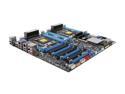
ASUS Z9PE-D8 WS SSI EEB Intel Motherboard
Pros: Before I start, it must be said that this board isn't for the average DIY'er who "claims" high tech knowledge when the best they can do is assemble a PC and fiddle with numbers. This is a server grade board. You can't use an i7 on this board. You can't really overclock here. A lot of flack this mobo has taken here is from incompetence and inexperience from these misguided folks. A MINIMUM of 900w power supply with high +12A rails is necessary to even attempt to boot this rig. You can't just pop your old 600-700w from your old rig and expect this board to take it. Oh no, doesn't work that way. This board is stellar - the options offered here are rarely found all together in one package. Highlights include 4-way SLI, dual quad channel that takes ECC and non-ECC memory, 6GB SATA and SAS ports, very granular options in BIOS, onboard USB and molex ports, and USB3 availability. I'm running 2x Xeon E5-2670, 32GB RAM with SSDs and 10k Velociraptor arrays using onboard Intel RSTe, so far still chugging along like a bullet train. It eats up anything and everything I throw at it.
Cons: The BIOS - though granular, AMI did a bad job with this BIOS; looks like something from 2001, really. It's functional, but come on, at least clean it up a bit. Also, the granularity is a double-edged sword - one wrong setting, and the system won't POST. This is where I believe got most people - a ton of options here aren't available on your run-of-the-mill board. Change one wrong value and you'll have to reset BIOS using the jumper method. Video card - it's picky on which video card it wants to accept. The NVIDIA 6xx and 7xx seems to work great, but anything from older generations may see some strange and unexplained glitches that seemingly suggest the video card is at fault, when it's not. On-board RAID - No idea why ASUS wanted to include the LSI MegaRaid SoftRAID OpROM and use it as default, when the hardware on the board are for Intel RSTe or Marvell RAID setups. User Manual - IT SUCKS. Some pages even used the wrong layout image with the wrong jumper circled!
Overall Review: This seriously isn't for the average joe that throws parts together and hope for the best. The board does have quirks, and there are a lot fo pitfalls about this board that will catch many off guard, including even the most basic requirement of Xeon processors, not i-series with LGA 2011 CPUs. Most of the reviewers that gave this board a bad rep probably didn't even know what QPI is, never mind why i-series can't run parallel with another processor. If you do all your homework before purchasing, know you're about to shell out a good bit of cash to build this up, and punched in all the numbers, this board is like any other board out there. The requirements for this board are simply too hard to fathom for the self-proclaimed "knowledgeable" tech monkey, then their egos get hurt, and out comes bad reviews.
9/3/2013See more detail
Stay away from this!
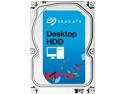
Seagate Desktop HDD ST3000DM001 3TB 64MB Cache SATA 6.0Gb/s 3.5" Internal Hard Drive Bare Drive
Pros: It worked for as long as it did. Just over a year, in fact.
Cons: I have this in a 5-disk array, two failed in almost total unison. I was lucky enough to be able to replace one before the other completely gave out, but now I'm paranoid about the remaining drives.
Overall Review: Don't run these. Seagate came out with a new 3TB drive, those seem to work better.
4/19/2014See more detail
Obnoxiously LOUD
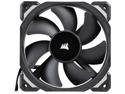
Corsair ML120 PRO CO-9050040-WW 120mm Premium Magnetic Levitation PWM Fan
Pros: It works, solid construction
Cons: LOUD
Overall Review: This thing is louder than it looks. My radiator fans, which see much more duty than this, which I use as an exhaust fan, is far quieter and at higher RPMs. Don't get this if you're into making a silent case.
9/24/2021See more detail
Great hardware, poor software, even worse support
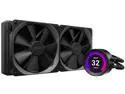
NZXT Kraken Z Series Z63 280mm - RL-KRZ63-01 - AIO RGB CPU Liquid Cooler - Customizable LCD Display - Improved Pump - Powered by CAM V4 - RGB Connector - Aer P 140mm Radiator Fans LGA 1700 Compatible
Pros: -Pump is very effective at dissipating heat -LED display is beautiful -Ability to rotate the pump to whatever angle pleases you
Cons: -CAM Software is unacceptable - literally gives you BSOD, well documented -Invasive software -Gives incorrect readings on Zen 3 architecture CPUs -For whatever reason, CAM attempts to take control of any ASUS Aura-compatible RGB hardware relentlessly, causing random spasms of blinks on the LEDs -Support pretends to be proactive on Reddit forums, but ignores even fundamental issues -Pump has very audible whining noise (not caused by bubbles, it's motor noise) above ~60%
Overall Review: This is soooooooooooo close to being a winner, but the software just makes this a no-go. Putting aside the shoddy software (and some hardware) history of NZXT, the pump hardware itself is great. One of the most effective at cooling, even. But the software and the poor support just kills it for me - what's the point of the display if I can't even get it to display proper readings, never mind the BSODs it's still giving me? Until they rectify their CAM software, I won't bother with buying another NZXT product again.
9/23/2021See more detail
Update breaks Wireless-N
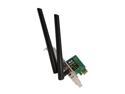
ASUS PCE-N53 Dual-Band Wireless-N600 Adapter IEEE 802.11a/b/g/n PCI Express Up to 300Mbps downlink+300Mbps uplink Wireless Data Rates
Pros: Card works as long as you use the driver CD that comes with the package. Don't use the ASUS utility.
Cons: Driver update essentially breaks N functionality. Don't know why that is, but it's the same story with two different PCs I popped the card into. Which sucks, because that means driver support is non-existent, and most likely won't see an update. Ever.
Overall Review: Just buy something else and save yourself the trouble.
9/5/2013See more detail