

Your Browsing History


Matthew J.
Joined on 06/05/02
0
0
product reviews
- 2
DisplayPort Fails Daily
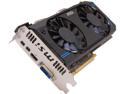
MSI Radeon HD 7870 GHz Edition 2GB GDDR5 PCI Express 3.0 x16 CrossFireX Support Graphics Card R7870-2GD5T/OC
Pros: Great performance per dollar at the Wattage I wanted, when it works.
Cons: The HDMI and DisplayPort outputs sometimes tear. The DisplayPort output fails daily (messed up lines on the screen), leading me to need to do a blind command prompt reboot / shutdown. All outputs fail simultaneously occasionally, leading me to have to do a hard power-down, essentially crashing the computer. When it does fail, it seems to happen when some type of video shows up when browsing (ad, youtube, etc.), though that is not the only time.
Overall Review: I'm not overclocking, I'm using the drivers that CCC wants me to use, and these monitors worked fine on my previous NVIDIA card. I did use driver tools to remove all traces of the NVIDIA drivers. I've combed some reviews, and I can't see others with the same problems, but I'm considering going back to NVIDIA, because I just didn't have these quirks.
3/13/2014See more detail
Good starting gaming mouse, doesn't work on the surfaces I expect

GIGABYTE M6900 Metal Black 7 Buttons Tilt Wheel USB Wired Optical Gaming Mouse
Pros: Inexpensive, low-friction, buttons do not require additional FORCE software to be useful (have default settings). Generally has a good feel and size for my hands, and I think it might help improve my ergonomic situation.
Cons: I unboxed it, plugged it in, and tried to use it on my mostly-matte-black desk, and it didn't work (it is shiny enough to reflect monitor light). There was near-0 pickup of the mouse movements, unless I pressed down on the mouse body, perhaps getting the sensor microns closer to the surface? These days, I have high expectations for mice to work on virtually any flat surface; I have M320s and M325s that work on more surfaces than this mouse.
Overall Review: Further reading makes me think that for better use across multiple surfaces, the more expensive M6980 would have been a better choice.
12/5/2014See more detail