
Your Browsing History


Ryan M.
Joined on 11/26/10
0
0
product reviews
- 2
Not Great
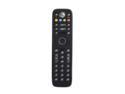
Microsoft XBOX 360 Media Remote
Pros: Nice Look and Feel
Cons: Doesn't have all the buttons necessary when using the Xbox as a media extender Weak or narrow transmitter beam
Overall Review: This remote is OK. It mostly gets the job done but with a few problems. The first problem is the lack of a media center button (Green Button) for automatically starting the media center extender on the Xbox. I'm using the xbox for watching live TV off my computer and really could use that button to start the Xbox and automatically start media center. The other problem I have with it is it needs to be aimed almost directly at the Xbox for it to work. If you are off axis somewhat it won't register the commands. I don't know if it is caused by a weak transmitter or a narrow beam. Most other remotes I have can bounce the signal off of walls and still have it picked up.
12/29/2012See more detail
Disappointing Product
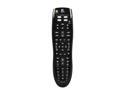
Logitech Harmony 300i Infrared Universal Remote - 3rd party
Pros: Online database of Remote Codes Provided Buttons
Cons: No Macros Can't Select which device goes where
Overall Review: I had high expectations for this remote based on Logitech Harmony's reputation, but I guess it doesn't extend to the lower end of their line. There are a lot of minor flaws and one fatal flaw with this remote. The fatal flaw is the lack of true macros. There is a "Watch TV" button but you have very little control over what this button does. It can only turn on or off a device via the power button. If you have a device, like a Yamaha receiver, that uses a separate button for power on and power off, you will only be able to get one or the other on the "macro". Similarly, you can't add other buttons to the macro such as the media center button for the Xbox360 to take you to the media center menu. The more minor flaws include not being able to select which device button your devices are assigned to. The Logitech software decided the Xbox should be on the "DVD" and there was no way to change that. The "Watch TV" button leaves off with "CBL/DTV" selected, so you would have to change the device button to DVD before you can control TV on the Xbox. Also, the database for my older Yamaha receiver had a bunch of codes that didn't work with it or looked like they came from a different model. This is more an annoyance- I was able to weed out the incorrect ones and program the proper ones. I have a 10 year old radio shack remote that I got for $15 that can do all these things and more. Unfortunately it doesn't have the buttons for controlling an Xbox, hence I was trying to get this Logitech to replace it. I guess I'll have to keep looking.
12/29/2012See more detail