




 here!
here!
I’m your shopping assistant for PC builds, upgrades, and everything tech.
Got questions? Ask away!
Start a conversation
here!
I’m your shopping assistant for PC builds, upgrades, and everything tech.
Got questions? Ask away!
Start a conversation

Joined on 10/01/02
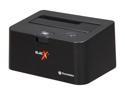
Pros: Small, convenient, easy to use, and works perfectly.
Cons: None really. Maybe could benefit from an IDE-SATA adapter, but that's about it.
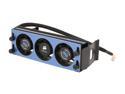
Pros: Well designed. Braided power cable. Easy to install.
Cons: Cheap components.
Overall Review: Works well, until . . . The cheap fans go out of balance and start buzzing. LOUDLY. Other than that, the unit works great.
You get what you pay for
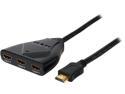
Pros: - Compact and convenient. - Solid feeling cable. - Switching function works very well (as long as you don't intentionally try to confuse it).
Cons: - Cheap plastic housing. - Doesn't work properly with everything (PS4 in particular).
Overall Review: I suppose it works in a pinch, or if you don't expect too much from it. Problem is that you won't know if it'll work with your device until you try. Even then, it may work but drop out at random times during use, meaning it's useless for gaming systems, annoying as h*ll for entertainment hardware. As the title states, you get what you pay for. Considering you can get a different device that handles 4k as well, and beautifully so, for less that $50, you may want to look elsewhere.
Bad. Just bad.
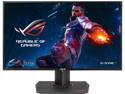
Pros: - It's 4k, which technically looks great (and technically it does). - No dead pixels as many others have complained about. - Very sharp and clear images. - Base and stand adjusters work great, until you need to plug something into the rear. Then it gets hairy because there's no way to lock the height in place, and the base will spring out as soon as you lift it (design flaw).
Cons: Where do I start? - Backlight bleed in the corners is simply unacceptable. It almost overrides an all-white screen. Yes, it's that bad. - Colors are ... off, and there's really no good way to adjust them. Changing one value screws with other values in odd ways. There's no way to get a good balance. Even with a so-so COLOR balance, blacks are gray, whites are OVERBLOWN. It's also TOO F*&^ING EASY TO delete your personal settings and blow a couple of hours you'll never get back. And again, there's no good BALANCE. I'm not a photographer or a perfectionist. I'm a gamer, and I just want a nice balanced color palette. This monitor cannot do this. This is serious problem number 2. - Controls pretty much suck. They may be OK for your 12-year old kids, but not for anyone else. Control joystick is a good idea and works OK, once you figure out it's quirks, but the 4 buttons on the back all feel the same and aren't even defined well enough to tell if you're pressing the third or the fourth one. Design flaw I can live with. - The viewing angle claimed by Asus is a flat out lie. It's more like 30 degrees, with significant picture degradation and color change (especially) outside of that narrow tunnel. I don't know if this a flaw of IPS panels in general or 4k monitors overall.
Overall Review: I gave this monitor a month's trial. It pretty much failed. Not sure why all the 4 and 5 egg reviews unless everyone's just super-jazzed about having a 4k monitor. If you're a professional photographer or graphic designer, steer clear as you'll never get a good color balance from this monitor. If you're a serious gamer, maybe steer clear as you won't get good color from this monitor and the backlight bleed is SERIOUSLY noticeable (though the G-sync is awesome!). Not a terrible effort from Asus, but the boneheaded design flaws, horrible backlight bleed and strangely impossible color controls put it in the Pass column. Wait for OLED prices to come down.
Good until. . .
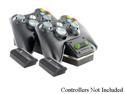
Pros: Convenient. Supplied batteries last an awful lot longer than the stock MS ones.
Cons: In the end, it will cost you much more than the convenience is worth (see below)
Overall Review: The system relies on the exposed terminals of the NYKO batteries to work. This means you cannot use your current battery packs. This shouldn't be a problem, except that the NYKO batteries are so heavy that simply placing the controller on the charging dock runs the risk of breaking the bottom shelf of the battery holder on the controller itself. This has happened to me twice now. I've NEVER had a MS controller break this way in all the years I've owned a 360 (since the 2005 launch). I've seen them break from abuse, but not from setting them down in a charging cradle. If I had kids or young adults playing my 360, I'd be buying new controllers every week. Bottom line: The end cost is not worth the convenience.
Good until. . .
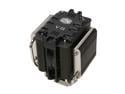
Pros: Does it's job very well, UNTIL. . .
Cons: It's HUGE, which causes problems beyond the initial case fitting issues. The fan is cheap and you have to remove the entire unit to replace it. Poor mechanical design, not well thought-out (thermal design is excellent).
Overall Review: The unit works as advertised. It's LARGE so check your case measurements before buying. However, the installed fan isn't anything special and requires you to uninstall the unit completely to access the two screws needed to replace it (fail), and that will likely mean that you have to remove the motherboard from the case just to access the hold-downs. It'd have been better if the unit was designed to allow users to pull and replace the fan from the top, but it isn't (epic fail). Due to the poor design, that's not possible because the unit is so large that it covers the hold-downs far enough requiring removal of the motherboard just to get at them. -1 egg for the cheap fan. -2 eggs for the poor design.


