

Your Browsing History


James W.
Joined on 12/29/04
0
0
product reviews
- 24
Good option for my needs
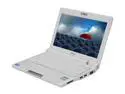
ASUS Eee PC EeePC 900 20G – Pearl White Intel Mobile CPU 8.9" WSVGA 1GB Memory 20GB SSD NetBook
Pros: I was looking for a very small, lightweight laptop with good screen resolution suitable for websurfing and logging into my work exchange server. Thid laptop is great - size (and weight) is everything. * 9"x7"x1" * weighs 2.18 lbs * 1024x600 native resolution (you'll have to make your own wallpapers for this odd size) * good price for what you get * my 20gb Xandros version came with all of the XP drivers and utilities. * asus provides lots of good utilities and drivers on their support site, and these are quality, full-featured utilities. * decent soft case included too.
Cons: * keyboard feels flimsy, and i worry about keys falling off with my "aggressive" typing. nobody on eeeuser.com has complained about keyboard problems in the past year though. * case feels kinda cheap and plastic, but good enough to house and protect the pc. in fact, i'd rather rather have this at 2.18lbs than a 3lb laptop that had a 1 lb case. * Xandros is very dumbed down, and is suitable only for "mentally challenged" linux novices. you need to install XP, Ubuntu, or Fedora on it. several versio ns of each exist, and there is great community support for linux drivers, mods, utilities, overclocking tools, etc. eeeuser.com is a great place to start. the wiki and forums there have a wealth of great info.
Overall Review: overall, it was definitely worth the money, because i wanted something this small and light. the 7" eee was just too small and had about half the resolution. impossible to surf the web or read email with the 7" version. this eee 900 though really works well for me. and as an added bonus, all of the laptop cases and backpacks that are best suited for a laptop this size are $5-15 childrens backpacks. you'll be the coolest exec in the boardroom when you come strolling in with your Star Wars or Dr Seuss kids backpack w/ your eee 900 inside. oh, also, newegg's overnight shipping was awesome. i made the purchase on thursday, and had my item on friday, so i could hack the gibson all weekend. btw, netstumbler runs great on. winpcap and wireshark too.
5/20/2008See more detail
Stu-stu-tu-tuuuuu-t-t-t-ters
Seagate Momentus XT ST95005620AS 500GB 7200 RPM 32MB Cache SATA 3.0Gb/s with NCQ 2.5" Solid State Hybrid Drive Bare Drive
Pros: Real world performance is not impressive. Doesn't seem to be any faster than the 7200rpm drive it replaced.
Cons: The drive stutters horribly and constantly. Actually, it is more like a 3-5 second lockup, and it happens every minute or so. I bought it to store music on for my laptop, and the computer-related activity where stuttering would probably be most noticeable is when listening to music. HUGE FAIL.
Overall Review: I should have known better.
11/17/2010See more detail
A true work of art, with a couple of minor flaws
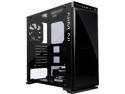
IN WIN 805 Infinity Black Aluminum / Tempered Glass ATX Mid Tower Case
Pros: - Gorgeous design of the case, with quality metals and tempered glass. - The optical illusion "infinity" effect looks wicked. Better in person than in the pics and videos. - Case design/layout is better than average, with locations on the back behind mobo to mount 2.5" SSDs.
Cons: - Manual is not comprehensive. Should have told me how to change gender on the LED strip, should have offered tips for installing mobo input panel. Should have provided link to the Halo software that controls all off the LEDs. - Halo software is decent ... works fine, provides basic options you would expect for a colored LED device. They need to add more interesting and complex routines though that take advantage of this outstanding LED concept. - Cable management is truly a nightmare with this system. Since it has visible tempered glass covering the entire left and right side panels, your cable management game had better be on point. The side behind the motherboard needs to be an inch wider so you actually have room to route things like the mobo power cables without causing the *glass* to bind. I'm a bit nervous about the bending glass. - Air flow is mediocre on this system. It's great that I could stuff a 280mmx140mm radiator and fans in it, but getting sufficient cool air into the radiator is a hopeless endeavor. On another system I have, that has similar specs, same water cooling setup, and a 25% overclock, but great airflow, I see CPU temps of 25-29C. In the 805, my temps are 38-42C with no overclock.
Overall Review: - Gorgeous product that I'd definitely recommend to anybody who likes the design and doesn't need to install more than 3-5 hard drives, and no front devices at all. - In Win makes beautiful, very well designed products, that suit my tastes, so my next case will probably be an In Win. I'm a former Lian Li and Corsair case connoisseur, so I definitely know what it takes to incorporate both successful form and function into a winning case. - I just hope In Win emphasizes cable management more during the case design process. You're not doing it right if you make the most beautiful and creative cases in the industry, but then fail to properly design *good* cable management into the product.
10/21/2016See more detail
Everything works, easy install, no problems
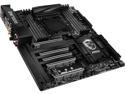
MSI X99A GodLike Gaming Carbon LGA 2011-v3 Intel X99 USB 3.1 Extended ATX Intel Motherboard
Pros: I'm typically not an MSI customer, but liked the features and design of this mobo, so took a shot with it. Board has a nice layout, and was easy to install. I used a new Broadwell i7-6950x CPU with it and was worried I'd have to update the bios (I had no other 2011 CPUs at my disposal). Fortunately, the mobo came with v2.2 bios installed and it recognized my 6950 on first boot. Drivers and utilities for the mobo are on both CD and USB 3.1 flash drive, which is a nice option. Came with lots of black SATA cables (with locking clips), so I didn't have to buy more of those. Mobo recognized my Samsung 950 Pro M2 SSD and Win 10 install was fast and easy. The Samsung 950 was tested in this mobo and confirmed to hit the advertised 2500 MBps read, 1500 MBps write (in bios, make sure M.2 is set to Auto and not PCH). Using an H115i water cooler for this system. With tweaks to just multiplier (44x) and voltage (1.35), had no problem hitting a cool and stable 4.4Ghz in minutes. Bios layout and features are nice and user friendly. Overclocking has been easy and had no problems so far. Did a 3 day burn-in at 4.4Ghz and had no issues. LEDs are cool. Onboard audio bardware and software are impressive. No problems with Corsair RAM. After a week, the mobo has been rock solid and I have no complaints. It's loaded with great features and components.
Cons: I'm not a fan of Killer NICs, due to previous software, reliability, and performance problems with other brands of mobo. So far, no issues with this Killer NIC implementation. Tested the throughput, and it's been identical to my Intel GB NIC, so no complaints. Price is high for this mobo, but I'm using all premium, cutting edge components, so can't complain too much.
Overall Review: Love everything about this mobo, so can definitely recommend.
6/15/2016See more detail
Great option for usb power/signal monitor
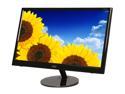
AOC 22" 60Hz USB LCD Monitor 5 ms USB 2.0 e2251Fwu
Pros: power AND video signal via USB thin lightweight good quality picture
Cons: Stand is not adjustable Not very bright display unless you plug in AC too
7/28/2012See more detail
Nice features
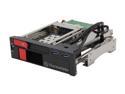
Thermaltake ST0026Z Max 5 Duo SATA HDD Rack
Pros: Really nice combination of features: USB 3.0 3.5 and 2.5 bays LED lights for each drive no drive trays required on/off switch (rare for drive bays) Everything works on it!
Cons: 19 pin USB 3.0 cable is probably too short if you have a full size tower case. USB 3.0 header extensions are hard to find and relatively expensive too. Mounting may be a bit unstable if mounting in a tool-less drive bay. Faceplate and drive doors feel too cheap and plasticky. Cheapo SATA cables with no locks.
Overall Review: My only big complaint is the short USB 3.0 19 pin cable. I like a tidy case with good cable management, so I'm going to have to spend another $15-20 for an extension cable.
7/28/2012See more detail