

Your Browsing History


Korey R.
Joined on 05/18/06
0
0
product reviews
- 47
Better than you'd think
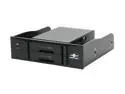
Vantec NexStar SE MRK-525ST Dual 2.5" SATA 6Gb/s SSD/HDD Mobile Rack, SATA III ready (Supports 7, 9.5, 12.5, 15mm height SSD/HDD)
Pros: - Two 2.5" bays. - Doesn't _need_ screws to hold drives. - reliable drive detection - independent SATA connections
Cons: - independent SATA connections
Overall Review: I used this exact model for around six months while I was employed for a computer repair center. We had a custom server designed to do all of our malware sweeps, and this thing was rock-solid. I was unplugging and plugging in 2.5" drives five or six times a day on two of these units and not once was I concerned they were going to break. The fit is snug enough that in the horizontal position, I never worried about the drives coming lose without screwing it in. This allowed rapid insert\removal of drives. This was used in a workplace, so the lights never bothered me, but I can see the complaints--blue LEDs are very difficult for the eyes to adjust to, and they're -bright-. Oh--and they don't use port-multiplication, they're two independent SATA cables--the bays are just pass-through, so they were fantastic for my line of work. However, if your drives are going to be a bit more 'long-term,' port multiplication probably would be a nice option.
7/11/2013See more detail
This is what failure looks like
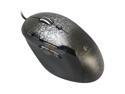
Logitech G500 10 Buttons Dual-mode Scroll Wheel USB Wired Laser Gaming Mouse
Pros: Comfortable Configurable DPI Three thumb-buttons tilt-wheel with 'hyperscroll' Configurable weight
Cons: LMB\RMB switches fail after moderate use
Overall Review: This is the second G500 I'm on. The first failed within a year of use--the LMB stops registering clicks properly. It will either double-click when a single click was used, or not 'hold' the click when the button is pressed down. Since these mice carry 3-year warranties, I contacted Logitech when the first one failed. They just up and sent me a new one without even asking for the old one back. That _have_ to know it's an issue at that point. I'm guessing, based on Logitech's website, that the G500 was redesigned into the G500S and hopefully it's fixed. However, this model, with the red LEDs, is prone to malfunctioning. I'm now in the market for a new mouse, and it's not going to be the G500.
8/7/2013See more detail
Avoid. Avoid. Avoid.
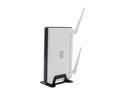
D-Link Xtreme N Dual-Band Gigabit Router (DIR-825) Wireless N600
Pros: I honestly can't think of one.
Cons: Customer Service is an atrocity against man. Reliability is shorter than ownership of product.
Overall Review: This isn't my first tragic rodeo with D-Link devices. This is now the third router I've had to replace for someone. I don't even want to imagine they spent $100+ on this junk. Worked for all of a week before I receive a call stating that it wouldn't work anymore. After arriving at the location to inspect the device, the familiar scent of burning electronics was in the air. A week. That is shorter than the two months the previous router I serviced from D-Link lasted. And you know what, I could accept manufacturing defects in a product--it happens--but completely ignoring your customer's requests for assistance? I submitted a ticket to D-Link, and only receive a half-a---d reply on it. When I requested further support from that reply--they never bothered. I submitted an additional ticket when no one assisted me, just to have them completely ignore that one. Just stay away from 'em. I would have to say pretty much any other company is probably going to be better than D-Link. Save yourself from a headache now, get your wireless from someone else.
8/1/2013See more detail
A solid love-hate relationship
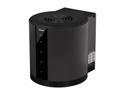
IVIEW HFR2-SU3 RAID 0/1/3/5/10, JBOD, CLONE, Normal 4 3.5" Drive Bays USB 3.0 / eSATA 4-Bay HDD RAID Enclosure
Pros: 4-bay storage LEDs bright, clear, and nicely designed controllable 80mm fan eSata and USB3 (backward compatible with USB2) RAID Quiet on lowest and highest settings
Cons: eSata Multiplexing host-controller dependent RAID handled by hardware dip-switches
Overall Review: I don't have a USB3 controller on my motherboard and my eSata controller doesn't support multiplexing, so I can't do anything over eSata--I'm left to using this as a giant, but functional, USB2.0 enclosure. I run the device primarily as a JBOD storage volume for all the drives that don't fit inside my current case. As a result, i can't test any meaningful speeds (and I know that's important for some people). For me, it's not. Unfortunately, I can't quite get the drive to recognize all of my drives if plugged into bays 1,2, and 3. Instead, I have them in 1,2, and 4, and it works as it should. I can't knock eggs down for something which very well might be my aging hardware, and I can't verify this until I do a rebuild later this year. Also, I can't get the "power synching" function to work. Essentially the drive cuts power to the drives if it it loses connection to the USB (as in, either you unplug it or the computer turns off its USB ports). My mobo doesn't do that in sleep or power-off, so this 4-bay enclosure would stay powered on 24\7 if I didn't flick it off. I want to replace the fan with an LED version, but I can't quite tell if it's a 10mm or 15mm fan--definitely not the 25mm fan depth of a standard case fan. A project for another day. The fan is pretty quiet. On the lowest setting, you can't even tell it's there. On the highest, it's noticeable, but out powered by my case fans and definitely by my stock CPU cooler. It still manages to move quite a bit of air.
11/28/2012See more detail
Starter case, not much else
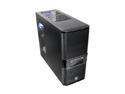
Thermaltake V3 Black Edition VL80001W2Z Black SECC / Plastic ATX Mid Tower Computer Case
Pros: Lightweight aluminum construction Front, rear, top, and bottom fan mounts. Nice little window. Tool-less design.
Cons: Flimsy aluminum construction. Only includes one fan (rear). Top fans difficult to put in 25mm fans, need slim fans instead. Tight fit for power-supply. Only came with one set of tool-less mounts (one for HDD, one for ODD). Rear cover plates are punch-out, meaning you can't put them back on once you've removed them.
Overall Review: I picked it up on sale for a budget gaming rig. The guy wasn't entirely too concerned about it being flashy, he just wanted a rig that'll play Diablo 3. Well, I spent all the money on the graphics card, processor, and memory, so the $40 I had left over went to the cheapest case I could find that looked halfway decent. This one won, and it serves its purpose, just be aware to buy extra fans (I thankfully had a few extra anyway) to keep the air moving. The one in the rear won't do much good without a solid intake somewhere.
5/25/2012See more detail
Best headphones I've owned
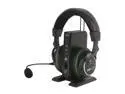
Turtle Beach Ear Force XP500 Wireless Gaming Headset
Pros: Lightweight. 5.1\7.1 Powerful. Well endowed with features Bluetooth wireless (up to 2 devices) Nice "dock" on wireless station.
Cons: Loose-fit for small heads. EATS. BATTERIES. ALIVE. Bluetooth sometimes lazy to connect. Construction feels a little cheap. Expensive
Overall Review: I received these as a gift for Christmas of 2011, and I've loved them since. They're expensive, but *mostly* worth the price. I'd say these are $180 headset, not $250+. The headset is fairly lightweight--you won't notice it after hours of gaming--the earcups eventually start making my ears sore after a few hours, but you can't tell the headset is, well, on your head. It has bluetooth on it, which will connect up to two devices. It also has TOSLINK passthrough, which is great, because I connect it to a 5.1 surround system. Combined with a 3-way optical splitter, it provides audio for my PC, PS3, and Xbox. I'm very pleased with the product, and would highly recommend it--as well as eight rechargeable AA batteries. Thing consumes batteries at a rate of 2 every ten hours. As a side note, sometimes the bluetooth puck and the bluetooth reciever in the headset take a while to connect (30s+), and sometimes it just doesn't connect, which requires power-cycling the BT puck.
4/28/2012See more detail