

Your Browsing History


Mark D.
Joined on 12/16/04
0
0
product reviews
- 11
Worth doing battle with the cable guy
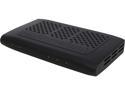
SiliconDust HDHR3-CC HDHomeRun PRIME 3-Tuner US CableTV with CableCARD Stream Premium Channels and Cut the Cord
Pros: Lets you watch cable shows on your computer with its high resolution monitor. Supports as many computers as you like, so long as you don't need to tune more than three live shows at once. Customizing your list of channels is relatively easy. Lets you record shows without them being chained to a cable box. Easy to fast forward and to skip commercials while viewing. You can have a DVR with as much storage as you want, use a RAID setup for data security, and back up your recordings. No monthly fees for DVR capability, though the cable company probably WILL charge you for an additional receiver if you add this to your existing equipment rather than replacing it.
Cons: Getting your cable company to provide and activate a CableCard can be challenging. (They are legally required to offer them, so be persistent.) On some Windows 7 computers, one of the setup steps will be missing from Windows Media Center, requiring an extra download and running a command line program to fix. (The directions are on the Silicon Dust web site.) No access to on-demand programming. The armchair interface of DVR software for computers doesn't measure up to the best settop boxes. Unless you have made special efforts to build a low power PC, the standby power draw of your PC will be higher than a TiVo or a cable company DVR.
Overall Review: My experiences are with Comcast, and with using the HD HomeRun with Windows 7 Media Center. YMMV if you are dealing with another cable company or other software. This isn't as plug and play as getting a DVR from the cable guy or buying a TiVo. Be prepared to do a bit of work to get things going. But it's easy to use once you do, and you will have unchained video recordings that you can watch on any computer, back up for safe keeping, and convert to other formats for mobile viewing. Windows Media Center has a limit of four tuners out of the box. If you are thinking of buying more than one of these you may need the patch that allows more tuners. If you have over the air channels available that your cable company doesn't carry, you can add an ATSC tuner to your setup (including another model of HD HomeRun) to enable your computers to watch both OTA and cable. You can use this with an HTPC (home theater PC), but the user interface of most available software (including Windows Media Center) works much better with a keyboard and mouse than with a TV remote. Some cable companies offer viewing of on-demand programming through their web sites. So you can't watch on-demand on your computer through the HD HomeRun but you may have another way to get to it.
12/11/2013See more detail
Backward compatibility for the win
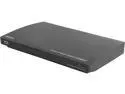
Sony BDP-S185
Pros: Loads Blu-Ray discs quickly. Useful internet features. Menus are responsive and mostly easy to understand. Composite video output for older TVs.
Cons: No WiFi. Can't change between letterbox and full-screen view mid-film.
Overall Review: I needed a Blu-Ray player to connect to an old CRT TV so my growing Blu-Ray collection could be viewed in that room. 2013 and later players have no analog video outputs (the Blu-Ray consortium has decreed their absence) so I had to track down an older model. This sleek little unit replaced an old, clunky DVD carousel changer and does everything I want it to do.
11/9/2013See more detail
Works perfectly
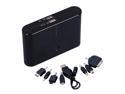
12000 mAh High Capacity Dual USB Power Bank Charger
Pros: High capacity. Useful indicator lights. Comes with adapters that will charge nearly anything - mini USB, micro USB, Apple 30 pin, and more.
Cons: A bit heavy for carrying every day. Charging takes a long time. The 5 hour figure in the product description substantially understates the amount of time for a full charge, which is unsurprising given the math of battery charging. The battery has a 12Ah capacity and the charge rate is 1A, so a full charge from ground zero has to take at least 12 hours. Battery charging is not 100% efficient so it will take longer than that.
Overall Review: I ended up with a white one because the seller had run out of black and there would have been a shipping delay. (They asked me first.)
11/3/2013See more detail
Outstanding value - and it pivots!
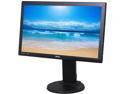
BenQ 21.5" LCD Monitor 5 ms D-Sub, DVI GL2250TM
Pros: Stand includes pivot capability (not mentioned in the product description) so you can use it in either portrait or landscape mode. (Windows handles that out of the box so you don't need any special drivers.) Very bright (too bright out of the box, I had to turn it down) and colors are vibrant. Lots of image adjustments available - you can change the color balance and gamma, turn dynamic contrast on and off, and more. Multiple image presets.
Cons: No DVI cable in the box. (A VGA cable is included.) The labeling of the controls is odd; when the monitor is pivoted for portrait mode the labels are upside down. The tilt range of the stand is limited. Windows deals with wallpaper badly when you have both a portrait display and a landscape display.
Overall Review: My monitor has no defective pixels. Good show, BenQ.
8/20/2013See more detail
A quality charging/data cable
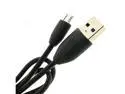
OEM HTC Incredible, Amaze 4G, Aria, Arrive, Bee Micro USB Data Cable DICMUSB
Pros: It's a well made cable; thicker than average, good quality connectors.
Cons: None.
Overall Review: This should work for any USB-A to Micro-USB connection needs, not just for the specific phones listed.
3/30/2012See more detail
Does what it promised to do
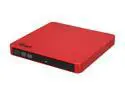
Rosewill Slim 8X DVD Writer External Optical Drive for PCs - USB 2.0 - Model ROD-EX003-R - Gloss Red
Pros: Light. Inexpensive. No power supply needed. Quiet when playing DVDs. Nero Essentials software included.
Cons: Glossy finish gets fingerprints easily.
Overall Review: I have the now-discontinued black version (it's been replaced by an updated one with Lightscribe) but the red should perform equally well. Data cable has two USB connectors for the computer end; some systems will require plugging both in. Windows identifies mine as a Teac drive.
12/9/2010See more detail
seller reviews
- 1
Just what I needed
My order arrived promptly and was exactly as promised.
On-time
Delivery
Product
Accuracy
Customer Service
Satisfactory
3/30/2012See more detail